Revit export To AutoCAD

Revit export To AutoCAD

spencercrane
Participant Participant
636 Views
5 Replies
Message 1 of 6

Revit export To AutoCAD

spencercrane
Participant
Participant

I exported a file to AutoCAD as a sheet. However, when I send it to someone, they can't view it (no xref). If I export the view from Revit it works for them, but I want the view and sheet in the same dwg file because I am sending it to someone from another business and need my companies sheet info attached. I know nothing about AutoCAD too, so a simplified explanation would be much appreciated. Thanks!

0 Likes
Accepted solutions (2)
637 Views
5 Replies
Replies (5)
Message 2 of 6

mhiserZFHXS
Advisor
Advisor
Accepted solution

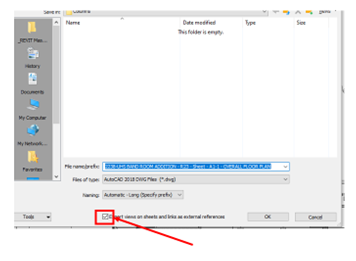
mhiserZFHXS_0-1668620551929.png

Uncheck this box.

0 Likes
Message 3 of 6

spencercrane
Participant
Participant
how do I get to that? I can't really read it either, the screenshot quality isn't too good.
0 Likes
Message 4 of 6

mhiserZFHXS
Advisor
Advisor
Accepted solution

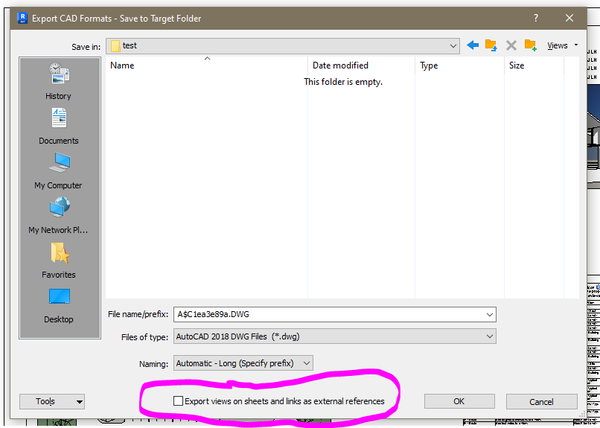
Its the second window the pops up when you export to .dwg. And its the only checkbox down there.

0 Likes
Message 5 of 6

pendean
Community Legend
Community Legend

@spencercrane wrote:
how do I get to that? I can't really read it either, the screenshot quality isn't too good.

???


REVIT (or REVITLT) with your source file open...


Click on the FILE tab (blue) at the top-left corner of your program window > select EXPORT > select CAD FORMAT > then select DWG


After you click on the NEXT button on the first pop-up you get to that screenshot


pendean_2-1668624684523.png


0 Likes
Message 6 of 6

spencercrane
Participant
Participant
that worked, thank you!
0 Likes