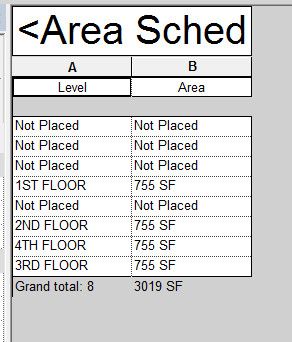
Revit area schedule total area not correct to schedule

Revit area schedule total area not correct to schedule

wjxu55
Advocate Advocate
1,479 Views
4 Replies
Message 1 of 5

Revit area schedule total area not correct to schedule

wjxu55
Advocate
Advocate

Hello,


I made four level area plans, and created building gross area schedule, but area schedule showed total area not correct to schedule (why there is only "1" difference?) & there are four not placed levels, Please help me to correct  them?

Thanks!


WillieArea Schecule.jpg

0 Likes
Accepted solutions (1)
1,480 Views
4 Replies
Replies (4)
Message 2 of 5

ToanDN
Consultant
Consultant

"Not Placed" mean the Areas have been deleted from the model.  Just select the rows and Delete Rows from the toolbar.   The 1SF discrepancy is because of the Unit rounding.  If you add more decimals you will get the more correct value.

0 Likes
Message 3 of 5

wjxu55
Advocate
Advocate

Thank you to answer me quickly!

For my area schedule, 4x755=3020

Could you kindly tell me how & where to  add more decimals?


Thanks again!


Willie


0 Likes
Message 4 of 5

ToanDN
Consultant
Consultant
Accepted solution

Capture.PNG

0 Likes
Message 5 of 5

wjxu55
Advocate
Advocate

I got it!

Thank you so much!


Willie

0 Likes