Message 1 of 2

Not applicable
01-18-2018
05:09 AM
- Mark as New
- Bookmark
- Subscribe
- Mute
- Subscribe to RSS Feed
- Permalink
- Report
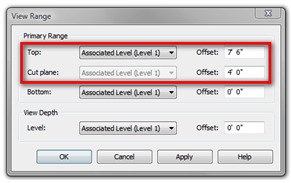
I work in the foodservice industry and we use a program called KCL to insert symbols into a Revit or CAD layout. We receive the base plan / model from the project Architect. When inputting an item, like a wall shelf, it comes in at ground level. Once changing the height of the item to its proper height, 54"-56" AFF, it is no longer seen in the layout view, it is should on elevations. Where / How do I change a setting to have items that have been raising show on layout view?
Title renamed for clarity: KCL Symbols not visible in plan view
Solved! Go to Solution.