How to hunt one unwanted symbol

How to hunt one unwanted symbol

Anonymous
Not applicable
1,205 Views
10 Replies
Message 1 of 11

How to hunt one unwanted symbol

Anonymous
Not applicable


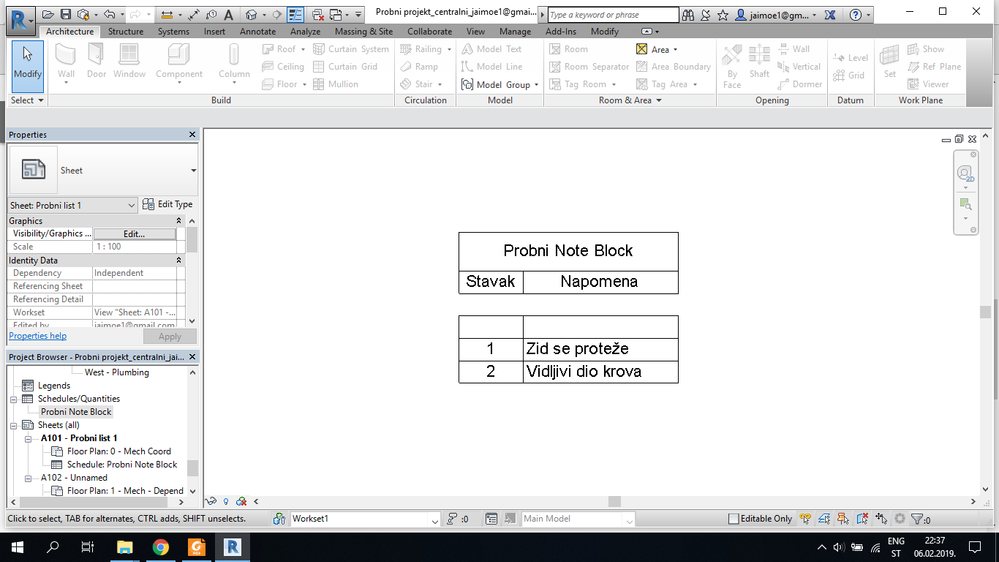
Ex2.png


Let me utilise bursting knowledge on this forum for something that might look trivial to experts, but it is not to beginners.


So, I was playing with  note blocks to learn to create one. This picture shows note block with one blank row. The row is in fact symbol which I place somewhere, without a text, and now I cannot find it.


Is there some simple clever way to hide everything but symbols in the entire project, so I can find this unwanted one quickly?

0 Likes
Accepted solutions (1)
1,206 Views
10 Replies
Replies (10)
Message 2 of 11

ToanDN
Consultant
Consultant
Edit the Note Block schedule, clink inside the row and go to Highlight in model button on the ribbon.
Message 3 of 11

Anonymous
Not applicable

That sounds really elegant, but didn't work; I receive "no good view could be found". After that, I am offered "show element in view" dialog, but every time I click, it is just "no good view could be found".

0 Likes
Message 4 of 11

cbcarch
Advisor
Advisor

-Select one of the symbols.

-Then right click and "select all instances in entire project" .

-Then use "lightbulb" tool at bottom of screen.

-Isolate Category.

Does this work?

Cliff B. Collins
Registered Architect The Lamar Johnson Collaborative Architects-St. Louis, MO
Message 5 of 11

ToanDN
Consultant
Consultant
Did you place it in a Legend view by any chance?
Message 6 of 11

Anonymous
Not applicable

That's very close to my desires, but unfortunately, Revit seems to not offer much here: when I made such selection, I had to isolate view by view, and after few views selection vanished, and was not able to use isolate tool any more. 

0 Likes
Message 7 of 11

Anonymous
Not applicable
Accepted solution

I don't have any legend view, but based on your previous advice, instead of row clicking and trying to see the instance in the view, I right-clicked the row in note block and used "delete row" command.


The warning appeared that not only row will be deleted, but annotation instance as well, but as I don't need that instance anyhow, wherever it was, I just accepted that, and the problem seems to be resolved. Smiley Happy

0 Likes
Message 8 of 11

ToanDN
Consultant
Consultant

Do you set the schedule to Not Itemize every Instance?  In fact, can you share the Sorting / Grouping tab of the schedule?

0 Likes
Message 9 of 11

Anonymous
Not applicable

I unclicked "itemise every instance", and sorting is set at minimum criteria.

0 Likes
Message 10 of 11

ToanDN
Consultant
Consultant

@Anonymous wrote:

I unclicked "itemise every instance", and sorting is set at minimum criteria.


In such case, multiple rows with unmatched value across every column can become a single blank row.  I would itemize rows and inspect them before delete the non-itemized row(s).

0 Likes
Message 11 of 11

Anonymous
Not applicable

I am doing just basic testing, so I didn't have more than 3 symbols, one of which was presented with blank row, and I already deleted that row.


Tryed to itemize each instance as per your suggestion, but did not bring me anything more than these two rows, as I don't have any double instances of annotations.

0 Likes