Hidden Line View: Reflection "Stroke" Lines on Glass materials?

Hidden Line View: Reflection "Stroke" Lines on Glass materials?

pearlofsadness
Advocate Advocate
6,625 Views
7 Replies
Message 1 of 8

Hidden Line View: Reflection "Stroke" Lines on Glass materials?

pearlofsadness
Advocate
Advocate

Hi all, 


I was watching a tutorial on the official Autodesk page:

https://knowledge.autodesk.com/support/revit-products/learn-explore/caas/CloudHelp/cloudhelp/2019/EN...


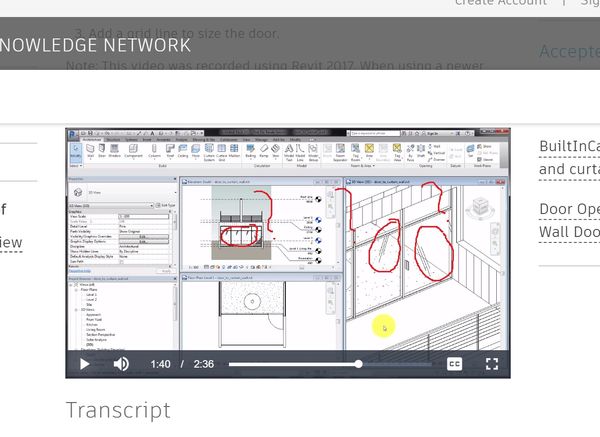
And I find that his glass / curtain walls etc has got like the nice Reflection Strokes on them. Whereas on mine, it doesn't show even though I adjusted my setting to his style (Hidden Line with FINE details)... We are using the exact same default materials too.


May I know how do I add them? Below is the screenshot of it annotated:
1.jpg

0 Likes
Accepted solutions (1)
6,626 Views
7 Replies
Replies (7)
Message 2 of 8

martijn_pater
Advisor
Advisor

Seems like a cw panel with symbol lines in exterior elevation. Could also be material hatch though.

0 Likes
Message 3 of 8

indiana_j0nes
Collaborator
Collaborator

No way, that is Wolverine.

 Jokes aside, you can achieve that using a model line too? perhaps?

Cheers, K

Kunal Tuljaram Gaidhankar

EESignature

0 Likes
Message 4 of 8

kadmonkee
Advisor
Advisor

open the window family you want to add the Model Lines to

Model Lines will show up in all views 2d and 3d

go to the front or (exterior) elevation view of the window

draw the model lines you want to apply

create a family (yes/No ) parameter and assign the lines to that.

you can toggle them on or off when in the projectReflective_Window_Lines_LI.jpg


If there is any information shared that is of value please give Kudos
If a solution is provided by any posters please mark them as Solved to benefit everyone else.
thank you
0 Likes
Message 5 of 8

Anonymous
Not applicable

Nope cant. I tried clicking in. and there's no family to edit. It's the default curtain wall. I tried...


Also, on the video, the guy literally just loaded a default curtain door in and his curtain door automatically shows up the reflection lines... So... I am not too sure what is going on 😞

0 Likes
Message 6 of 8

pearlofsadness
Advocate
Advocate

Hi here is the screenshot.


I was able to add it on the Curtain Door because it's a family. But I can't do it on the curtain wall... 😞

1.jpg

0 Likes
Message 7 of 8

kadmonkee
Advisor
Advisor
Accepted solution

you will need to go into the Curtain Panel family to make that happen.

my example was for window families not for Curtain Wall panel families

sorry for the confusion

 if you can locate where your Curtain Panel Families are locate you can open them and create a duplicate version and apply the reflective model lines to the Curtain Panel directly then apply that panel to your curtain wall system


If there is any information shared that is of value please give Kudos
If a solution is provided by any posters please mark them as Solved to benefit everyone else.
thank you
Message 8 of 8

ToanDN
Consultant
Consultant

Those are model lines add to the family or a model pattern added to the material.  I added a similar thing to a mirror family.


If you use the system curtain wall panels then you need to add the lines as a surface pattern to the material.  Try pyRevit, it is fairly simple to create custom patterns.


Annotation 2019-11-19 112546.png