Floor Openings Cut Issue

Floor Openings Cut Issue

Ian_H
Advocate Advocate
9,610 Views
22 Replies
Message 1 of 23

Floor Openings Cut Issue

Ian_H
Advocate
Advocate

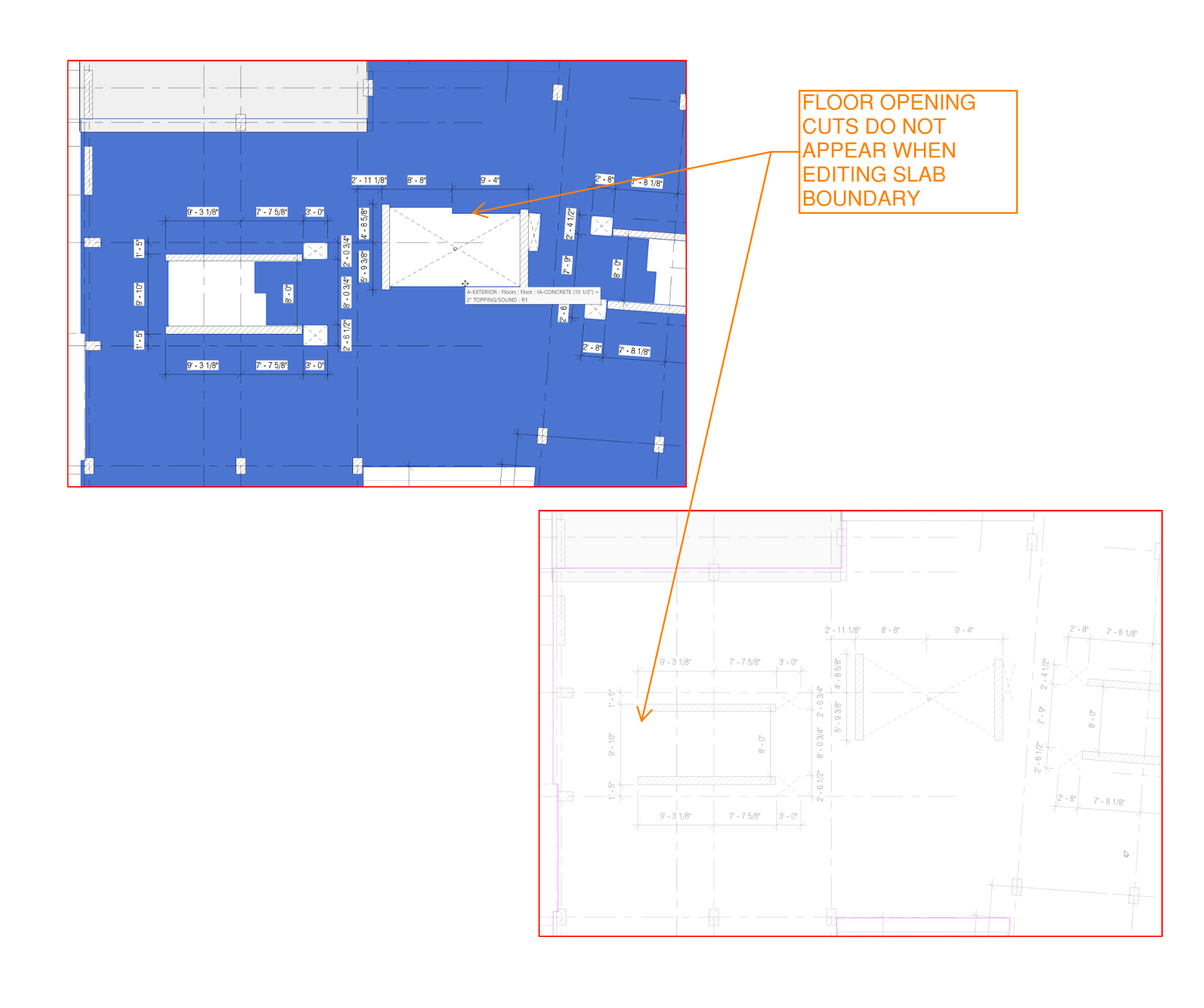
We are having an issue where there is clearly a floor opening cut in our slab, but when we go to edit the boundary of slab to modify the floor opening cut shape it does not appear. 


Any tips or advice? 


Thanks

0 Likes
9,611 Views
22 Replies
Replies (22)
Message 2 of 23

barthbradley
Consultant
Consultant

Sounds like you have an Opening, such as a Shaft.  A Shaft won't affect the Sketch Boundary of the Floor. 


TAB-Select on the edge of the Opening.

0 Likes
Message 3 of 23

ToanDN
Consultant
Consultant

Tab over the edge of the opening until you see the Cut Opening indicated in the tooltips, select it and edit sketch.  Or use window selection to grab a bunch and filter out everything except the Opening Cut.

0 Likes
Message 4 of 23

Ian_H
Advocate
Advocate

@barthbradley 

I am not the one in our firm who modeled the slab, but there are both floor opening and shaft opening cuts in the project. See screenshot


@ToanDN 

We have tried both of those options. I have even copied the slab into a new project and the floor openings that appear do not copy over. 


They are there but they are not there. I have tried looking at our workset options, design, options, and phasing but no luck. 

0 Likes
Message 5 of 23

barthbradley
Consultant
Consultant

I'm not clear on what you are trying to do.  Do you want to remove the Opening? Change the Opening? If it's a Shaft, it's got a Height as well, so do you want to lower the Shaft so it doesn't penetrate the Floor?  

0 Likes
Message 6 of 23

Ian_H
Advocate
Advocate

@barthbradley 

We are wanting to modify the shape of the floor opening cut in the slab, but when we go to edit the boundaries of the slab the floor opening cuts do not appear.  

Message 7 of 23

barthbradley
Consultant
Consultant

So, the issue is that you see it, but can't select it. Is that about the size of it?  If so, sounds like the Category/Element is Hidden in the View.  Reveal Hidden Elements help?   


Just to be clear: you need to select and Edit Boundary of the Opening itself.  Not the Floor.

0 Likes
Message 8 of 23

Ian_H
Advocate
Advocate

@barthbradley 

That is the long and short of it. 


When I reveal hidden elements, select all, and filter it still only shows there being 1 floor opening cut and that is for the elevator. The floor opening cuts we need to modify are for the stairs. 

Message 9 of 23

ToanDN
Consultant
Consultant

@Ian_H wrote:

@barthbradley 

I am not the one in our firm who modeled the slab, but there are both floor opening and shaft opening cuts in the project. See screenshot


@ToanDN 

We have tried both of those options. I have even copied the slab into a new project and the floor openings that appear do not copy over. 


They are there but they are not there. I have tried looking at our workset options, design, options, and phasing but no luck. 


Try the two methods in a 3D view then.

0 Likes
Message 10 of 23

barthbradley
Consultant
Consultant

That screenshot just shows what was selected. Not what was NOT selected. So maybe the Opening is non-selectable. Do you have any selection restrictions active? 


Selection Restriction 1230.png

Message 11 of 23

Ian_H
Advocate
Advocate

@ToanDN 

Trying them in 3d did not work either


@barthbradley 

I did have (2) options unselected, but it came up with the same filter results


The guy in our office who modeled it remembers modeling them and there are other floors above these that the floor opening cuts doo appear. The floors we are having issues with are 2nd and 3rd, 4th and up seem to be functioning as they should. We have tried comparing the properties of each and can't find any differences.

0 Likes
Message 12 of 23

barthbradley
Consultant
Consultant

Any way you can post the file here for us to examine? Just the relevant portion of it?  

0 Likes
Message 13 of 23

Ian_H
Advocate
Advocate

@barthbradley 

How would I do that?
It looks like you can create a group and then click 'link' and it creates a new revit file. When I select everything to create a group though the floor opening cuts are not in the group. It is similar to when I copy and paste the floor slab into a new project. The floor opening cuts do not copy over. 

0 Likes
Message 14 of 23

barthbradley
Consultant
Consultant

If you can group, then right-click the Group Name in the Project Browser and press Save Group.  

0 Likes
Message 15 of 23

ToanDN
Consultant
Consultant

@Ian_H wrote:

@ToanDN 

Trying them in 3d did not work either


@barthbradley 

I did have (2) options unselected, but it came up with the same filter results


The guy in our office who modeled it remembers modeling them and there are other floors above these that the floor opening cuts doo appear. The floors we are having issues with are 2nd and 3rd, 4th and up seem to be functioning as they should. We have tried comparing the properties of each and can't find any differences.


It doesn't look like you window select a bunch of things, just the floor.  See the screenshot below for what I mean.

ToanDN_0-1640887046516.png


0 Likes
Message 16 of 23

barthbradley
Consultant
Consultant

Shaft is a category.  


Shaft1230.png


...and a "bad mother f*cker" too. he, he. 

0 Likes
Message 17 of 23

Ian_H
Advocate
Advocate

Attached are the 2nd, 3rd, and 4th levels.


In the main model I selected all the floors, floor opening cuts, shaft opening cuts, etc when I made the group. The openings on the 3rd level didn't copy over, but there are still some funky things going on with the 4th level which hopefully will provide some insight on what is happening. On the 4th level when you hover over the shaft opening it is not the same shape as the opening in the slab, so there must be something else making the opening but nothing else is selectable. 


0 Likes
Message 18 of 23

Ian_H
Advocate
Advocate

@ToanDN 

Everything in the filter menu in my screenshot was selected, I just uchecked  everything but the floors since that is what I was referencing. You can see behind the filter menu that the entire 3d model is highlighted blue because it is selected.

0 Likes
Message 19 of 23

barthbradley
Consultant
Consultant

No issues selecting them here. 


1230 s.png1230 s2.png

1230 s3.png

0 Likes
Message 20 of 23

Ian_H
Advocate
Advocate

You can see though that the opening cuts that are in the main model did not copy over to the newly saved model. There isn't a way to select them, hence the original issue of not being able to modify them. 

0 Likes