ESC key will not work in Revit but works everywhere else

ESC key will not work in Revit but works everywhere else

Anonymous
Not applicable
79,231 Views
116 Replies
Message 1 of 117

ESC key will not work in Revit but works everywhere else

Anonymous
Not applicable

So we are having a problem with revit where the esc key does not work but it works everywhere else.  It is not an adobe product as we do not use those programs.  Any ideas?


Accepted solutions (3)
79,232 Views
116 Replies
Replies (116)
Message 2 of 117

barthbradley
Consultant
Consultant

Well, for the time being: clicking "Modify" will escape out too. 

0 Likes
Message 3 of 117

Anonymous
Not applicable

Well we specifically need the escape key because we have an add on for revit that uses the escape key as kind of a start button for splitting walls, etc.  Thanks though for the input!

0 Likes
Message 4 of 117

barthbradley
Consultant
Consultant

Sounds like you pinpointed the problem: the add-in.  Think? 

0 Likes
Message 5 of 117

Anonymous
Not applicable

The add in is fine.  My revit and add in work perfectly it is just one of my co-workers computers that it does not work with. 

0 Likes
Message 6 of 117

Viveka_CD
Alumni
Alumni

Hi @Anonymous


Welcome to the Autodesk community! Are you the 'M' from James Bond?Smiley Happy


I'm just checking back to see if this issue still persists.

Can you confirm if your co-workers have the latest updates installed for their Revit versions?


To make sure that the issue you are seeing is not something already fixed in one of the product updates, I would suggest checking the Desktop App to see if there are any Revit updates available. For information on using the Desktop App see the following article: About the Autodesk Desktop App


Please let me know if you seek more assistance.

Looking forward to your reply.


Regards,

0 Likes
Message 7 of 117

JOfford_13
Advocate
Advocate

We have a user experiencing this issue right now with Revit 2019.2

Message 8 of 117

Viveka_CD
Alumni
Alumni

@JOfford_13 


Can you try a complete reboot, relaunch Revit and check if the issue is resolved?


Regards,


0 Likes
Message 9 of 117

JOfford_13
Advocate
Advocate
Accepted solution

Restarting the machine did resolve the issue but does take a lot of time, especially when you have to re-open large projects after rebooting.

Message 10 of 117

Viveka_CD
Alumni
Alumni

@JOfford_13 


Good to hear that rebooting helped.

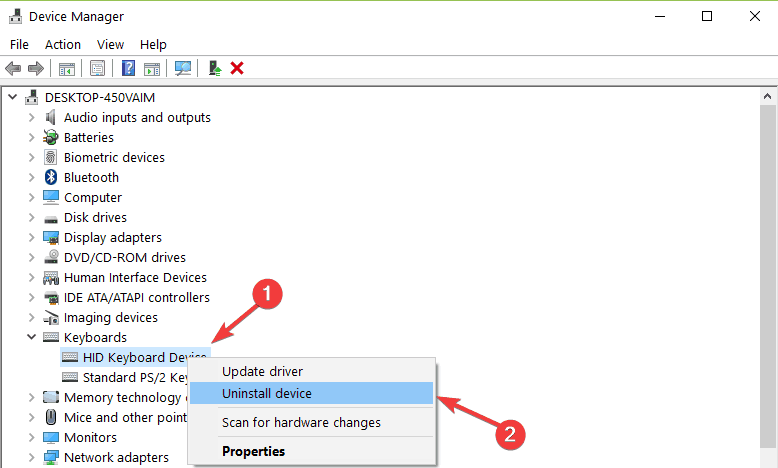
One more suggestion is to check  your keyboard for driver updates from your device manager. (clkc update driver)


The image below shows how you can locate this:

uninstall keyboard driver


Regards,


Message 11 of 117

JOfford_13
Advocate
Advocate

It doesn't appear to be a driver-related issue because the key still functions fine in every other program but Revit, including AutoCAD.

Message 12 of 117

Viveka_CD
Alumni
Alumni

Hi @JOfford_13 


Are you available for  quick screen share sometime tomorrow?


Regards,


0 Likes
Message 13 of 117

JOfford_13
Advocate
Advocate

We could arrange a screen share with the user(s) who experienced the issue however it hasn't been an issue since the restart and we wouldn't be able to reproduce it on the spot.  I've only heard of 2 of our employees ever running into the issue, both of which was resolved by simply restarting Revit.

Message 14 of 117

Viveka_CD
Alumni
Alumni

@JOfford_13 

No worries, let me know if the issue comes back again!


Regards,

0 Likes
Message 15 of 117

praa276
Contributor
Contributor

Hi, we experience the issue with Revit 2018 for a user and a simple close open can't be a solution.

It happend 3-5 time a week.

Message 16 of 117

JOfford_13
Advocate
Advocate

Agreed this is not a solution.  Autodesk marked it a solution, not me.


Message 17 of 117

praa276
Contributor
Contributor

Issue is still there. Do you have any upate on this?

Message 18 of 117

Viveka_CD
Alumni
Alumni

@praa276 

Can you check if you are on the latest updates for your Revit version?

Also, did you run a windows update recently?


Regards,

0 Likes
Message 19 of 117

Anonymous
Not applicable

Same problem here. Viveka_CD you are not much of a help..

Restarting Revit is a quick fix but does not solve the issue.

Message 20 of 117

Anonymous
Not applicable

@Viveka_CD 
Same here. I have had this issue for the last 4 years, across 3 different PCs and i'm tired of it! 3 to 4 times a week I need to stop what I'm doing and re-start Revit! often it is not only the ESC key that stops working  but the Delete key as well. Sometimes I only need to go to Outlook and start typing something and when I return to revit the issue resolves itself, other times I need to restart Revit.

Surely restarting the software cannot be a solution.