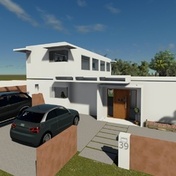
Hello,
For some reason it is not possible to view inside / see through a 'Frameless Glass Walls / Door' family when imported into the project in Elevation mode.
The family is definitely built with an opening in the wall. There is no issue seeing through in 3D mode, but in none of the Elevations reveal the inside of the building.
May I ask if someone can have a look at the attached file please? I have placed a few pieces of furniture to illustrate the issue and help pinpoint what the issue may be.
Thank you so much for your help.
Transparency of glazing elements is not available, by default, in elevation views, only in 3d views. You will need to override the graphics of the elements that you need to be transparent.
Note: For construction documents, it will be confusing to see through windows and curtain walls.
Go to the view(s) in which you want to make the familly see-through and then select the familly element(s) > right click on one of the selected elements > override graphics in view > select "by element" or "by category" depending on the need > there you can modyfy the transparency
What are you trying to show in elevation - the doors open (as in the 3D view) or doors closed?
If it's the latter then you will need to do as others have suggested and use your Visibility Graphics to adjust the transparency but this may be confusing. It would probably 'look' better if you had a suitable material / colour applied as well as showing some swing lines in elevation.
If it's the former then you need to look at the visibility of the modeled components in your family so that the closed door is not visible in elevation.
Hello,
Thank you for your help, and apologies for not replying before I have been out of the office reason why I can only reply now.
@Alfredo_Medina, thank you for confirming "Transparency of glazing elements is not available", I am new to Revit and was not aware of this for "Elevation views".
@torresdiver92,thank you for detailing how to modify the transparency of elements, step by steps, without your feedback I did not know how this could be achieved. You made it easy to follow, great, Tx.
@Keith_Wilkinson to reply to your question : yes for this project, and for those Elevations I needed to doors open. I tried as suggested to edit the family, and have no idea as to why it was not possible to hide those doors when imported into a project (and see the furniture inside the house, which was what I was trying to achieve like in 3D view). I tried via 2 different ways:
- by adding a "Visibility parameter" yes/no as occurrence to the doors when in. No go: you still can not see inside, the furniture placed in the house.
- 2nd method I tried while in the family still, was to play with the "Visibility parameter" for the door itself and unticked : show : front/back left/right, as well as plan view and medium details as well as high details. No go: you still can not see inside, the furniture placed in the house). No idea why the last method did not work. Thanks anyway, this could have worked.
The last comment I would like to add if someone one day is in the same situation, and if it helps : I found that the default wall opening (for doors, and for Windows too, I believe the system/outcome is the same) is not enough to see through the house.
If you need to represent and see the furniture inside (in Elevation mode), it is best to delete this default wall opening in the Family editor, and replacing it with a good 'old' VOID. (Yet so obvious but did not think to do so, believing the default wall opening was enough for Elevation views). This was the/my solution. Simple efficient and now you can see through.
Thanks again to the 3 of you for your help !
![]()
This image illustrates what I needed to achieve, with ground level furniture showing (white at this stage but will be textured), with folding door opened and stacked to the right.
See attached family - I've removed the 'opening cut' and replaced it with a void extrusion. It now behaves as you expect it to.
K.
You could use a 3D views in lieu of true elevation. Overlay dims, grids, levels from a true elevation if need be.
@ToanDN As suggested I made an other test with your solution : duplicated a 3D View and oriented it as an Elevation. After placing on a sheet, I overlaid a true Elevation view, that has levels on it, and hid the modelled components in it except those levels, the result is brilliant.
Your solution is so very clever !! Thank you ![]()
for the avoidance of any doubt here's a Screencast showing the process and the outcome....
Hey, i read the discussion, and im dealing with a similar problem. first i changed a similar family to foldable shutters. i dont really know how to change families so i improvised. it works, if i stay in the same dimensions, because the changes i made are not totally linked to the parameters. this is the first question: how do i do this? and secondly how do i remove the gap like you did, and replace it with a void extrusion? hope you guys are still active on this board.
greetings,
Niek
Sie finden nicht, was Sie suchen? Fragen Sie die Community oder teilen Sie Ihr Wissen mit anderen.