Change multiple schedule text font

Change multiple schedule text font

pputte.stenqvist
Enthusiast Enthusiast
2,333 Views
5 Replies
Message 1 of 6

Change multiple schedule text font

pputte.stenqvist
Enthusiast
Enthusiast

Hi!
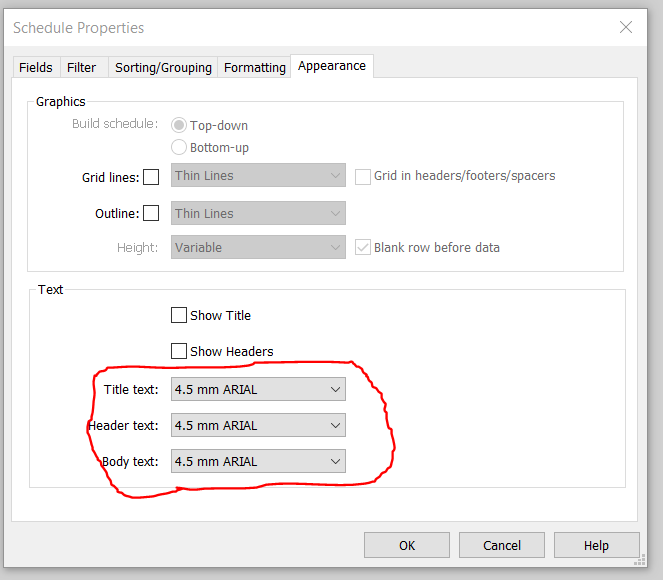
I need to change multiple schedules apperance (font text)

is there a way to change this without need to enter every single schedule and change this.

I have multiple projects that need font change because i have to upgrade the model to revit 2017 (read more in my earlier post: https://forums.autodesk.com/t5/revit-architecture-forum/updating-model-from-2016-to-2017-area-schedu... )


0 Likes
Accepted solutions (1)
2,334 Views
5 Replies
Replies (5)
Message 2 of 6

Ilic.Andrej
Advisor
Advisor

I'm afraid you re gonna have to edit every schedule.


Andrej Ilić

phonetical: ændreɪ ilich
MSc Arch

Autodesk Expert Elite Alumni

0 Likes
Message 3 of 6

ToanDN
Consultant
Consultant
Accepted solution
Create a schedule template and apply to multiple schedule views.
Message 4 of 6

pputte.stenqvist
Enthusiast
Enthusiast

oh ok, thats not good..

I have very many projects wich need this text change 😕

Thanks for the reply!

// Patrik

0 Likes
Message 5 of 6

Ilic.Andrej
Advisor
Advisor

I forgot about that...I just didn't use it for schedules. Might as well start now


Andrej Ilić

phonetical: ændreɪ ilich
MSc Arch

Autodesk Expert Elite Alumni

0 Likes
Message 6 of 6

pputte.stenqvist
Enthusiast
Enthusiast

Thank you, this gonna save me alot of time.

cheers!

//Patrik

0 Likes