Cannot enable "snap" for imported PDF in R2020

Cannot enable "snap" for imported PDF in R2020

HVAC-Novice
Mentor Mentor
9,664 Views
4 Replies
Message 1 of 5

Cannot enable "snap" for imported PDF in R2020

HVAC-Novice
Mentor
Mentor

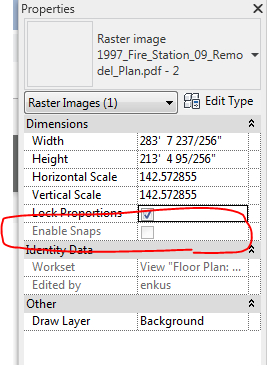
I have PDF imported to use a tracing background. The check box for the "enable snap" feature is grayed out. 

how do i enable snappingSnap.PNG
Revit Version: R2026.4.2
Hardware: i9 14900K, 64GB, Nvidia RTX 2000 Ada 16GB
Add-ins: ElumTools; Ripple-HVAC; ElectroBIM; Qbitec
0 Likes
Accepted solutions (1)
9,665 Views
4 Replies
Replies (4)
Message 2 of 5

ToanDN
Consultant
Consultant
Accepted solution
Because it is a raster, not a vector PDF?
Message 3 of 5

HVAC-Novice
Mentor
Mentor

You are correct, this PDF is scanned from a paper plan. 


I tried with a PDF that I had generated with Revit (Vector Processing) and it "un-grays" that check mark and I can trace by "picking lines".


Assuming most older plans are scanned, this won't really help me. The scanned copies are not perfect anyway (rotated by 0.347° etc.). So I guess I will have to just manually trace. 


Thanks for your help. 

Revit Version: R2026.4.2
Hardware: i9 14900K, 64GB, Nvidia RTX 2000 Ada 16GB
Add-ins: ElumTools; Ripple-HVAC; ElectroBIM; Qbitec
0 Likes
Message 4 of 5

DDD-Greg
Explorer
Explorer

Hi,

I am also having the same issue not being able to enable snaps for a pdf file in Revit 2020. I am following a training video where the trainer imports a raster door image from a website and he is able to enable snaps and then scale. Not sure why I can't as I have used the same file from the same website. Still snaps are grey'ed out? Any Ideas? thanks Greg D.

Message 5 of 5

nabo_raymond
Community Visitor
Community Visitor

Hello
I've watched some videos on youtube where they have able to snap a "RASTER IMAGE"

0 Likes
