

Message 1 of 8
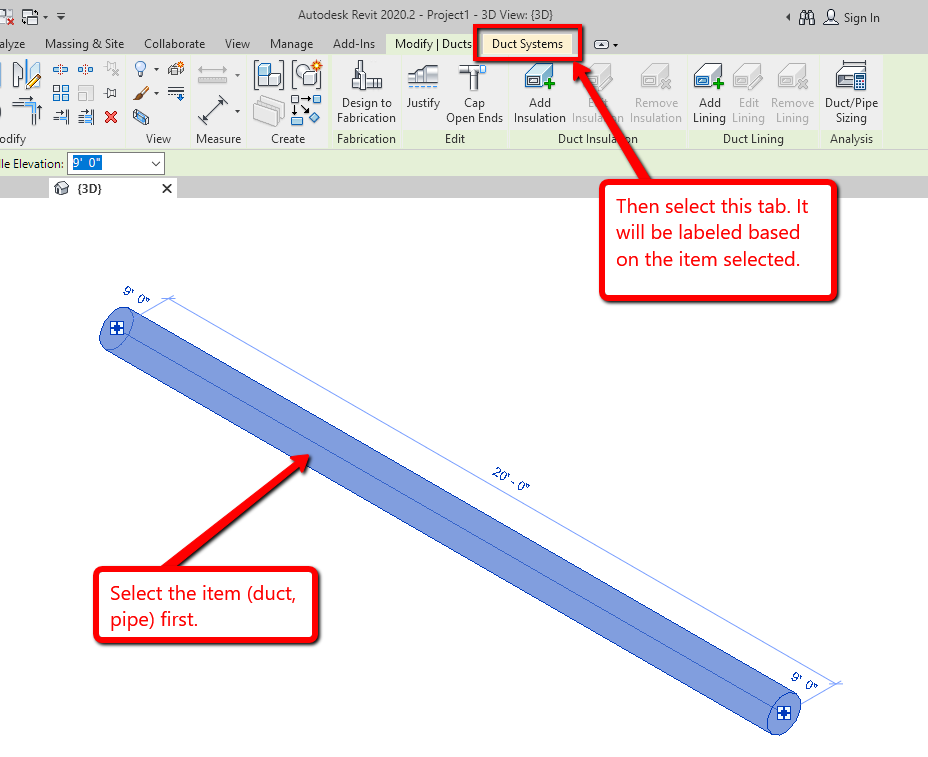
Can anyone tell me how to find the "System Tools Panel"?

- Mark as New
- Bookmark
- Subscribe
- Mute
- Subscribe to RSS Feed
- Permalink
- Report
For some reason I have a pipe fitting that has its 'System Classification' and 'System Type' shown as undefined and is not changeable in the 'Properties' dialog. I have therefore been trying to change this by trying to find how this is done through the Revit 2020 Help site but none of it makes any sense;
In the 'Adding a Component to a System' it says firstly - "1 In the drawing area, select one of the components in the system where you want to add a component, and click the appropriate (Duct, or Pipe) Systems tab > System Tools panel >Edit System (Piping System or Duct System).
I have done this over and over and cannot find any of these!
Andrew Robertson
Chartered Architect
Robertson Partnership
Truro. UK
Chartered Architect
Robertson Partnership
Truro. UK