
Any way around the stair nosing length's gap in plan view?

Any way around the stair nosing length's gap in plan view?

Redrunner92
Collaborator Collaborator
1,932 Views
8 Replies
Message 1 of 9

Any way around the stair nosing length's gap in plan view?

Redrunner92
Collaborator
Collaborator

Is there a way to not show the gap created in plan view by the stair Nosing Length value ? I have seen this space for years but haven't known what caused it until I recently found out. I understand that, when multiple steps are involved, this helps make all the lines involved in plan view cleaner. But with only one step, this creates a gap between the end of the tread and an abutting object. Can I somehow close this gap while keeping the stair nosing value greater than zero?
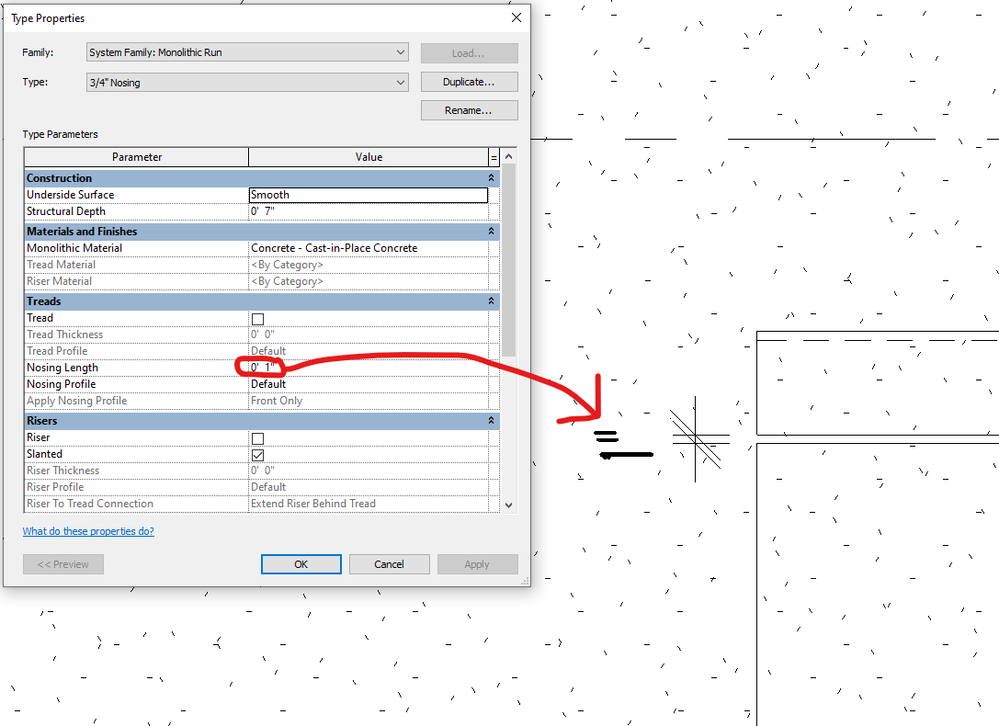
 

Redrunner262_1-1601088800877.png


0 Likes
Accepted solutions (2)
1,933 Views
8 Replies
Replies (8)
Message 2 of 9

barthbradley
Consultant
Consultant

I never noticed that before. Does it go away when not slanted riser? 

0 Likes
Message 3 of 9

barthbradley
Consultant
Consultant

Edit Stair and uncheck End with Riser

0 Likes
Message 4 of 9

Redrunner92
Collaborator
Collaborator

The gap remains when I change the stair so it does not have a slanted riser.

0 Likes
Message 5 of 9

Redrunner92
Collaborator
Collaborator

The gap remains when I uncheck this. And I changed the stair's height to preclude the warning "Stair top... cannot reach the top elevation of the stair." After playing with various options in combination with unchecking "End with Riser," I don't see a connection between the "End with Riser" property and the plan view gap.

If this removes the gap for you, would you please post a Revit file with the stairs you modified to make this work?

It may be worth noting that I am using a Cast-In-Place Stair, in case each stair type acts differently.

0 Likes
Message 6 of 9

barthbradley
Consultant
Consultant

hmm? Post the file. I'll get to the bottom of this symbolic representation.  That's what Revit is showing you in Plan View - a symbolic representation - not a model representation.  Does the gap exist in 3D?  I'm betting not.  If it does, then the Plan View Representation is correct. Move the step to close the 1" gap.   

0 Likes
Message 7 of 9

Redrunner92
Collaborator
Collaborator

I agree, I quickly found out it's a plan view representation and not showing what is modelled.

This behavior applies to any stair as far as I can tell. A file is attached. I'm eager to hear if you find a way to close the gap while keeping a non-zero Nosing Length value.

0 Likes
Message 8 of 9

barthbradley
Consultant
Consultant
Accepted solution

Why don't you in-place model the step under the Stair Category? Bada Bing. 

0 Likes
Message 9 of 9

ToanDN
Consultant
Consultant
Accepted solution

- Create another stair Run type and set nosing length to 0. Use this type when you have 1-step stairs.
- Model the step as a floor, which it actually is.

0 Likes

