Add editable text label to Room Tag

Add editable text label to Room Tag

lwindsor
Contributor Contributor
9,107 Views
10 Replies
Message 1 of 11

Add editable text label to Room Tag

lwindsor
Contributor
Contributor

I would like to add a label to my room tag that would allow me to click on it once installed in the project and edit the text. 

Sometimes when designing homes, I like to give the client a floor plan showing Length x Width under the Room Name.  This would be easier if could make this part of the Room Tag rather than placing a separate piece of text in each room and trying to line it up under the room name.  

0 Likes
Accepted solutions (2)
9,108 Views
10 Replies
Replies (10)
Message 2 of 11

barthbradley
Consultant
Consultant

Why not put the "Comment" parameter field label into the Room Tag?

0 Likes
Message 3 of 11

ToanDN
Consultant
Consultant

If you want to manually type in the L x W value, add a shared parameter to the tag family as a label and to the project > Rooms category.

However, there is a way to pull the value directly from rectangle rooms. I can dig up the topic and post it later for you.


https://forums.autodesk.com/t5/revit-architecture-forum/room-tag-width-x-depth-parameters-generating...

0 Likes
Message 4 of 11

barthbradley
Consultant
Consultant
0 Likes
Message 5 of 11

lwindsor
Contributor
Contributor

Thanks to Barthbradley and ToanDN for your quick responses.  

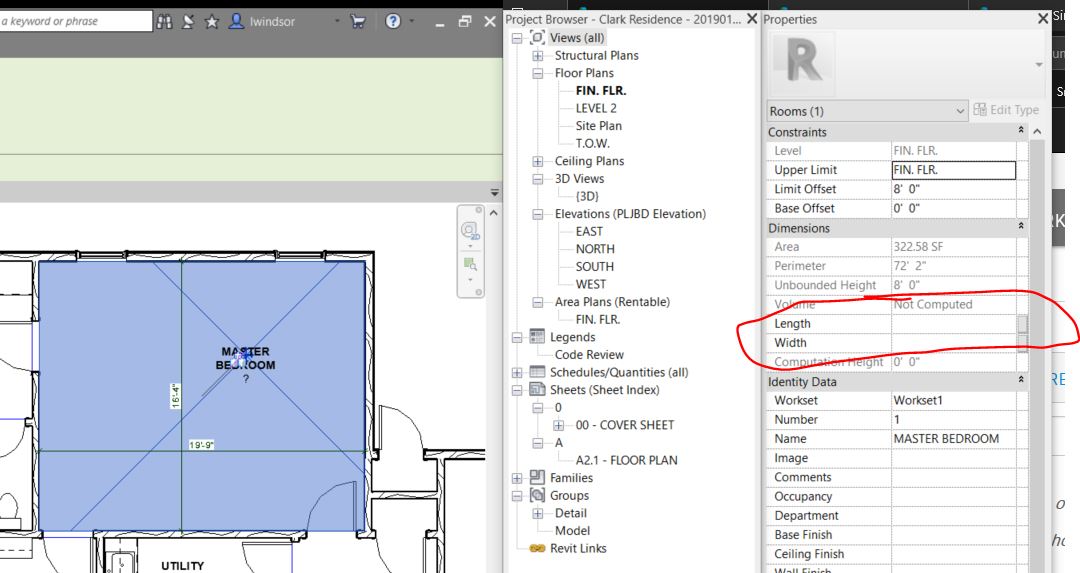
The Dynamo solution seems to be the most complete solution.  This is my first time using Dynamo and I am feeling a little out of place with it.  The problem I have may be with my Length and Width shared parameters though.  When I select the room, the Length and Width are now part of the room parameters, but display no values.  Is this a parameter issue, or is this a Dynamo issue?

0 Likes
Message 6 of 11

lwindsor
Contributor
Contributor

Attached below are a screenshot from Revit and a screenshot from Dynamo.

0 Likes
Message 7 of 11

ToanDN
Consultant
Consultant
Accepted solution

@lwindsor wrote:

Attached below are a screenshot from Revit and a screenshot from Dynamo.


I didn't have a chance to study the Dynamo approach but if it is in the Knowledge database then it should work.  Anyhow, if the Rooms are rectangle, using the OOTB method with formulas in a Room tag does work.


Annotation 2019-01-23 101936.jpg

Message 8 of 11

lwindsor
Contributor
Contributor
Accepted solution

Thanks to everyone for all of your replies and assistance.  I have come up with a room tag using a similar formula to the one suggested by ToanDN.  The only problem is that it doesn't work with a non-rectangular shaped room (of course).  My solution for that was to include an option to fill in the dimension manually.  There is also an option to display only the room name for dimensional floor plans.  


I am attaching the room tag file I created if anyone wants to use it.  


Thanks again for everyone's help.  Have a Great Day!!!

0 Likes
Message 9 of 11

deanguggenheim
Observer
Observer

Hi thank you for your contribution. I was wondering how do you edit it manually because when I tried that, a question mark appears instead


0 Likes
Message 10 of 11

lwindsor
Contributor
Contributor

Hi Dean:

Just double click the question mark and it should allow you to edit it there on the screen. 

Thanks and have a great day!!

0 Likes
Message 11 of 11

Y_Dave
Explorer
Explorer

I CANT EDIT THE MANUAL TEXT , ALTHOUGH THANKS FOR RECREATING IT

0 Likes