Dear Miguel,
Thank you for your patience.
The development team respond:
You can use the following code to create non-planar curves and loft:
  // Create an S shape with control points and weights
  List<CurveLoop> cls = new List<CurveLoop>();
  IList<XYZ> bottomControlPoints = new List<XYZ> { new XYZ(100, 100, 0), new XYZ(50, 100, 0), new XYZ(50, 50, 0),
      new XYZ(100, 50, 0), new XYZ(100, 0, 0), new XYZ(50, 0, 0) };
  IList<double> weights = new List<double> { 1, 1, 1, 1, 1, 1 };
  Curve bottomCurve = NurbSpline.CreateCurve(bottomControlPoints, weights);

  // Z coordinate is varied for the top curve
  IList<XYZ> topControlPoints = new List<XYZ> { new XYZ(100, 100, 10), new XYZ(50, 100, 20), new XYZ(50, 50, 30),
      new XYZ(100, 50, 40), new XYZ(100, 0, 50), new XYZ(50, 0, 60) };
  Curve topCurve = NurbSpline.CreateCurve(topControlPoints, weights);

  CurveLoop bottomLoop = new CurveLoop();
  CurveLoop topLoop = new CurveLoop();
  bottomLoop.Append(bottomCurve);
  topLoop.Append(topCurve);
  cls.Add(bottomLoop);
  cls.Add(topLoop);

  SolidOptions options = new SolidOptions(ElementId.InvalidElementId, ElementId.InvalidElementId);
  Solid mySolid = GeometryCreationUtilities.CreateLoftGeometry(cls, options);
  Assert.IsNotNull(mySolid);
Here is a DirectShape generated from the resulting solid:
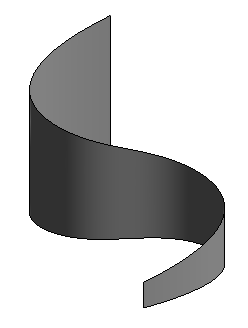
I hope this answers many of your questions.
Some further discussion ensued, which may or may not be relevant:
[Q] The user calls NewLoftForm, whereas the sample code calls CreateLoftGeometry.
NewLoftForm might use different criteria than CreateLoftGeometry, or maybe it decides to use a different form creation method than the one you used, and that fails.
User:
var modelcurve = doc.FamilyCreate.NewLoftForm(true, profiles);
Sample code:
Solid mySolid = GeometryCreationUtilities.CreateLoftGeometry(cls, options);
[A] I think the user is calling outdated (obsolete) methods for curve creation and loft. We should point out latest methods. One of his questions was how to create a non-planar Nurbs curve. Now we have better API methods to do that. My sample code has an example.
More feedback on the user's questions.
[Q] how can i programmatically create a non-planar hermite or nurb spline, please?
[A] Please see the functions in APIGeometryNurbSpline.h, e.g.,
  static Autodesk::Revit::DB::Curve ^CreateCurve(
    System::Collections::Generic::IList<Autodesk::Revit::DB::XYZ ^> ^controlPoints,
    System::Collections::Generic::IList<double> ^weights);
[Q] Do both Hermite and Nurb Spline need to be created on a plane? Is there any way around this?
[A] No, the Hermite and NurbSpline curves can be non-planar. Please see the answer to previous question.
Note that surface created by lofting may not be a Nurbs surface and we may not provide API functions for editing the surface.
[Q1] The loft could be done in a different way with a different method and I am doing it wrong.
[A1] Yes, the curves and the loft can be created using different API methods. Please see the example.
[Q2] The only way around this would be to modify the control points after the creation of the loft.
[A2] As noted above, the workaround is not needed and the proposed workaround will not be possible.
I hope this helps.
Please let us know whether this works for you and how you end up using it.
Thank you!
Best regards,
Jeremy


