MORE TASK BAR USER DEFINED FIELDS

MORE TASK BAR USER DEFINED FIELDS

kmarkopouliotis
Advocate Advocate
3,023 Views
17 Replies
Message 1 of 18

MORE TASK BAR USER DEFINED FIELDS

kmarkopouliotis
Advocate
Advocate

DOES ANYONE HAVE AN IDEA HOW MORE USER DEFINED FIELDS MIGHT BE ADDED ?

THANK YOU.

0 Likes
Accepted solutions (1)
3,024 Views
17 Replies
Replies (17)
Message 2 of 18

iamcdn79
Mentor
Mentor
Accepted solution

Until you have the ability to add more user defined fields you can use the Quick access toolbar. Its a little more powerful where you can add macros and commands as well as expressions.


Capture.PNG


Intel Core i9 13900KF CPU
128 GB Kingston Beast DDR4 SDRAM
PNY RTX A2000 6GB Video Card
WD 1 TB SSD Hard Drive
Windows 11 Pro

Message 3 of 18

kmarkopouliotis
Advocate
Advocate

Thank you very much Andre,

this helped me a lot.

i would like to have your support on some issues that i'm facing in holemaking whenever you are avaliable.

Thank you once more

0 Likes
Message 4 of 18

iamcdn79
Mentor
Mentor

Sure no problem


Intel Core i9 13900KF CPU
128 GB Kingston Beast DDR4 SDRAM
PNY RTX A2000 6GB Video Card
WD 1 TB SSD Hard Drive
Windows 11 Pro

0 Likes
Message 5 of 18

danmic7JH66
Advocate
Advocate

One issue I have with the expression fields is they don't always update for me right away. There are many times where the value that's displayed is an old value. Overall it's a super useful tool for me being able to display different project parameters for a quick visual reference, just wish it refreshed a little faster.


0 Likes
Message 6 of 18

kmarkopouliotis
Advocate
Advocate
Hi ANDRE, I'M TRYING TO CREATE AN EXPRESSION FIELD IN ORDER TO SEE ACTIVE HOLE'S DEPTH BUT I RECEIVE AN ERROR. WHAT AM I DOING WRONG ??? THANK YOU.
0 Likes
Message 7 of 18

iamcdn79
Mentor
Mentor

I have the same issue on my end as well


Intel Core i9 13900KF CPU
128 GB Kingston Beast DDR4 SDRAM
PNY RTX A2000 6GB Video Card
WD 1 TB SSD Hard Drive
Windows 11 Pro

0 Likes
Message 8 of 18

iamcdn79
Mentor
Mentor

Its not working for me as well. Not sure why it has {oldfeature}


Intel Core i9 13900KF CPU
128 GB Kingston Beast DDR4 SDRAM
PNY RTX A2000 6GB Video Card
WD 1 TB SSD Hard Drive
Windows 11 Pro

0 Likes
Message 9 of 18

evo80
Collaborator
Collaborator


0 Likes
Message 10 of 18

iamcdn79
Mentor
Mentor

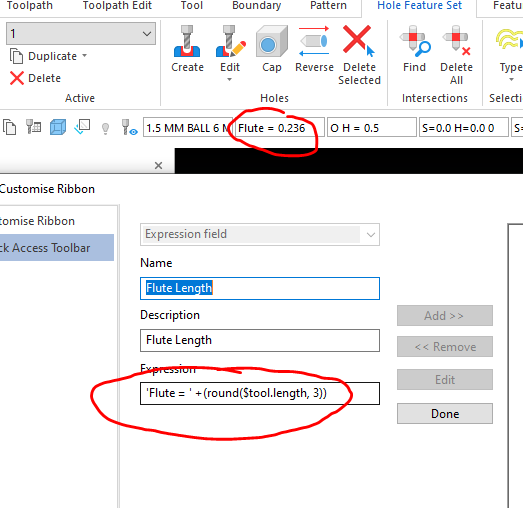
Do you mean your own customized text? Just add a ' and whatever you write in between gets added 


Capture.PNG


Intel Core i9 13900KF CPU
128 GB Kingston Beast DDR4 SDRAM
PNY RTX A2000 6GB Video Card
WD 1 TB SSD Hard Drive
Windows 11 Pro

Message 11 of 18

evo80
Collaborator
Collaborator

Thanks Mate,

I'm assuming the 3 is for decimal places?

0 Likes
Message 12 of 18

iamcdn79
Mentor
Mentor

Yup


Intel Core i9 13900KF CPU
128 GB Kingston Beast DDR4 SDRAM
PNY RTX A2000 6GB Video Card
WD 1 TB SSD Hard Drive
Windows 11 Pro

0 Likes
Message 13 of 18

O.C.
Enthusiast
Enthusiast

Is there a way to add the Tool name to either Quick access tool bar or the user defined fiels in the status bar?


0 Likes
Message 14 of 18

p.valente
Enthusiast
Enthusiast
Can you please can share with us all of that expressions ? The formula.
Thanks in advance.
0 Likes
Message 15 of 18

Dkal7
Enthusiast
Enthusiast

Hello there.

Very nice thread.

Question: Wha's the expression to show the active tool?

Thank!

0 Likes
Message 16 of 18

glaubergimenez
Enthusiast
Enthusiast

Hi! try $tool.name to see if it works for you. 👈 @Dkal7 

Message 17 of 18

Dkal7
Enthusiast
Enthusiast
Works perfect thank.
Is there a way to increase the field so the whole name can fit?
0 Likes
Message 18 of 18

glaubergimenez
Enthusiast
Enthusiast

unfortunately I don't know, but it would be good if the user needs it, maybe someone from the forum with more experience can answer for us.