How to change language in Powermill

How to change language in Powermill

iortiz
Advocate Advocate
5,221 Views
6 Replies
Message 1 of 7

How to change language in Powermill

iortiz
Advocate
Advocate

Hi,


Could be possible to change the Powermill's language from the default install to another language?


For example from English (default install) to Russian


Thanks

Regards.
0 Likes
Accepted solutions (2)
5,222 Views
6 Replies
Replies (6)
Message 2 of 7

Yogesh.Mohite
Alumni
Alumni
Accepted solution

Hi @iortiz,


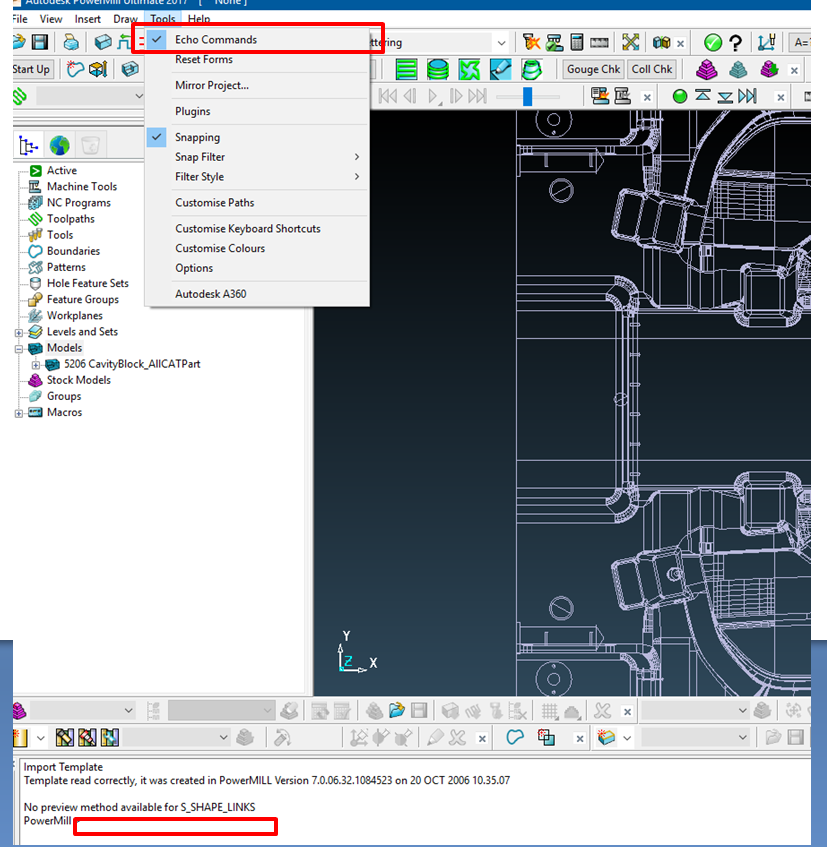
In PowerMill Echo Command you need to type LANG RUSSIAN.


Hope this helps.


Thank You


Yogesh Mohite
0 Likes
Message 3 of 7

iortiz
Advocate
Advocate

Were is located Powermill Echo command?


Thanks.

Regards.
0 Likes
Message 4 of 7

iamcdn79
Mentor
Mentor
Accepted solution

If you click on Tools it will be the very first option. When you turn it on a dialog box at the bottom of the powermill screen will open up where you would type your command 


Capture.PNG


Intel Core i9 13900KF CPU
128 GB Kingston Beast DDR4 SDRAM
PNY RTX A2000 6GB Video Card
WD 1 TB SSD Hard Drive
Windows 11 Pro

0 Likes
Message 5 of 7

tejas.lawate
Observer
Observer
How to change it to Chinese language?
0 Likes
Message 6 of 7

gosmann.andreas
Advocate
Advocate

lang Chinese-TWN or Chinese-CHN i think


but when we change the language it jumps back to the original language when we close pm how can it be change for ever.

0 Likes
Message 7 of 7

BTCouto
Participant
Participant

Hi Gosmann


to change by default, you need to go to the control panel - region - and set the format for the country / Language you want.


Hope this helps.

Best regards,
Bruno Couto
----------------
Tech Support Engineer
NORCAM