Differing render quality from single frame render to animation render

Differing render quality from single frame render to animation render

Anonymous
Not applicable
1,801 Views
7 Replies
Message 1 of 8

Differing render quality from single frame render to animation render

Anonymous
Not applicable

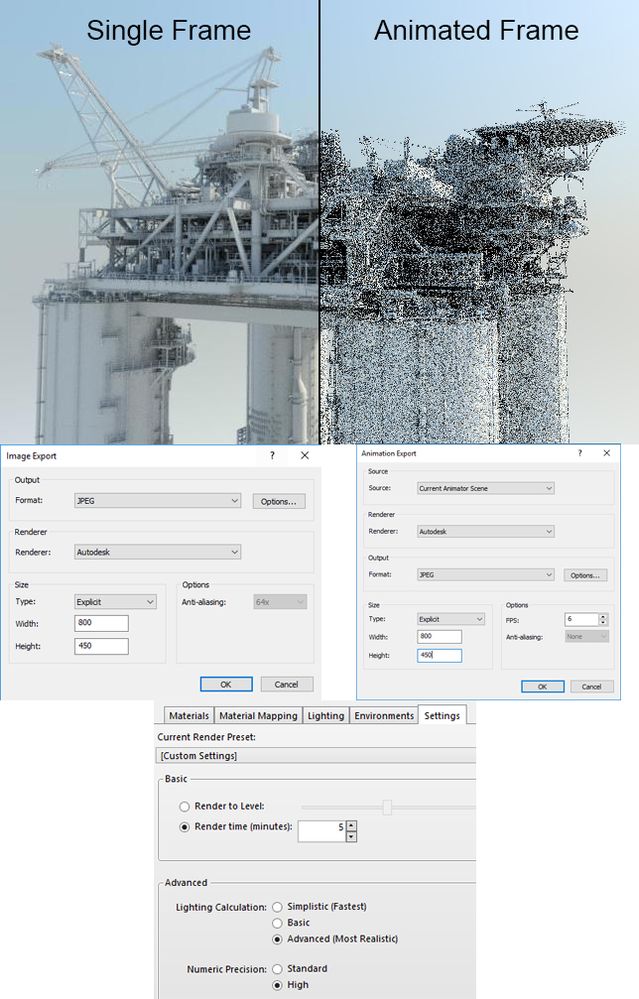
Does anyone know why there is such a difference in quality when rendering a single image as opposed to rendering frames from an animated sequence?

The left hand side of this image is rendered as a single file, the right hand side as a frame from an animation.

Both have the same render settings, defined from within the Autodesk Rendering window.
 

Ray 5 min Custom_1.jpg

0 Likes
Accepted solutions (1)
1,802 Views
7 Replies
Replies (7)
Message 2 of 8

dgorsman
Consultant
Consultant
Accepted solution

You have set render by time; 5 minutes on 1 frame will give better results than 5 minutes for multiple frames.  I recommend you don't render by time but by levels.  For both lighting and numeric precision on "High" you'll need at least 20 levels.  I normally recommend using "Standard" for numeric precision; you don't loose a whole lot and it reduces rendering time.


Also, render to PNG format.  JPEG format is "lossy", once compiled into an animation this can cause some banding and other artifacts.  Plus, it supports alpha-channel (transparency) for compositing.


Model looks good Smiley Happy

----------------------------------
If you are going to fly by the seat of your pants, expect friction burns.
"I don't know" is the beginning of knowledge, not the end.


0 Likes
Message 3 of 8

Anonymous
Not applicable

Thanks for the reply.

I have had more success rendering with levels, but the frame time on a single machine is too lengthy for my needs (it's a pity network rendering isn't supported).

I have the model exported into Max, so I'll do the animations there - I was just hoping to negate the need for export and import.


0 Likes
Message 4 of 8

dgorsman
Consultant
Consultant

Yeah, if you want something nice it takes a while.  Thankfully I've got a few computers at work, so when I need some serious Navisworks rendering I split up the animation sequence between them overnight.


Not sure if the Autodesk cloud rendering supports animation or not, but since you've got 3DSMAX that doesn't really matter.  Unless you are using MR, Arnold, or another CPU renderer in which case rendering time may not improve by much.  You'd need to switch to a GPU renderer and have several high-end cards to seriously reduce time from Navisworks.

----------------------------------
If you are going to fly by the seat of your pants, expect friction burns.
"I don't know" is the beginning of knowledge, not the end.


0 Likes
Message 5 of 8

Anonymous
Not applicable

Unfortunately there's no support for animation in the cloud rendering yet. I do use it, but mainly for panoramic renderings, and you can get some great results for exterior scenes. Not so much for interiors. Upload times can be quite lengthy too, depending on the model complexity, obviously.

As it is, working with both NW and Max is giving me a pretty decent output.

0 Likes
Message 6 of 8

Zsolt.Varga
Autodesk Support
Autodesk Support

Hi WatsonAlan7507


In order to be able to help other users to find an answer to the same question more quickly,  I went on and marked dgorsman´s answer to your original question as an accepted solution. 


Please, feel free to continue the conversation and mark other helpful comments as accepted solution´s as well in case you find this might help other users to resolve similar issues.


Best regards, 


Zsolt Varga
Technical Support Specialist
Autodesk, Inc.

Revit Ideas | Screencast | Revit Help | AKN

0 Likes
Message 7 of 8

Anonymous
Not applicable
Hi,

Much as I appreciated the reply from dgorsman, it didn't really answer my query as I still don't understand why in the single frame render the quality is so much better than in the sequence frame render when the settings are identical for both.

Any further light that can be shed on the matter would be greatly appreciated.

Regards,
Alan Watson
0 Likes
Message 8 of 8

Zsolt.Varga
Autodesk Support
Autodesk Support

Hi WatsonAlan7507,


Thanks for your reply. Sure, I am happy to help you with some further details. 


Dgorsman´s point was, if you use a rendering setting "rendering by time" and you set i.e. 5 minutes, your product will go ahead and start the rendering process and it finishes it after 5 minutes, giving you the results what ever it was able to achieve within these 5 minutes. 


If in those 5 minutes it had the job to render one single frame only, you might get a fairly good result, however if you gave him the order to render an animation, which contains multiple frames in every single seconds in it, the program might not be ready with all the rendering work to be done. After the 5 minutes are over, it gives you it´s results anyways, but you may have to expect far worse quality as the program invested the same amount of effort into a lot more work to be done. 


I hope this makes sense. 


Best regards,


Zsolt Varga
Technical Support Specialist
Autodesk, Inc.

Revit Ideas | Screencast | Revit Help | AKN

0 Likes
