Insert edge loop tool problems...

Insert edge loop tool problems...

Anonymous
No aplicable
3.802 Vistas
11 Respuestas
Mensaje 1 de 12

Insert edge loop tool problems...

Anonymous
No aplicable

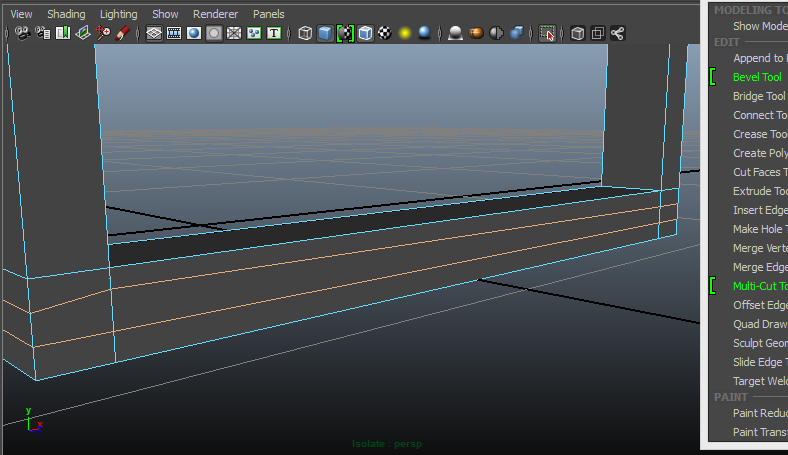
Hi, I am quite new to modelling in Maya so this problem will probably have a very easy answer: When I try to insert an edge loop on a door frame that I made instead of a clean straight line like will all my other loops it goes diagonal and out of shape. (I have inserted an attachment so you can see what I mean.) How do I fix this? Any help would be greatly appreciated!

Thanks in advance.
 

maya problems.PNG

0 Me gusta
Soluciones aceptadas (1)
3.803 Vistas
11 Respuestas
Respuestas (11)
Mensaje 2 de 12

Anonymous
No aplicable

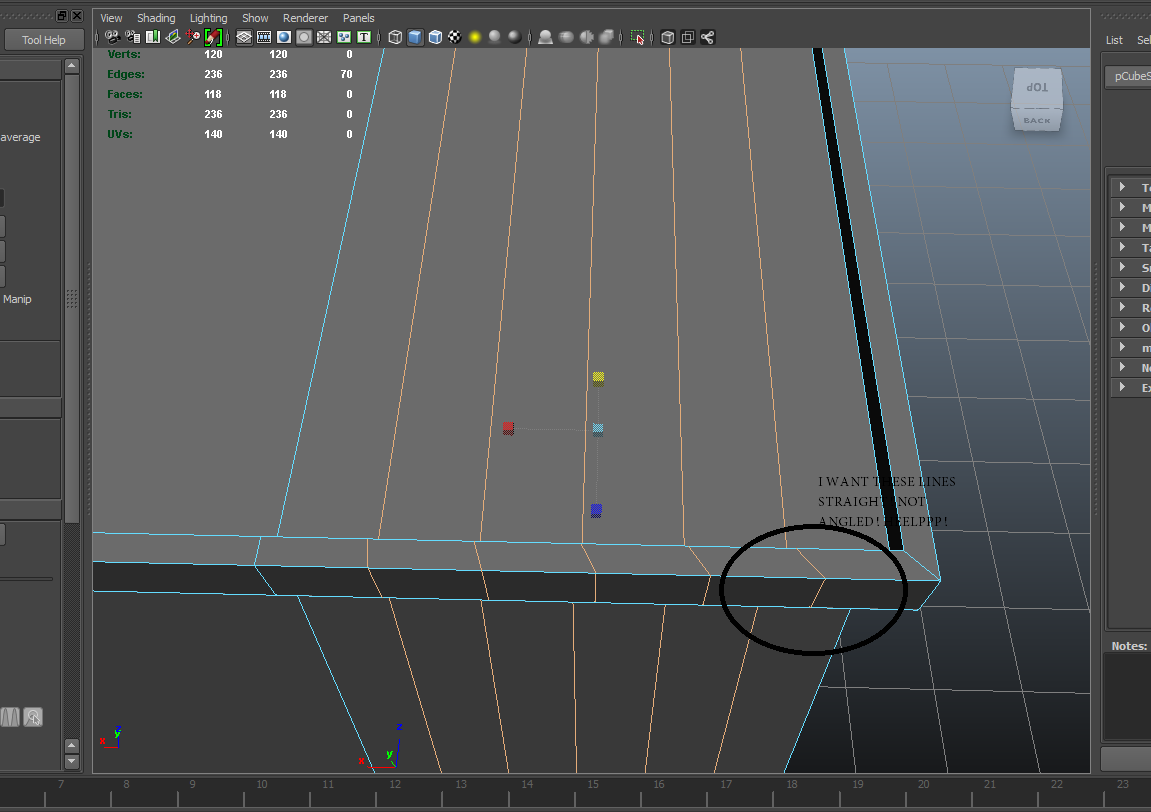
I'm having sort of the exact same issue. I inserted these edges *multiple of 5* with the insert edge loop tool. I'd like to have these line straightened out as opposed to following the lateral edges.

Please help!!!!


So essentially I want these edges to be straight along the world grid instead of the object.


mayahelp.png

0 Me gusta
Mensaje 3 de 12

Anonymous
No aplicable

Were you using Maya 2015, maybe it's a problem with that?

0 Me gusta
Mensaje 4 de 12

Anonymous
No aplicable

Using maya 2014...

0 Me gusta
Mensaje 5 de 12

Anonymous
No aplicable

Hmm, that's weird then, I hope someone knows what the problem is!


0 Me gusta
Mensaje 6 de 12

Anonymous
No aplicable

I got a reply on another forum, I'm seeing if it works now, try it for yours!


http://simplymaya.com/forum/showthread.php?t=40479

0 Me gusta
Mensaje 7 de 12

_sebastian_f
Advisor
Advisor

@sbruno: what you seeing is the normal and expected behaviour. by default maya averages between the loops around. you can try to set your insert edge tool to "equal distance from edge" and start inserting from the most left straigt edge, hold lmb and drag the loop to the right.


@pablolopez0001: from the image here and the images you posted at simplyMaya i´d say there is something wrong with your geometry. can you upload your file here? hard to tell just by the pictures!

0 Me gusta
Mensaje 8 de 12

Anonymous
No aplicable

Thanks for the reply, how do I go about attaching a .mb file? It doesn't seem to allow the file type!

0 Me gusta
Mensaje 9 de 12

_sebastian_f
Advisor
Advisor
a zip file should work.
0 Me gusta
Mensaje 10 de 12

Anonymous
No aplicable

Here's the file! 

0 Me gusta
Mensaje 11 de 12

_sebastian_f
Advisor
Advisor
Solución aceptada

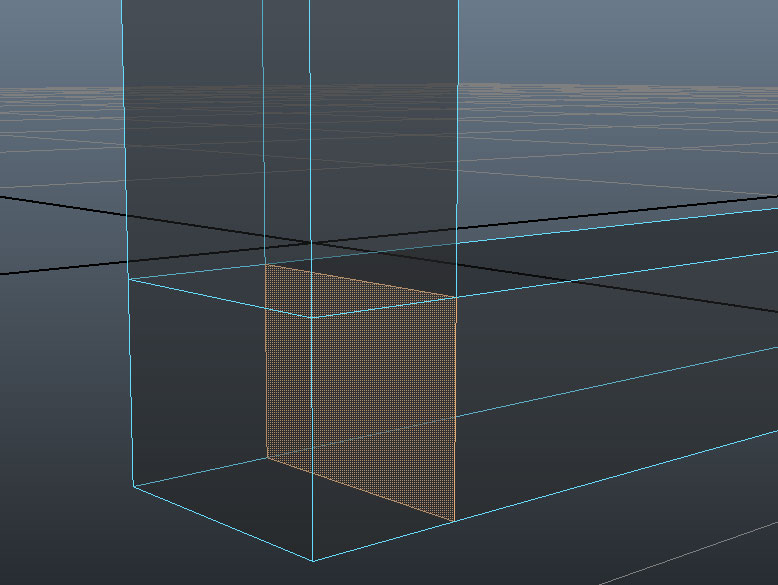
your problem is the face inside your geo. selected in the screenshot which creates nonmanifold geometry (in this case edges with a connection to more than 2 faces!). deleting it should solve your issue.

nonmanifold.jpg

Mensaje 12 de 12

Anonymous
No aplicable

Thank you so much, it's finally fixed!

0 Me gusta