Question about selection in Maya - long time Softimage user here

Question about selection in Maya - long time Softimage user here

Anonymous
Not applicable
651 Views
2 Replies
Message 1 of 3

Question about selection in Maya - long time Softimage user here

Anonymous
Not applicable

Hi guys 

When I am in vertex/edge/face selection mode sometimes I accidentally select another object. Is there a way to prevent Maya doing this? For example in Softimage when you are in one of the component modes it is not possible to select another object. 

Thank you in advance!

0 Likes
652 Views
2 Replies
Replies (2)
Message 2 of 3

sean.heasley
Alumni
Alumni

Hi @Anonymous


There's a handful of ways to do this:


Template an object so it can’t be selected.

Select the objects you want to template and select Display > Object Display > Template.

or

Select an object and open the Attribute Editor. On the Shape tab, open the Object Display options and select Template.

Template a layer of objects.

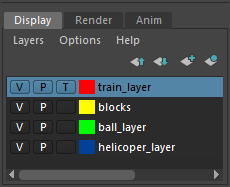
Add objects to layers in the Display Layer Editor, then click the third box for the selected layer so that a Tappears - see Edit all objects on a layer at once for a video showing this.

Keep clicking this box until it's empty to make the objects selectable again.

You can also click this box until an R appears to make the objects unselectable without changing the display mode.

Select a templated object.

Use the Hypergraph or Outliner. Templated nodes have a different color in the Hypergraph and Outliner.

or

Click the Select by hierarchy and combinations icon in the Status Line (toolbar) and click the Template icon  for the selection mask.

Make a templated object selectable again.

Select the templated node as described above, then select Display > Object Display > Untemplate.


If one or more of these posts helped answer your question, please click Accept as Solution on the posts that helped you so others in the community can find them easily.


Kudos are greatly appreciated. Everyone likes a thumbs up!


Message 3 of 3

Anonymous
Not applicable

Thanks for the answer. I appreciate it! I was looking for a more straightforward method. Templating objects takes extra time, especially when you have a lot of them. I think there should be an additional option in the Settings->Selection for this. 

Thanks again.