rotations change after saving when using quaternion interpolation

rotations change after saving when using quaternion interpolation

Anonymous
Not applicable
2,224 Views
7 Replies
Message 1 of 8

rotations change after saving when using quaternion interpolation

Anonymous
Not applicable
Hello! I'm having an issue with rotation. When I'm working on my animation using quaternion slerp interpolation, everything looks perfect and exactly how I want it to. I save and then close Maya, and when I reopen it, all of the rotation is messed up. The character is suddenly turned all different directions. When I look at the rotation values, they're all different from what they were when I set the animation and saved it.

If I use euler, the rotations don't get messed up when I close and reopen, but the gimbal lock makes it way harder to get the rotation right.


Here's a video of the problem that shows what the animation looks like both before and after saving:


Sometimes it's worse than this, and if I save the messed up version and then close and reopen, the values have changed again.


I've been using 3ds Max for years, but I'm pretty new to Maya. Has anyone else experienced this issue, or can anyone tell me if there's some setting or other than I need to use to make sure this doesn't happen?

0 Likes
Accepted solutions (2)
2,225 Views
7 Replies
Replies (7)
Message 2 of 8

sean.heasley
Alumni
Alumni

Hi @Anonymous and welcome!


Can you attach the scene file here or via dropbox/google drive so I can take a look at it?

Message 3 of 8

Anonymous
Not applicable

Hey! Sorry, I thought I'd attached it. Yes, absolutely, I can do that! Thanks!

Message 4 of 8

mspeer
Consultant
Consultant

Hi!


I did 2 savings and imported them to the original file.

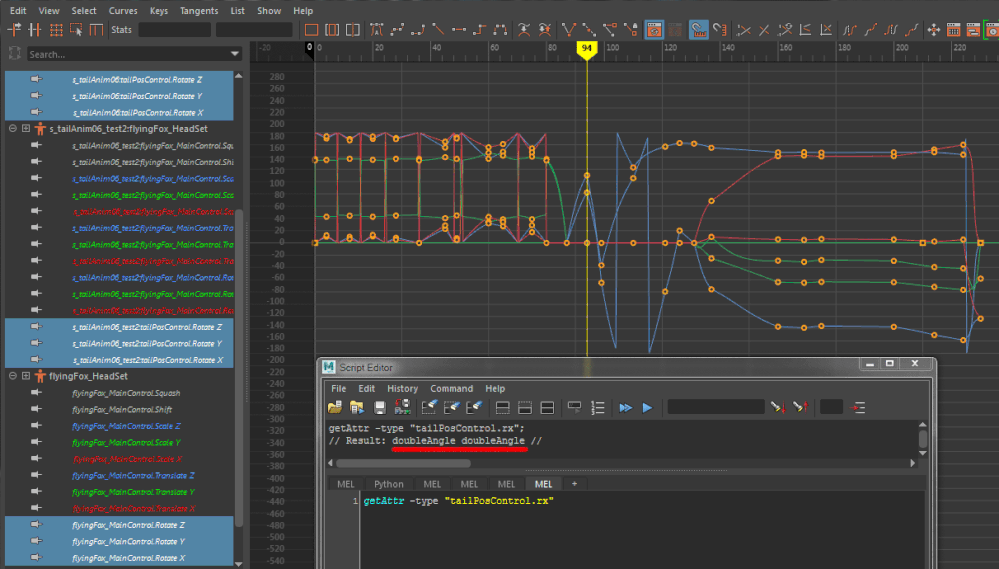
This is the result, there seems to be a problem with your attributes for tailPosControl.rotate:


double.gif


Message 5 of 8

sean.heasley
Alumni
Alumni

Hi @Anonymous just checking in, did @mspeer's solution help at all?

Message 6 of 8

Anonymous
Not applicable
Accepted solution

Hey, thanks guys!

I see there's a problem with the TailPosControl and that doubleAngle attribute. To be honest, I don't know much about scripting, at least not yet, so I don't understand the relationship between the doubleAngle attribute and Maya changing my rotation values when saving.

However, I did end up resolving the issue with a help from my animation professor.


We selected the tailPosControl, and then went to edit>keys>bake simulation, and baked it down with Smart Bake turned on and the percent set to 1. After that, the values stopped changing when saving the file.

I wish I could also tell you guys we figured out how it ended up getting messed up in the first place, but even asking around at the animation studio he works at, nobody could figure out how the problem started. Just one of those things, I guess.

Anyway, I really appreciate everyone's help!

Message 7 of 8

mspeer
Consultant
Consultant
Accepted solution

Hi!


Glad you found a solution.


The problem is, there should be only 1 value (for each rotation axis) not 2, so "doubleangle" and not "doubleangle doubleangle".

If you duplicate the object (tailPosControl), the duplicate has only 1 value as expected.

I am not sure what caused this but i don't have the time to look deeper into this.

Message 8 of 8

Anonymous
Not applicable

Ah! Ok, I understand what you mean now. Thanks! I'll let my professor know in class today.