
No text on minimized windows inside Maya 2017 on Windows 10

No text on minimized windows inside Maya 2017 on Windows 10

robogunx
Explorer Explorer
8,842 Views
36 Replies
Message 1 of 37

No text on minimized windows inside Maya 2017 on Windows 10

robogunx
Explorer
Explorer

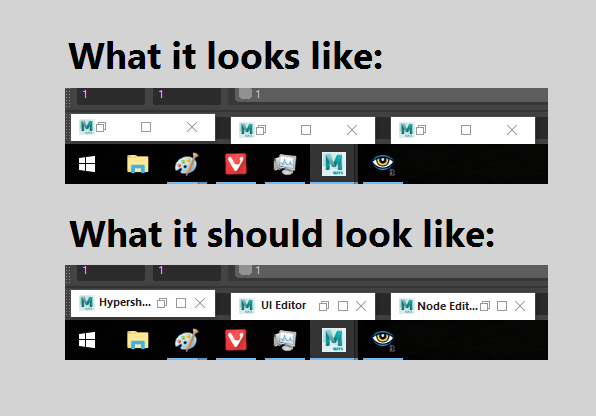
Hello, my problem is that whenever I minimize a window inside Maya (Hypershade, Node Editor, UV Editor, etc.) they're nested at the bottom-left of the screen but there is no text displayed on them. In short... they're too short. This affects productivity because I'm wasting time finding the window I need.


Do the three window control buttons have to be so far apart? I realize this is the standard for Windows 10 UI design but can't it be overridden by an application? If they were closer together there would be space to render the window text.


This doesn't happen on Windows 7; there's usually at least the first letter of the window displayed which makes it easier to guess what to restore.


A picture to describe my issue is attached.
 

minimizedwindows.png

Accepted solutions (1)
8,843 Views
36 Replies
Replies (36)
Message 21 of 37

andymc4997
Advocate
Advocate

YES. I'm really really tired of needless clicking around just so I can find a certain window to work in. 


PLEASE fix this asap. 


Thank you.

Message 22 of 37

andreas.olofsson
Enthusiast
Enthusiast

That's the truth. As long as people pay their overpriced subscription Autodesk can't care less about how poorly their software performs

Message 23 of 37

marcobPC4TU
Participant
Participant

marcobPC4TU_0-1645373027279.png

After spending days on this I have figured out how to fix this problem after years of suffering. If someone at autodesk is willing to compensate for my time, happy to share it.

Message 24 of 37

ncrossFYSVM
Observer
Observer

You can't say you found a fix and not share it... Thats what this forum is for...

Message 25 of 37

halfstone
Collaborator
Collaborator

yeah, good luck with that.  Do you think someone from Autodesk is going to see your post and cut you a check?  Are you going through all the correct channels, and copyrighting your script with an NDA before you show it to them?  Has it been tested on multiple platforms?  I'm not sure that Autodesk has a policy where they pay users for scripts; my guess is that if they were truly interested in solving this problem they'd put a salaried programmer on it and get it done. 


I'm glad you figured this out.  I hope it continues to work for you.  For me, I'll either live with the issue or try to figure it out myself - so far it hasn't really been worth the effort but maybe someone with a somewhat more generous streak will post a solution one day and make a contribution to the community. 


For all the people on this forum who have directed their anger and frustration to Autodesk over this, now there's another target. 

Message 26 of 37

bamorim
Contributor
Contributor
Accepted solution

yeah I think io found the solution

regedit : 

bamorim_0-1645417096571.png


HKEY_CURRENT_USER\Control Panel\Desktop\WindowMetrics

add the string value "MinWidth".

Change the string value named "MinWidth". Set its value using the following formula:
-15*width in pixels


try it out. 

let me know if works


Message 27 of 37

bamorim
Contributor
Contributor
that is not nice of you to ask for money on somehting like this.
0 Likes
Message 28 of 37

bamorim
Contributor
Contributor
fixed check my answer.
0 Likes
Message 29 of 37

andymc4997
Advocate
Advocate

This didn't do anything for me @bamorim

0 Likes
Message 30 of 37

ncrossFYSVM
Observer
Observer
Generally, if you change registry values you need to reboot your machine.
0 Likes
Message 31 of 37

andymc4997
Advocate
Advocate

Ah, ok @ncrossFYSVM, thanks. 


So is this literally all you do?


andymc4997_0-1645458813669.png


0 Likes
Message 32 of 37

ncrossFYSVM
Observer
Observer
I used the same value as bamorim, -3300
Thanks for sharing bamorim
0 Likes
Message 33 of 37

halfstone
Collaborator
Collaborator

Thanks so much for posting this!  I had given up on Autodesk ever putting any time or effort into this most annoying issue - they claimed that it was a Windows issue (I guess they were right, but still ...). 


I plugged in "-3300" and it worked fine, although the labels were truncated ... "Arnold Ren..." but it was enough. I changed the value to "-5000" and got a full label, but a rather long icon.  If I have a few minutes I'll change again to something like "-4000", and bet that will do the trick. 


Thanks again for your generosity and your contribution to this community. 

Message 34 of 37

marcobPC4TU
Participant
Participant

Ahh, and just like that other people have figured it out after 5 years, all you needed was a kick up the backside. So funny.

0 Likes
Message 35 of 37

Egd4
Contributor
Contributor
You're a life savior!
My issue wasn't really the same but this was the registry key I needed to get back to normal!
Fun fact is I remember testing this registry key but with no result one year ago, I certainly did not unlog or reboot to see changing effects...

The only "issue" is that it also change the size of the windows taskbar button (the whole Icon/label/buttons is wider when there's few windows minimized in the taskbar)
0 Likes
Message 36 of 37

robogunx
Explorer
Explorer

I can't test your registry solution myself right now but others are saying it works, and that's good enough for me. Tagged your post as a solution!

0 Likes
Message 37 of 37

joerg
Participant
Participant
Thank you very much. YAt least a workaround for an Autodesk bug. Seems to be on all their apps? I am on 3ds max i.e. Anyway, thanks again!
0 Likes