Maya 2020 Wacom Right Mouse Button is not working

Maya 2020 Wacom Right Mouse Button is not working

mayanim8
Advocate Advocate
19,496 Views
48 Replies
Message 1 of 49

Maya 2020 Wacom Right Mouse Button is not working

mayanim8
Advocate
Advocate

Hello,

I am on a PC

Windows 10

Nvidia Quadro M2200/PCIe/SSE2

Maya 2020.1

For some reason Maya 2020 will not recognize the Right Mouse Button on my Wacom Tablet Pen Intuos Pro.

All I get is a circle with the mouse arrow Icon.

I can get the Functions to work as a Right Click, however as soon as I bring the pen onto the tablet it does not work.

I have tested this with a different Intuos tablet and get the same results.

This appears to be an issue with Maya 2020


The functionality is fine on Maya 2018 and Mudox 2020.

This is a clean install with default prefs.

Wacom tablet is up to date driver.

I tried to copy the Maya 2018 prefs, hoping that there is some setting, however this did not work.

If anyone could help I'd greatly appreciate it.

Best



19,497 Views
48 Replies
Replies (48)
Message 21 of 49

amaterasu-qbb
Collaborator
Collaborator

I don't think Wacom is the only one to blame.
My guess is that there may be a relationship between the following that is causing this problem. The more below, the weaker the effect I think.

One case.

  • OS(Windows, macOS, Linux)
  • Software such as Autodesk Maya
  • Wacom

Two cases.

  • OS+Wacom
  • OS + software such as Autodesk Maya
  • Wacom+Autodesk Maya and other software

Or the whole thing is the cause.
I hope it gets better, no matter what the actual cause.

0 Likes
Message 22 of 49

Anonymous
Not applicable

I have the same issue with Maya 2020.4
I use a laptop windows 10 and wacom intuos small tablet. 
Will there be a solution?

Message 23 of 49

Anonymous
Not applicable

I am also having this issue in Maya 2020, it is very frustrating. Any help appreciated!

0 Likes
Message 24 of 49

Anonymous
Not applicable

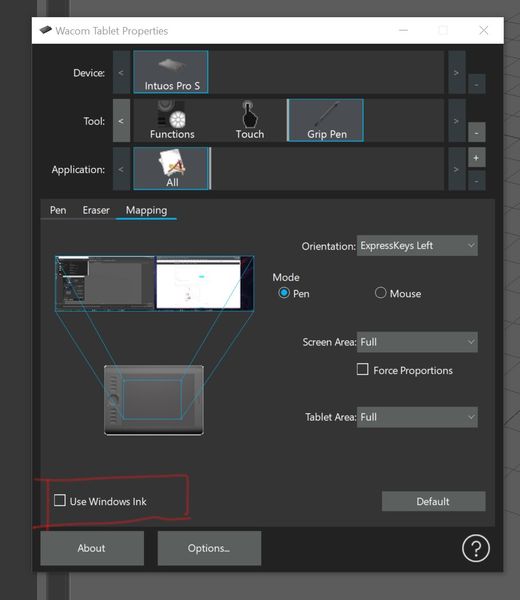
* Correction this fix worked for me! Disable Use Windows Ink.

0 Likes
Message 25 of 49

Anonymous
Not applicable

I'm happy for you. I still have the issue..

Message 26 of 49

akcharly
Collaborator
Collaborator

Turn off the "Windows Inc" and install the latest Wacom Drivers. This helped me to fix the issue on Maya 2020.4

EESignature

Відповідь корисна? Клікніть на "ВПОДОБАЙКУ" повідомленню! | Do you find the posts helpful? "LIKE" these posts!

На ваше запитання відповіли? Натисніть кнопку 'ПРИЙНЯТИ РІШЕННЯ' | Have your question been answered successfully? Click 'ACCEPT SOLUTION' button.

Андрiй Кривуля | Andrew Krivulya | 3D Grooming Artist - Facebook | Instagram | Twitter | LinkedIN | Youtube | Artstation


0 Likes
Message 27 of 49

Anonymous
Not applicable
Thanks a lot, it works!
0 Likes
Message 28 of 49

dsluna
Observer
Observer

I got the same issu. 

Maya 2022, wacom tablet PTH 451/K

The solution for the problem was the same.

Wacom tablet properties > Mapping > Uncheck Use Windows Ink 

Good Luck guys!

Screenshot 2021-05-30 100454.jpg

Message 29 of 49

Anonymous
Not applicable

I was having the same issue but then I enabled...

**Settings -> Pen & Windows Ink -> Let me use my pen as a mouse in some desktop apps**

Control Panel - Pen and Touch -> Pen buttons -> Use the pen button as a right-click equivalent was already enabled.


Restarted Maya 2022 and issue resolved! 😎

Message 30 of 49

aguilera.agustin
Community Visitor
Community Visitor

This fixed the problem for me. Thank you!

Message 31 of 49

nasua.gd
Observer
Observer

I have an ancient Wacom Intuos 3, and this solved the right click issue. I have Maya 2022 and Windows 10. Thank you good sir.

0 Likes
Message 32 of 49

michaeltodd4LMB8
Observer
Observer

I followed all the other suggestions to no avail but I eventually got things sorted after I installed new Video drivers and then uninstalled and re-installed the wacom tablet drivers. THEN right click in 2022 worked again for me. Remember to have a mouse handy after uninstalling the wacom drivers!

Message 33 of 49

Anonymous
Not applicable

It work Only When you use right click, Click on the Tablet AND Drag a little bit in any direction u want without realesing the right click button, then it fully work perfectly in any maya version I hope!

Message 34 of 49

Anonymous
Not applicable

Hi guy

I have same problem and I fixed

In default setting they used pen mode So swap to the mouse mode if you want to use Maya

Maya 2022

one by Wacom

I hope you guy can fix this

0 Likes
Message 35 of 49

jcpantoja
Explorer
Explorer

jcpantoja_0-1632266678038.png

I just uncheck th windows ink option on the driver settings and it's working again.

0 Likes
Message 36 of 49

Anonymous
Not applicable

Hello ! i got same issue on my tablet after few test i probably found a solution you need to deactivate " Windows Ink" on wacom propertie.

Like this :
MayaPen.PNGI hope this work for you, have a good day 😉

0 Likes
Message 37 of 49

Anonymous
Not applicable

Had the same issue with Wacom Intuos. The issue was with the new driver of Wacom 6.3.44. I downgraded to 6.3.43 and it worked fine.

Message 38 of 49

Anonymous
Not applicable

OH MY GOD THANK YOU IT WAS THAT ALL ALONG

0 Likes
Message 39 of 49

alfredo.siordia.g
Explorer
Explorer
Thank you. In Maya 2022 I had the same problem. The right click button on my wacom was not working. But this solution fixed that problem. Thanks Again.
0 Likes
Message 40 of 49

thebizon
Explorer
Explorer

I've never used a tablet with Maya before today, but I just purchased the Huion Keydial KD200 to replace my Wacom Intuos PT, and I am experiencing exactly the same thing: there is a huge lag with the right-mouse-click function when using the pen and tablet with Maya 2022. I thought it must be the device, so I plugged in my Wacom, and it responds exactly the same way, and only in Maya, and only in the viewport. It works just fine in the Time Slider, so I'm fairly certain it's a Maya issue.


I've turned off Windows Ink, tried every other suggestion offered here, and still get the same result with both devices: a lag of about 1-5 seconds (if it registers at all) when right-mouse-clicking in the viewport. Everywhere else, and in every other program, the right-mouse click works normally.


0 Likes