Can't find download for Maya 2018 on Linux

Can't find download for Maya 2018 on Linux

Anonymous
Not applicable
4,309 Views
5 Replies
Message 1 of 6

Can't find download for Maya 2018 on Linux

Anonymous
Not applicable

Can someone help me locate the 2018 version of Maya for Linux? When I point my browser at manage.autodesk.com I am only given the option of downloading the 2017 version.


Thanks

Marcelino


Accepted solutions (1)
4,310 Views
5 Replies
Replies (5)
Message 2 of 6

sean.heasley
Alumni
Alumni
Accepted solution

Hi @Anonymous and welcome to the community!


It's odd that the 2018 download isn't appearing as it should be there when you filter by product version.


However I went ahead and hosted a download link for Linux that can be found here!


Please let me know if this link works for you or if you need any more assistance!


If one or more of these posts helped answer your question, please click Accept as Solution on the posts that helped you so others in the community can find them easily.


Kudos are greatly appreciated. Everyone likes a thumbs up!


Message 3 of 6

simona.golisciano
Alumni
Alumni

Hi @Anonymous,


I understand you're a Student. In this case, you first need to download Autodesk Maya 2018 on Education Community. Then, you should see the 2018 downloads and license details on your Autodesk Account. There, you should have the option to download the Linux version.


Regards,


Simona Golisciano
Message 4 of 6

Anonymous
Not applicable

Thank You for your help, but when I tried to follow your directions I was still not presented with Maya 2018 as an option for download. Who should I contact to possibly get this fixed?

Thank You

Marcelino

0 Likes
Message 5 of 6

simona.golisciano
Alumni
Alumni

Hi @Anonymous,


Sorry about the delay.


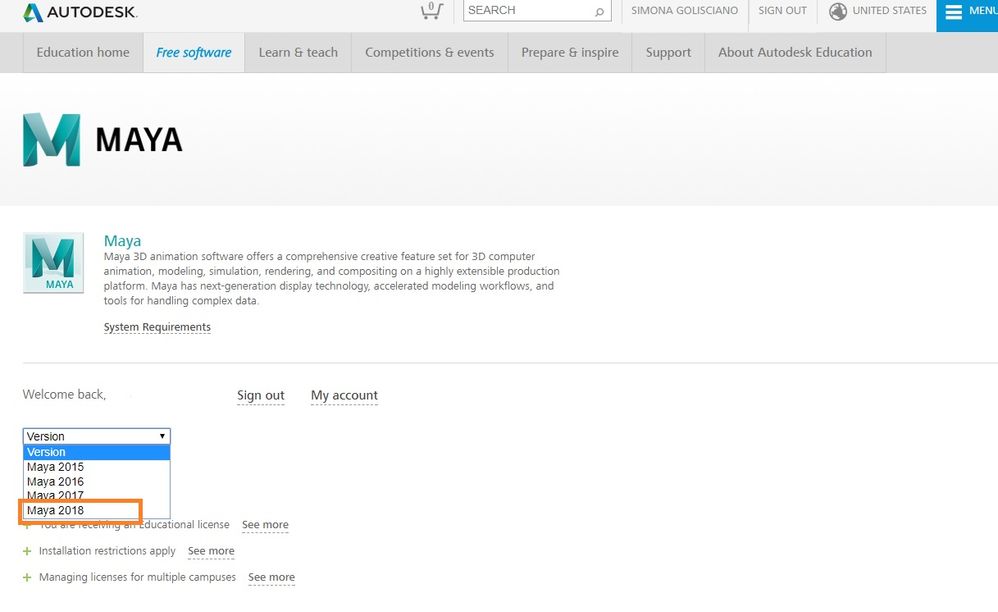
When you log into the Maya download page on Education Community and you select 'Version', you should see an option to download Maya 2018:


Maya 2018 Download.jpg

However, under 'Operating System', you will not see the Linux option:


Maya 2018 OS.jpg


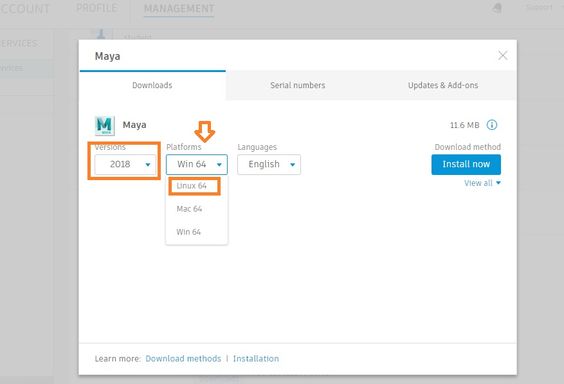
Just select Windows or Mac OS. Then wait a few minutes and log into your Autodesk Account. There, you should find the 2018 version of Maya, with the corresponding licenses details and download links. If you click on 'Downloads', then on the drop-down menu under 'Platforms', you should see the option to download the Linux 64 version:


Maya 2018 Linux.jpg


If this does not work, please contact Education Support for further assistance.


Regards,


Simona Golisciano
Message 6 of 6

Anonymous
Not applicable

Thanks!, this really worked.


I had been looking for this solution since long ago.

0 Likes