Batch Render says it rendered but doesn't show anything?

Batch Render says it rendered but doesn't show anything?

Anonymous
Not applicable
3,212 Views
6 Replies
Message 1 of 7

Batch Render says it rendered but doesn't show anything?

Anonymous
Not applicable

So I tried cleach cache and mobeling history and my maya program still won't batch render.  I can get 1 frame to render but nothing else.  My computer did crash between making this project and I got the data files back form bestbuy when they worked on it. I don't know if that make it so my project doesn't work anymore or if my program has a glitch.  The weird part if it says it rendered complete but when I go to the location it was supose to be in their nothing their.


mayaproblem.png

mayaproblem2.pngmayaproblem3.png

0 Likes
3,213 Views
6 Replies
Replies (6)
Message 2 of 7

saihtam
Collaborator
Collaborator

You're looking in the wrong place. That doesn't say where it saved your files. It's only saying it saved a version of your file there(and failed), notice that the file extension is .mb.


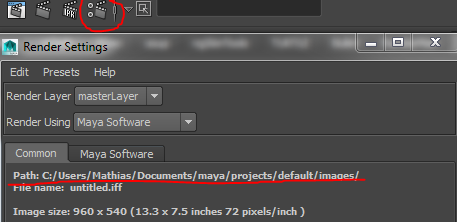
The default path for renders is maya/projects/default/images/


Check your render settings to see where your path points to.


- Mathias
0 Likes
Message 3 of 7

saihtam
Collaborator
Collaborator

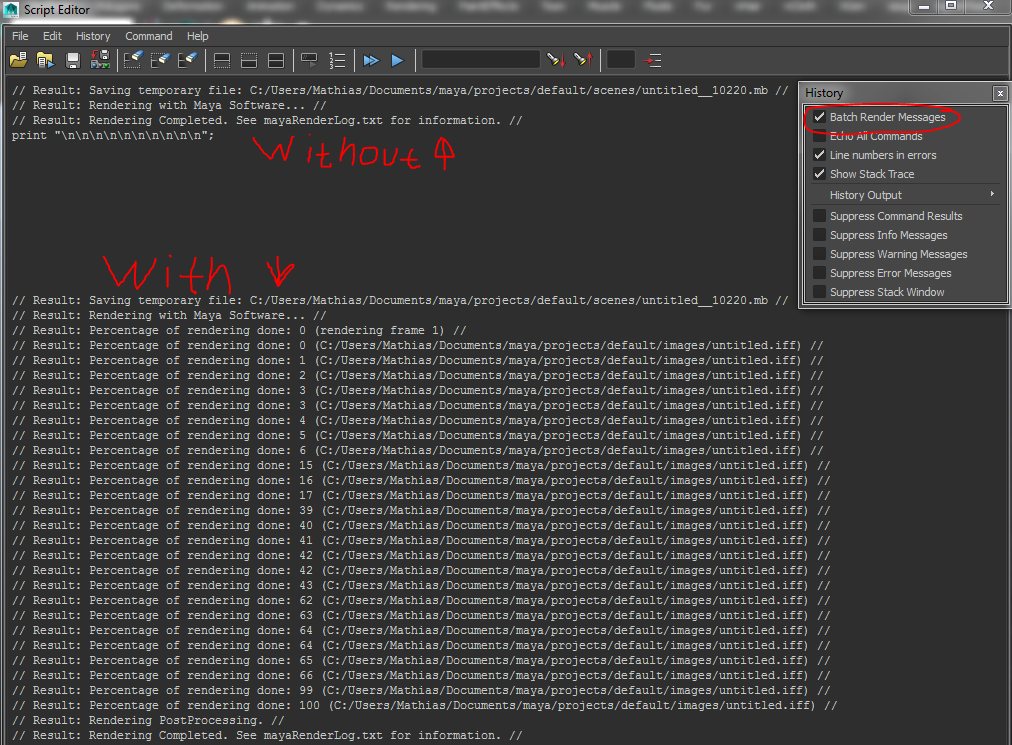
Also, I'd recommend that you turn on "Batch Render Messages" under history. This will show you usefull information about your render. Like what frame it's on and how far along it is. You find this under "History" in the Script Editor. And please excuse my writing, it was done with my mouse. I'm terrible.


- Mathias
0 Likes
Message 4 of 7

Anonymous
Not applicable

I've look their and it says to going to the location I set it to and I also check that folder to and nothing their either.

0 Likes
Message 5 of 7

saihtam
Collaborator
Collaborator
Did you try to turn on the batch render history and see where Maya says it's writing the images to?
- Mathias
0 Likes
Message 6 of 7

Anonymous
Not applicable

where do I find "batch render history"?

0 Likes
Message 7 of 7

saihtam
Collaborator
Collaborator
Like I mentioned previously, in the Script Editor go under "History" and make sure "Batch Render Messages" is ticked on.
- Mathias
0 Likes