Auto-suggest helps you quickly narrow down your search results by suggesting possible matches as you type.
Showing results for
Show only
|
Search instead for
Did you mean:
This page has been translated for your convenience with an automatic translation service. This is not an official translation and may contain errors and inaccurate translations. Autodesk does not warrant, either expressly or implied, the accuracy, reliability or completeness of the information translated by the machine translation service and will not be liable for damages or losses caused by the trust placed in the translation service.Translate
My idea is different from this. I don't know who combined these ideas. When you look at my iLogic it is for drawing. This theme is for a model. Can anyone explain it to me? Why were ideas merged that have nothing in common?
Thanks for exploring. To be precise, the ideas are from marthall. I only added comments and specified the procedure. I have verified the function for version 2021. So far, the function is not available. The solution is iLogic code. That's enough for me. Just not all users know that it can be changed with this code.
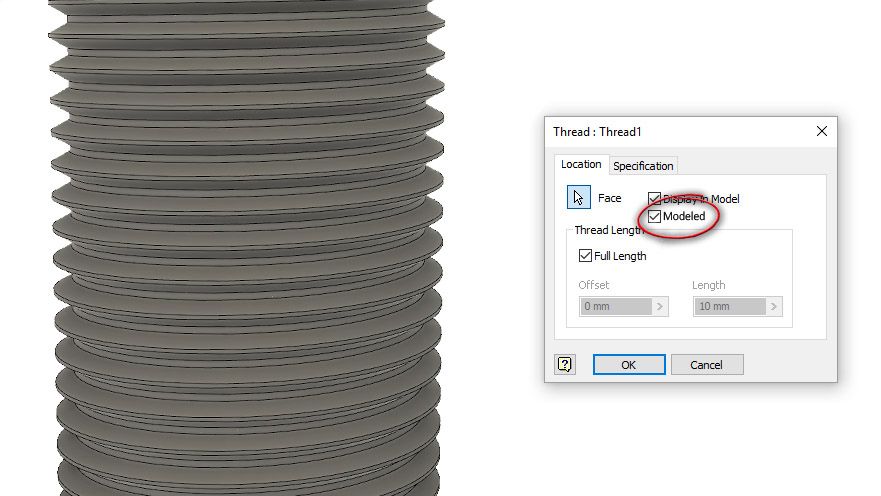
Time-Saver/Productivity Idea/Inventor Stomps Competition - How much time do we spend on figuring out threads so we can 3D print a prototype part (rhetorical)? I currently have a non-standard/non-standard thread to model. Non-standard for Inventor but also non-standard for the industry: 1 5/8 - 16 BUTT-2A-RH. I need the mating 2B thread also. Idea sequence after selecting Thread Button: 1.) Select the surface/face. 2.) Select the Thread TYPE, SIZE (auto-input from the surface/face), PITCH, CLASS & DIRECTION. 3.) Select Thread DEPTH & OFFSET. 4.) Select whether the thread is a simplified or modeled by clicking the correct CHECK BOX.
Just came here looking exactly for this. I'm using 2021 and just needed a fully modeled thread for a 3D printed project. No problem, I go and get the coolOrange Thread Modeler add-in from the store and install it. Hmmm, doesn't work. Turns out 2020 will be the last supported version. We need the ability to have fully modeled/functional threads easily within Inventor. At a bare minimum, please add the feature that is available in Fusion 360. I ended up using Fusion to remodel my part with threads.
@Daniel.SponholzQJA9W I'm glad I'm not the only one that thinks this would be a great advantage over other CAD modelers and a real boost in the right direction for 3D printing. This would put Inventor above the rest. If coolOrange can do it, then so can we.
I've recently been working through the "Tutorial Gallery" and discovered the power of Inventor in "Design Accelerator" features, not to mention the "Frame Generator". Wow! Knowing this power, it makes me hope that there could be a Design Accelerator for all types of threads (Thread Modeler). The gear modeling is amazing so you're almost there!
Thread modeler from Cool Orange doesn't work in Inventor 2021. I would like to have some tool which will generate a real thread (3D thread). It would help a lot in usual design process, also in 3D-printing of part with the thread. Thank you 😃
It would be great to incorporate a thread modeller (such as the one supplied by Cool Orange) into native Inventor. The current version of Inventor (2022) no longer supports the Cool Orange Thread Modeller, so we are now devoid of that.
The CoolOrange addin can be made to work with newer versions of Inventor. Edit the c:\ProgramData\Autodesk\ApplicationPlugins\coolOrange_threadModeler.bundle\Contents\coolOrange.ThreadModeler.Inventor.addin file
Change the line for "<SupportedSoftwareVersionLessThan>" & set it to 28 for Inventor 2022
That link no longer works properly.That model doesn't work.If it has Fusion functionality, which is like a lower cad in the level, then so could Inventor.
Is there any future development on putting actual thread forms on parts for 3d printing from Inventor ? Apparently Fusion already has this capability and there was also a 3rd party program which did the same by using the thread data tables from Inventor ( doesn't work with later versions of Inventor though ). It seems that more and more people would probably like this function now with 3d printers becoming more common in the workplace .