Background text on drawings

Background text on drawings

Anonymous
Not applicable
4,705 Views
10 Replies
Message 1 of 11

Background text on drawings

Anonymous
Not applicable

Hi to all,


Maybe the issue is really simple to solve but I cannot find how to do it.


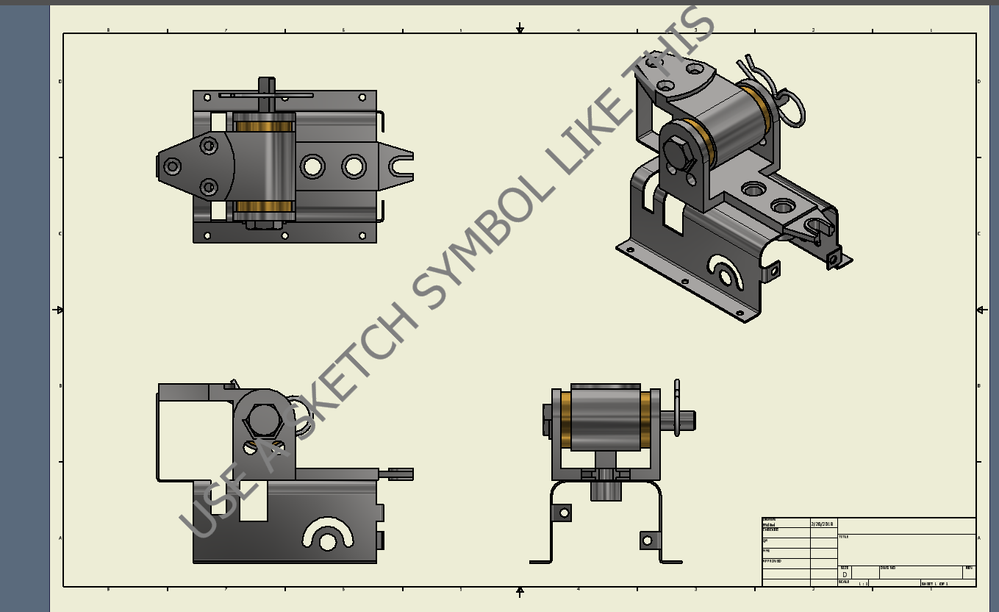
I have the necessity to write text on the background of a drawing ("company confidential" in the specific case). I have tried to write it on a sketch but I do not know how to place it in backgroun (see png attached).


How do you manage it? Thanks!

0 Likes
Accepted solutions (2)
4,706 Views
10 Replies
Replies (10)
Message 2 of 11

mdavis22569
Mentor
Mentor

Make a sketch symbol of it ..


That way you can remove it after the drawing is done...


Are you looking for something like this?


like this..PNG


Did you find this reply helpful ? If so please use the Accept as Solution or Kudos button below.

---------
Mike Davis

EESignature

0 Likes
Message 3 of 11

Anonymous
Not applicable

Hi,


Thanks for the suggestion, but it does not solve the problem: also in your screenshot I see that the text goes over the drawings, which is not good. The text must not cover the drawings.

0 Likes
Message 4 of 11

mdavis22569
Mentor
Mentor

Then do it in the border if you don't want to be able to remove it ....


Did you find this reply helpful ? If so please use the Accept as Solution or Kudos button below.

---------
Mike Davis

EESignature

Message 5 of 11

mcgyvr
Consultant
Consultant
Accepted solution

Currently not possible directly in Inventor..

I would suggest printing the drawings to PDF and using their built in watermark functionality/stamps,etc...


https://knowledge.autodesk.com/search-result/caas/sfdcarticles/sfdcarticles/Inserting-watermarks-int...

https://forums.autodesk.com/t5/inventor-forum/transparent-text-watermark/td-p/6733884


-------------------------------------------------------------------------------------------
Inventor 2023 - Dell Precision 5570

Did you find this reply helpful ? If so please use the Accept Solution button below.
Maybe buy me a beer through Venmo @mcgyvr1269
Message 6 of 11

mdavis22569
Mentor
Mentor

@mcgyvr gives a good option ...watermark it in the PDF


Did you find this reply helpful ? If so please use the Accept as Solution or Kudos button below.

---------
Mike Davis

EESignature

0 Likes
Message 7 of 11

Anonymous
Not applicable

Hi,


Thanks for the answer, but still it is not good, as you can see in the attached image still the text goes over the sketch.


At the end I think it is not possible directly in Inventor.

0 Likes
Message 8 of 11

mdavis22569
Mentor
Mentor

What's you're looking for isn't possible ...


It's always going too. It'll never void out for where the views are. The views can reset on changes, or shift / be moved. 


As @mcgyvr point out ... the AKN about Watermark, or use a sketch symbol like I saw in the beginning.


You could make it smaller and pattern it all over the sheet in a lighter color maybe


Did you find this reply helpful ? If so please use the Accept as Solution or Kudos button below.

---------
Mike Davis

EESignature

0 Likes
Message 9 of 11

-niels-
Mentor
Mentor
Accepted solution

I went a bit creative and made the text a transparent png in photoshop, then added the image to a sketched symbol.

Result:

2018-02-21_1308.png


png attached


Niels van der Veer
Inventor professional user & 3DS Max enthusiast
Vault professional user/manager
The Netherlands

Message 10 of 11

mdavis22569
Mentor
Mentor

that's what I was trying to explain ..


Thanks @-niels- for that .... 


Did you find this reply helpful ? If so please use the Accept as Solution or Kudos button below.

---------
Mike Davis

EESignature

Message 11 of 11

Anonymous
Not applicable

Nice! This could open the way to a solution! Thanks a lot!