Troublesome Shadow Images

Troublesome Shadow Images

rwbishop
Contributor Contributor
340 Views
5 Replies
Message 1 of 6

Troublesome Shadow Images

rwbishop
Contributor
Contributor

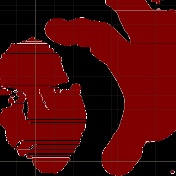
I've started having an issue with strange shadow like images. I can't seem to get rid of them unless I restart Fusion. I can be working on a design, and when I hide the body/component so I can work on another body/component. It leaves behind random shadow images of the hidden parts surface. I can't remove them or hide them and they interfere with viewing the body I'll be trying to work on. I have to save my work, and reboot Fusion to continue working. Is anyone else having this issue? I've attached a workspace capture for an example.

0 Likes
341 Views
5 Replies
Replies (5)
Message 2 of 6

TheCADWhisperer
Consultant
Consultant

@rwbishop 

Can you attach example Fusion file?

Message 3 of 6

rwbishop
Contributor
Contributor

Sorry, if this isn't right. But, here's a simple quick design. When I hide the body on this one, a shadow of the text remains visible.

0 Likes
Message 4 of 6

TheCADWhisperer
Consultant
Consultant

@rwbishop wrote:

Sorry, if this isn't right. But, here's a simple quick design. When I hide the body on this one, a shadow of the text remains visible.


Can you post screen capture image of this shadow?

Message 5 of 6

rwbishop
Contributor
Contributor

Here is a .png I captured using the capture option in fusion. I have both bodies hidden, but the shadow remains.


0 Likes
Message 6 of 6

TheCADWhisperer
Consultant
Consultant

@rwbishop 

Is this the exact same file?

TheCADWhisperer_0-1777837365651.png

TheCADWhisperer_1-1777837389886.png


0 Likes