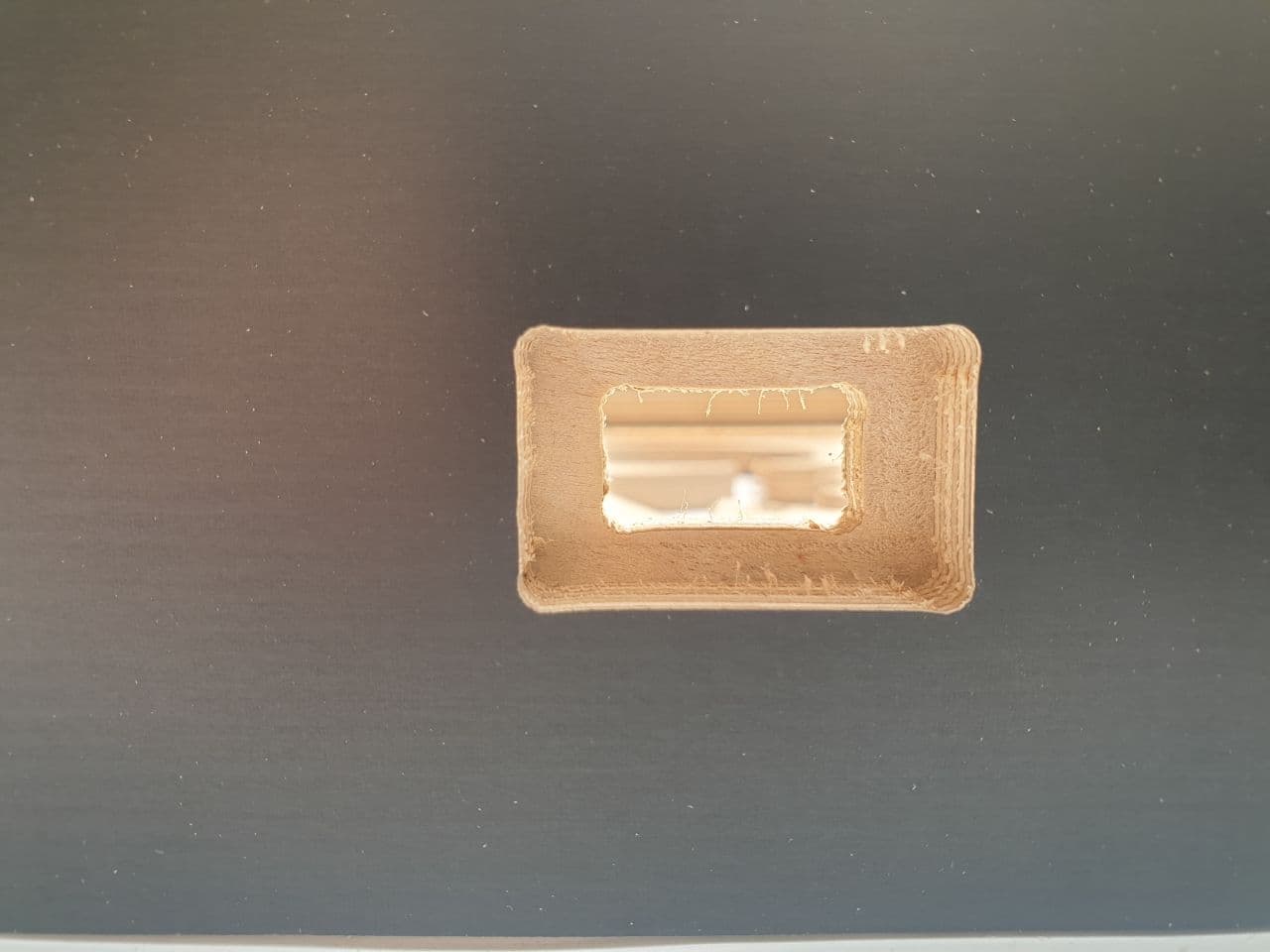
2D pocket corner over cutting

2D pocket corner over cutting

lachlan.dowd
Contributor Contributor
4,027 Views
7 Replies
Message 1 of 8

2D pocket corner over cutting

lachlan.dowd
Contributor
Contributor

Trying to use a 2D pocket for cutting timber rectangular shapes. If I use a 2D contour I get great results but below a certain size I need to use a pocket or similar to remove internal stock otherwise it'll grab the bit.
If I add a fillet to the corner in my model then the 2D pocket will be fine but for right angle corners I get the results in the picture. I'd like to understand why this is happening and what I could potentially do to fix it without having to edit the model.


The tool is a 4mm diameter bit. So expecting a matching curve on the corner to the bit but not expecting it to go further into the corner as shown in the picture.

0 Likes
4,028 Views
7 Replies
Replies (7)
Message 2 of 8

Anonymous
Not applicable

@lachlan.dowd 


First, it is good practice to model the pocket with fillets, usually best modelled a fraction larger that the radius of the cutter, it will often be "dragged" into a corner especially in softer materials.


Have you tried using the "Optimized Feedrate" option available under the "Passes" tab, you can set the feedrate to slow down as it approaches the corner so it does not "bang into" the corner at full feedrate speed, see images attached and example file attached. You can see in the second image the Yellow line that is done at a slower feedrate going into the corner, set at 4mm for the 4mm cutter in the example shown and at 25% of the full feedrate, see settings in the file.

Pocket optimized feedrate-1.jpgPocket optimized feedrate-2.jpg

0 Likes
Message 3 of 8

daniel_lyall
Mentor
Mentor

It could be anything making that happen it would make it easier if you attach the model, To attach a file Go to File -> Export and save as a .F3D Archive File and attach it to your next post, if you can not post the file you can PM it to me or say in your next post you can not post the file and one of the Guys that do NDA work will help.


Win10 pro | 16 GB ram | 4 GB graphics Quadro K2200 | Intel(R) 8Xeon(R) CPU E5-1620 v3 @ 3.50GHz 3.50 GHz

Daniel Lyall
The Big Boss
Mach3 User
My Websight, Daniels Wheelchair Customisations.
Facebook | Twitter | LinkedIn

0 Likes
Message 4 of 8

lachlan.dowd
Contributor
Contributor

Here is a simple test file that will give me those results

0 Likes
Message 5 of 8

lachlan.dowd
Contributor
Contributor

Also remembered that when cutting slots using 2D pockets it tends to create a peanut shape.

It is not a limitation on the machine as we previously used Enroute to generate our nc files and we would get perfect cuts out of that.

0 Likes
Message 6 of 8

daniel_lyall
Mentor
Mentor

You have the toolpath set very loose having .1 for the tolerances it means the cutter can move off the toolpath by.1 .001 would be better.

What were the speed and feed settings you used with the other cam program you used?


Win10 pro | 16 GB ram | 4 GB graphics Quadro K2200 | Intel(R) 8Xeon(R) CPU E5-1620 v3 @ 3.50GHz 3.50 GHz

Daniel Lyall
The Big Boss
Mach3 User
My Websight, Daniels Wheelchair Customisations.
Facebook | Twitter | LinkedIn

0 Likes
Message 7 of 8

lachlan.dowd
Contributor
Contributor
Speed and feed settings would have been the same
0 Likes
Message 8 of 8

Anonymous
Not applicable

@lachlan.dowd 


I don`t see anything wrong with the code I have here, it has no extra positions so if the machine is following the code as output by Fusion PP then it should only move to those positions, here is the code for the last passes around the outside of your pocket, it is from a basic Generic PP and is "clean" code, if that code produces overcut then the issue is at your CNC machine as it is failing to stop where it is told to by the code, that can`t be anything to do with Fusion.

Looking at your settings I doubt very much that your CNC can change from 6000 mm/min to 1500 mm/min in a distance of 0.8mm, a lot will depend on the Motor Drive settings for the acceleration/deceleration parameters, I would expect a slow down distance of at least the diameter of the cutter, preferably more. Does your other software have an automatic slow down for cornering? A lot of CAM softwares have settings where the cornering can be slowed down by a percentage of the feedrate for all corners, FeatureCAM is a good example of this.

Here is the code


G1 Y62.2  CNC moves to this position @ F6000
Y63. F1500. CNC moves to this position @ F1500

The code has told the CNC to stop at Y63. so if it does not obey this command then the fault is with the CNC, not the code
X37.8 F6000.
X37. F1500.

Same here, CNC told to stop at X37. again if it does not obey this command then the fault is with the CNC, not the code.
Y37.8 F6000.
Y37. F1500.
X62.2 F6000.
X63. F1500.
Y39.478 F6000.
G0 Z27.


What PP are you using, can you show some sample code from both softwares so a comparison can be made.

Don`t know what your CNC is so no idea of it`s Mechanical Resolution, does it have precision ground Ball Screws or just Lead Screws?