2D pocket pre drill location question

2D pocket pre drill location question

wenhan.liu
Explorer Explorer
2,347 Views
3 Replies
Message 1 of 4

2D pocket pre drill location question

wenhan.liu
Explorer
Explorer

Hi, I have a 1.6mm channel with a 1.6mm drilled through hole in the middle of the channel (see attached screenshot). I'm using the 1.5875mm flat bit to drill the hole first followed by 2D pocket to clear the channel with the same drill bit. I want to use the drilled hole as the pre drill location for the 2D pocket. However, I keep on getting an error saying the tool will not fit. Is there any 2D pocket parameters I can change for it to use the drilled location as the entry point? I can always enlarge the hole in the model slightly to get it to work but I want to see if there is a more elegant solution. Thanks!

Accepted solutions (1)
2,348 Views
3 Replies
Replies (3)
Message 2 of 4

xander.luciano
Alumni
Alumni
Accepted solution

Hello! Welcome to the forums! 🙂

Have you tried using the predrill location? 

8DRpFlo


Thought I don't think you're getting an error because of the hole size, but rather the fact that you are trying to do a pocketing operation on a slot the size of your endmill. You should just use the slot command with a predrill location instead 🙂 here's a quick mock up I did:


Lmmv9uQ


Here are the settings I used:


nOLlXnm


Give it a shot with a slotting operation instead and let me know if that gives you the results you want. If not let me know and we'll figure it out! 🙂


edit: Also, your terminology might be a little confusing to others. Just a few pointers to help ensure you don't say the wrong thing without realizing it."


"1.5875mm flat bit to drill the hole" - What you are referring to is a Flat End Mill. And while I don't think drilling is an incorrect term, the common term is plunging.
"[...] clear the channel with the same drill bit." - Technically, a drill bit is the pointy one you use to drill holes with.

Here's a few different types of endmills:

mXnWsI2


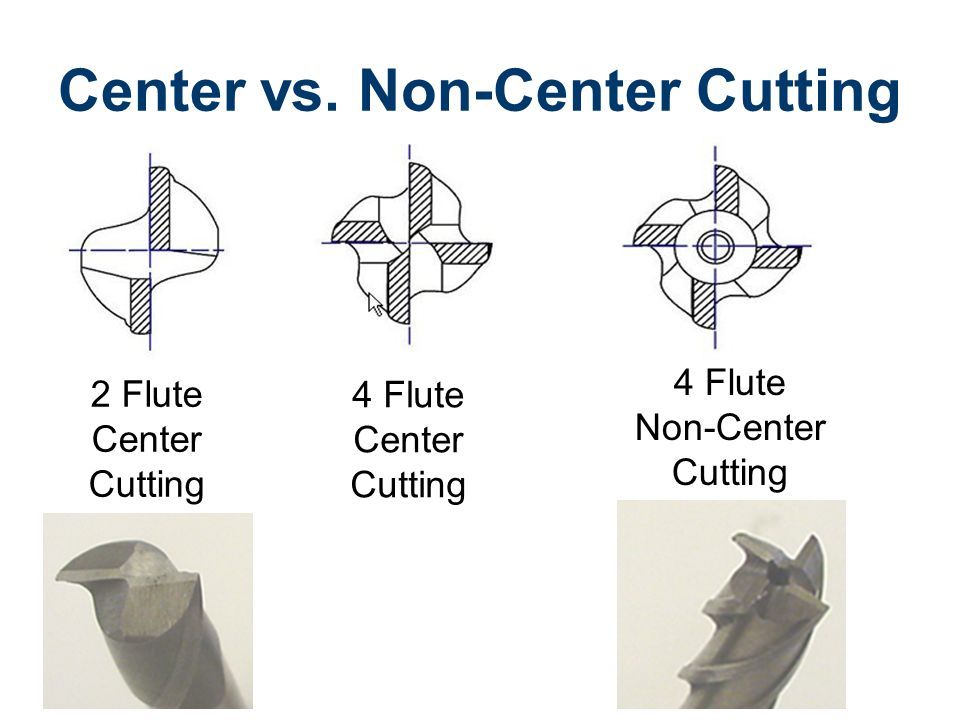
And one last note, not all endmills can plunge. In order for an endmill to be able to plunge, it has to be a center cutting endmill.
slide_6


If you try to plunge with a non center cutting endmill, you will crash your machine.

If you already knew all that, then no worries. But I thought it would better to be safe than sorry wit this and explain the proper terminology. Hopefully that doesn't come off as being rude, just don't wanna sound like a rookie machinist now, do ya? 😉 

Either way, welcome to the community! 🙂 I hope to see some of the cool things you make in the future!


Best,

Xander Luciano


Xander Luciano
CAM Content Developer

If my post is helpful, press the Kudo button - If it resolves your issue, press Accept as Solution!
Quick Tips: When to resselect CAM geometry | Understanding Smoothing in CAM | Adaptive Facing | Online GCode Viewer
Message 3 of 4

wenhan.liu
Explorer
Explorer

Hi Xander,


Thanks a lot for the reply. I've switched it to the slotting operation and it works great now! Also thanks for explaining the terminologies to me. I'm just starting to learn and use milling for school.

Message 4 of 4

xander.luciano
Alumni
Alumni

Great to hear! So glad I could help you out 🙂

And no problem! Trust me, everyone uses the wrong terminology in the beginning. If anything it's just force of habit. I hope you enjoy machining though. The possibilities are endless as to what you can make!

If you ever run into trouble again or get confused, feel free to tag me (@xander.luciano) in a post and I'll get you an answer 🙂

Best of luck in school dude!
Xander Luciano


Xander Luciano
CAM Content Developer

If my post is helpful, press the Kudo button - If it resolves your issue, press Accept as Solution!
Quick Tips: When to resselect CAM geometry | Understanding Smoothing in CAM | Adaptive Facing | Online GCode Viewer