SVG multiline

SVG multiline

MichaelT_123
Advisor Advisor
2,472 Views
10 Replies
Message 1 of 11

SVG multiline

MichaelT_123
Advisor
Advisor

Hi TF360, Fellows,


I have encountered a strange problem (well ... all of them are !!!) with multiline (multi-group) SVG files inserted into a sketch environment.

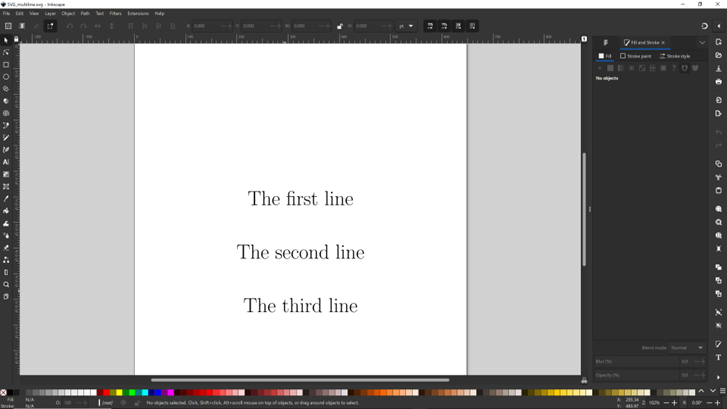
The first line is converted correctly. The following ones are not. The point the conversion fails depend upon the text string composition. The lines when processed/inserted separately are rendered as expected.

The SVG file produces coherent images in other popular software: Inscape, Chrome, ...


The example file  and the rendered sample are presented/attached below:


 GenericGenericInscapeInscapeFusionFusion

Regards

MichaelT


MichaelT
0 Likes
2,473 Views
10 Replies
Replies (10)
Message 2 of 11

Drewpan
Advisor
Advisor

Hi,


Fusion may support svg files but there is information that is implied instead of known in svg files that fusion does

not cope well with sometimes. While some svg files work perfectly well with fusion, others are a nightmare that should

be avoided at all costs. It is sometimes difficult to tell which is which.


While I agree that it would seem trivial to import something like text, text created by software that knows it is text

and has a text engine to render it, is not the same as fusion trying to import a vector graphic with information missing

such as scale and origins. This is a known problem with fusion that the devs know about. I don't think there is a fix

in the works to address this problem.


Ultimately fusion is a modelling program not a drawing package. If you look at the actual file meta data, much of this

meta data does not fit the svg standard. Fusion follows the standard to the letter (AFAIK) and if it isn't standard

meta data it will ignore it. This even happens with dwf files from AutoCAD and that is made by the same company.


Cheers


Andrew

Message 3 of 11

MichaelT_123
Advisor
Advisor

Hi Mr Drewpan,


SVG is a straightforward format. It is also a well-matured and connoisseured standard. Yes, I have observed some problems with SVG ventures to Fusion World, but the issues seem to be related to geometries represented rather than matters or rendering failures.


What can I add …?

Having the relevant pieces of code (perhaps a few hundred lines) would not be too challenging to squash the bug. Well, it could be as simple as dunking a piece of cookie in a cappuccinooh American coffee could also do.

Without such insight,  … I/we can only guess. By short observation of the bug responses on my computer and briefly switching on my WiFi ∞ telepathic antenna, I tend to anticipate that the problems lay in the data's internal flow.

The potential causes are:

  • Too small buffer allocation to parsed data segments
  • Messing up indexes of parsed data when switching to different SVG-data-groups.
  • If multithreading is utilized, the running-out of threads syncs while processing different SVG group segments.

On a positive note … I hope the problem is trivial enough to be solvedby one or two cookies … even when they are dunked in American coffee.


Regards

MichaelT

MichaelT
0 Likes
Message 4 of 11

matt_davey
Participant
Participant

It would  be good to workout directly what causes it. Maybe break down every part of last svg to see what type things cause issue. then can avoid them or migrate in our svg files. what font and size did you use?


0 Likes
Message 5 of 11

matt_davey
Participant
Participant

Yes, it is modeling program, but, sketches are vectors. and this are drawing. so svg they should be fully compatible convertible. (apart from colour stuff.)

0 Likes
Message 6 of 11

MichaelT_123
Advisor
Advisor

Hi TF360,


Attached is another file resource that I hope will help solve the "SVG multiline" rendering problem.


Regards

MichaelT


MichaelT
0 Likes
Message 7 of 11

Francois_Moreau
Advisor
Advisor

I wonder that also what seems a easy SVG, like a Qr Code do not open right in Fusion (picture is Qr code create  in Svg export format from Adobe express )


Francois_Moreau_0-1761730526469.png

and how it open in fusion


Francois_Moreau_1-1761730626596.png

well , I have seen that it is possible to find with other Qr generator a normal attempt result directly in SVG, maybe I find a one On-line service SVG to SVG (svg wo do not work in Fusion to SVG wo Work in fusion?)

François Moreau

bénévole sur le programme Expert Fusion:

EESignature

0 Likes
Message 8 of 11

MichaelT_123
Advisor
Advisor

Hi M Francois_Moreau,


Reputable software such as F360 should recognise such ubiquitous 

QR labels in any form and automatically convert them to an efficient internal Fusion format/object.


Regards

MichaelT


MichaelT
0 Likes
Message 9 of 11

felsentreu
Advocate
Advocate

Hi,
The best way is to convert text into paths.


Formula_Text_Fusion.pngpath_SVG_multiline_B.png


Regards

0 Likes
Message 10 of 11

MichaelT_123
Advisor
Advisor

Hi Herr Felsentreu,


So, ... as I understand it, you "filter" the SVG file in Inkscape before importing it into F360, don't you?


Regards

MichaelT

MichaelT
0 Likes
Message 11 of 11

felsentreu
Advocate
Advocate

Hello,
That's right. Paths are the way to successful paths.


Grüße