Setting Joint Limits

Setting Joint Limits

Anonymous
Not applicable
3,140 Views
8 Replies
Message 1 of 9

Setting Joint Limits

Anonymous
Not applicable

The Joint Limits dialog is about the least intuitive and most incomprehensible piece of UI design I have ever seen.  I have a cylindrical joint and I'm trying to set the limits for the linear motion.   But no matter what I try, I can't make sense out of how this is supposed to work.  If I click on "Min" or "Max", BOTH Min and Max get checked or unchecked.  When I enter a value into one textbox, the value is entered into BOTH textboxes.  No matter what I do, the motion is either unconstrained, or there is no motion whatsoever.


What on earth is the logic here, and why doesn't the dialog operate in a logical, predictable, OBVIOUS manner?


Regards,

Ray L.

3,141 Views
8 Replies
Replies (8)
Message 2 of 9

Trigg3r
Advocate
Advocate

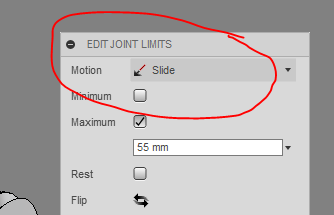
It can be a little confusing, but Cylinder Limits has two motions, Rotate and Slide.


I think you're trying to set Max/Min for the Rotate hence you can either set both or none as you'd go 0 -> 360 and back through 0.


In the motion drop down at the top, choose Slide, you can then set the linear motion you're after.


See the pictures below.


Select1.PNGSelect2.PNG

0 Likes
Message 3 of 9

Anonymous
Not applicable

No, I was selecting Slide, and getting the same goofy behavior I get with rotate.  It appears to me the ONLY way to get rational behavior is to use the (tiny and nearly invisible) "handles" on the motion "ruler" to set the two positions.  Typing into the text boxes simply does not work UNLESS you first at least click on, if not move, the corresponding "handle".


Regards,

Ray L.

0 Likes
Message 4 of 9

Trigg3r
Advocate
Advocate

Weird, looks like a bug then. Is this on Mac or Windows ?


Works fine here on Win 10.

0 Likes
Message 5 of 9

Anonymous
Not applicable

Win10, 64-bit.


Regards,

Ray L.

0 Likes
Message 6 of 9

Trigg3r
Advocate
Advocate

Is this a file you can share ?


Export to archive, save to computer and upload here if so.

0 Likes
Message 7 of 9

Anonymous
Not applicable

I can induce goofy behavior with a trivial assembly of only two parts.  It seems to depend on the specific values entered into the text boxes.  Some values cause BOTH textboxes to be updated, while others behave as expected, and I can't see any rhyme or reason to the behavior.  I have to WATCH both textboxes whenever I change either.  It appears completely random to me.  Yesterday, playing around with it, I had to set Min to 0, Max to -3.0 to get the motion I wanted.  Today, it won't even let me do that - the Max value MUST be larger than the Min value.  I have seen this same unpredictable behavior every single time I've tried to use this feature.


Regards,

Ray L.

Message 8 of 9

gmdimarzio88
Collaborator
Collaborator

Does anyone know if joint limits will ever be added to the joint creation box, instead of this being a separate menu, and step? Just curious

0 Likes
Message 9 of 9

Anonymous
Not applicable

It would also be nice to do away with the Rotate/Slide drop-down, and simply have both present at all times in the dialog.


Regards,

Ray L.

0 Likes