Rookie seeking Tutorial advice for Toy Design / Robots

Rookie seeking Tutorial advice for Toy Design / Robots

thoreaubakker
Advocate Advocate
3,407 Views
8 Replies
Message 1 of 9

Rookie seeking Tutorial advice for Toy Design / Robots

thoreaubakker
Advocate
Advocate

Hello Team Fusion!


I am a giant robot / toy fanatic, and am interested in making my own. 
However, my modeling skills are not good enough right now.

I am familiar with the very basic workflow, but right now all I can is make block objects and add bevels / chamfers etc.


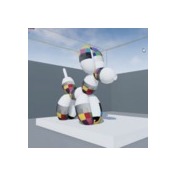
Can anyone suggest some terms or techniques I should research, or even links to tutorials? I'm attaching a screen cap of a horrible model I started, as well as an example of the expert work done by Sergey Kolesnik from Russia. I'm blown away by the nice forms in his work, and would love to learn how to make these kind of shapes.


My sincerest help for any suggestions.

Thoreau
P.s. if there happen to be any modelers out there who want to get involved in some toy production with me, let me know!


sergey-kolesnik-2stbpoz.jpgrough.JPG

0 Likes
3,408 Views
8 Replies
Replies (8)
Message 2 of 9

ahreum.ryu
Autodesk Support
Autodesk Support

Hi @thoreaubakker,


Thank you for sharing your model!

Awesome!!! It's so amazing~ Smiley Surprised


Below are some my favorite training resources to get you started that are available to the public:

Fusion 360 Webinars and Hangouts Channel

Classes from Autodesk University

Top 10 Tips for Solidworks Users

Fusion 360 YouTube Playlists


and I've searched few avi

1. Fillet and Chamfer : https://youtu.be/kJ-IlkN7kZw

2. How to character modeling (using the form etc...)  : https://youtu.be/SchNbXBOOsw


I hope that this will help.. Smiley Happy

If you need more help, please let me know 


Many thanks!

Message 3 of 9

TrippyLighting
Consultant
Consultant

I believe wth your model you are off to a good start.


The more advanced robot model you posted might have stared with basic shapes like yours and then a lot of detail was added with extrusions, cut-extrusion, nice fillets etc.

The reason why it looks nice is not because it uses some ueber sophisticated modeling techniques but just was continuously refined.


EESignature

Message 4 of 9

thoreaubakker
Advocate
Advocate

@ahreum.ryu


Thank you for the great links!  I really appreciate it.
I will go back to basics and start learning those today.

Also to be clear and give credit where credit is due: The awesome quad model is by Sergey Kolesnik's work, not mine
https://www.artstation.com/artist/ksn-art


0 Likes
Message 5 of 9

thoreaubakker
Advocate
Advocate

@TrippyLighting


Thanks for the kind words of encouragement — much appreciated.

Do you see the curve on the mode's front lower leg, the way it's graceful, and fillets thicker at the front than the back?


Filleting / chamfering blocky shapes seems pretty straightforward, but it's those graceful curves I find most elusive. Any thoughts on that? Would that be cut extrusion?


0 Likes
Message 6 of 9

PhilProcarioJr
Mentor
Mentor

@thoreaubakker

T-Splines is what your after. I will be making a set of tutorials for my "Angel of Death" Project that will probably help you quite a bit.


Phil Procario Jr.
Owner, Laser & CNC Creations

Message 7 of 9

TrippyLighting
Consultant
Consultant


Here is a little screencast that explains how he could have one this cute shape in the front leg:


EESignature

Message 8 of 9

thoreaubakker
Advocate
Advocate

@PhilProcarioJr Thanks Phil. I've experimented with t-splines a bit, but will go back and look again. I look forward to your tutorial.


@TrippyLighting Thank you VERY much for taking the time to make that screen cast. That technique of the two angles / removal / mirroring gets me much closer to what I'm hoping for. I super appreciate it.

0 Likes
Message 9 of 9

Anonymous
Not applicable

Funny how I was reading your post and all I could see at first was that first image of that cool robot. Then I got the part where you said...


"I am familiar with the very basic workflow, but right now all I can is make block objects and add bevels / chamfers etc."


and I keep looking at the robot thinking this guy can do pretty amazing things with just the basics.


Then I scrolled down and seen the image you had with the start of a robot. Looked like a good start to me.


I don't know the guy you credited for the first robot drawing, but I would guess he has a lot of experiance. 

It's just going to take some time and dedication for you to get to that point too.


0 Likes

