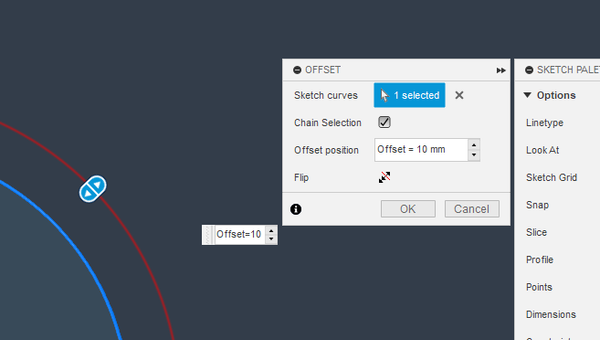
"Offset" does not retain Parameter reference

"Offset" does not retain Parameter reference

tima123d
Advocate Advocate
962 Views
7 Replies
Message 1 of 8

"Offset" does not retain Parameter reference

tima123d
Advocate
Advocate

When using the Offset tool.
Specify a named Parameter as the offset distance.
It will use the value, but not retain the Parameter reference.


i.e If you change the value of the Parameter in the "Modify->Change Parameters", the offset will not change.


There is a workaround:

You have to select the dimension again and add the Parameter reference back in from the dimension change dialog for it to work.


Please see the screencast.


0 Likes
963 Views
7 Replies
Replies (7)
Message 2 of 8

Anonymous
Not applicable

I wonder if this is related to a similar issue referenced here...

0 Likes
Message 3 of 8

jeff_strater
Community Manager
Community Manager

Yes, those are both bugs, and while not the same exact bug, are definitely instances of the same bug.  Thank you for reporting this


Jeff


Jeff Strater
Engineering Director
0 Likes
Message 4 of 8

Garyselliot
Contributor
Contributor

Wow! This was reported in 2016, acknowledged as a bug by Autodesk yet I'm still having the issue in 2023

0 Likes
Message 5 of 8

jhackney1972
Consultant
Consultant

I do not see this problem anymore.  Maybe you need to update your Fusion 360 version or repair your application.  If this continues for you, please make a video showing the issue you are seeing.


John Hackney, Retired
Did you find this post helpful? Feel free to Like this post.
Did your question get successfully answered? Then click on the ACCEPT SOLUTION button.

EESignature

0 Likes
Message 6 of 8

Garyselliot
Contributor
Contributor

All my software is up to date. I created some offset sketch objects using normal dimensions, then later decided I should apply a user parameter to them. When I apply the parameter it changes to the correct dimension, but it does not retain the 'fx' parameter identifier and does not update if the parameter value is changed. If I delete the offset feature then recreate it using the parameter it does retain the parameter. Although this is a workaround it did mean re-drawing most of the sketch, so it seems like the bug may only be partly fixed.

0 Likes
Message 7 of 8

g-andresen
Consultant
Consultant

Hi,

that´s what I see


günther

0 Likes
Message 8 of 8

HughesTooling
Consultant
Consultant

If you try creating a parameter at the time you create the offset then it doesn't work. The parameter is created but not applied to the offset.  Edit. Looking back at the first post in this thread this bug is a bit different as you couldn't create on the fly parameters in 2016. @jeff_strater do you know if this new bug has been logged?

HughesTooling_0-1694515209695.png


Mark Hughes
Owner, Hughes Tooling
Did you find this post helpful? Feel free to Like this post.
Did your question get successfully answered? Then click on the ACCEPT SOLUTION button.

EESignature


0 Likes