Parameter Problems - Where did I go wrong?

Parameter Problems - Where did I go wrong?

Anonymous
Not applicable
3,222 Views
27 Replies
Message 1 of 28

Parameter Problems - Where did I go wrong?

Anonymous
Not applicable

Hello All!


I have attached the f3d file below of which I am about to speak.


It is a confusing file (sorry) but I can't seem to get my prameters to update correctly.


What this is is a wooden box case. There is an interior box. Then there is a variable thickness foam lining and an exterior box, with removable front and rear lids.


My eventual plan is to make a sketch using the parameters defined in the file in order to extrude the wood peices to cut the box. Then, I can change the foam line and case dims to quickly create different sized boxes.


Primitive "RackCase" (dims d1 d2 and d3) are the big "controlling" dims on this project.

Primitive "ExteriorCaseBody" is the outside case.

Primitive "InteriorCaseBody" is the inside case.

Primitives "FrontLid" and "RearLid" are, of course, the front and rear lid.


I want RackCase to define the dimensions of everything. FrontLid depth defines the lid depth.

FoamLine needs to be a variable.

FrontLid and RearLid need to have the height and width of the ExtCase body so they can fit on ExtCase.


However, it doesn't seem like my parameters update correctly when I change them.

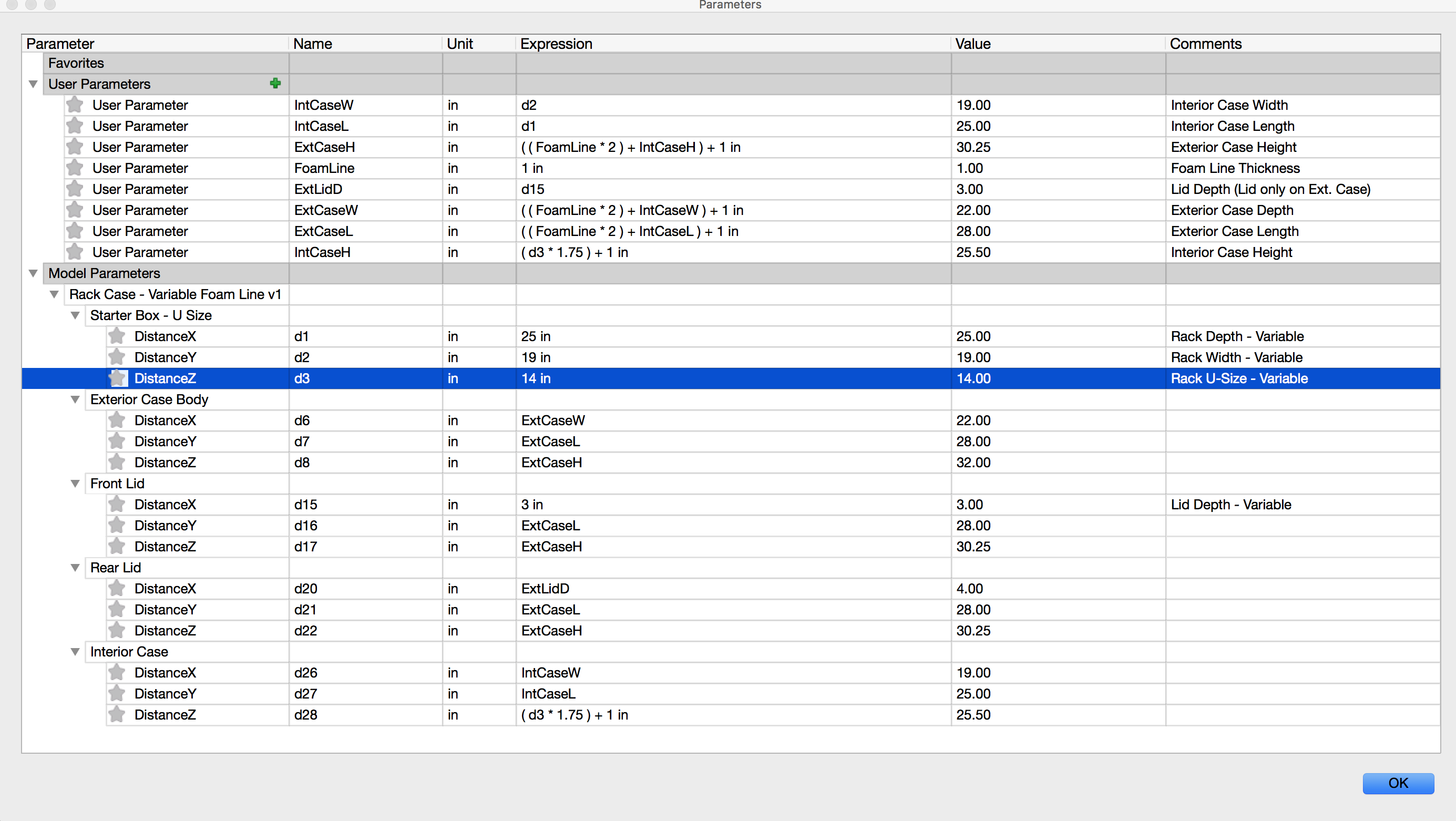
See the attached screenshot as well. ExtCaseH has three different values (see d8 vs d22).


What did I do wrong? Should I have my variables in a different order?


Compute All doesn't fix it either.


Any help would be greatly appreciated. Thanks so much!

0 Likes
Accepted solutions (2)
3,223 Views
27 Replies
Replies (27)
Message 2 of 28

Anonymous
Not applicable

So, it seems to be related to the order in which I had created them. I am trying to clean that up and I ran across the error mesage attached.


It says I can't delete the parameter becasue it is in use in an empty parameter? I have seen this before, but usually when I am trying to delete a parameter in use. The ones marked Old are no longer in use anywhere.


I have attached the updated f3d file as well.


I have tried looking at the parameter help, but it seems pretty scarce.


Thanks for any help!

0 Likes
Message 3 of 28

James.Youmatz
Autodesk Support
Autodesk Support

Hi @Anonymous,


EDIT: Just read your post. Looks like your update helped. Check your parameters name though. In Rear Lid, one of those variables does not exist anymore.


I only briefly looked at this and what I noticed is that for some reason your initial box parameters never updated. All I did, was go into edit feature on the first initial box (so your d1, d2,d3 parameters) and then press okay, and the parameters seemed to update accordingly and worked. I have only quickly looked at this, but by using the measure tool that box seemed to have its measurements off. I'll try to take a deeper look in a little bit.


Thanks,


James Youmatz
Product Insights Specialist for Fusion 360, Simulation, Generative Design
0 Likes
Message 4 of 28

Anonymous
Not applicable

Hi @James.Youmatz


Yeah, it seems to be okay with me deleting parameters in use sometimes, which seems like a bug. I can't seem to reproduce it, though. Sometimes it gives me an error, and sometimes it doesn't.


In other cases, even once a parameter has been deleted, I can't seem to "recreate" a variable with the same name (it thinks it is still there). In this file, that is CaseExtH. Which is why I am now using CaseExtHt.


The more I play with these parameters, the more I wish I had a clear tutorial or something to reference. Is there a workflow or parameter rules list somewhere? I can't seem to find one.


Thanks!

0 Likes
Message 5 of 28

Anonymous
Not applicable

Well now things are crazy. I think i have to start over with a new file.


See attached error - it says "FoamLine" isn't a variable when it clearly is....It's the second in the list...


I'm so confused haha 🙂


0 Likes
Message 6 of 28

Anonymous
Not applicable

Sorry for the multiple replies....


I have attached a screenshot showing some weird behavior I have in this file.


Also the most recent version of this file for comparison.


I have thee parameters that are broken. One is the first in the list - "ExtCaseH" Even when deleted, it reappears in the dialog once closed and reopened.


The others are named "FoamLine". These can match names (a big no no, I understand) and I can't delete either one.


Thanks!


EDIT:


The screencast wasn't ready yet oops. Link is here: https://knowledge.autodesk.com/community/screencast/612061ea-b521-4b15-b5ae-b21151132392

0 Likes
Message 7 of 28

Anonymous
Not applicable

@James.Youmatz


I saw your PM and replied with the number. Thanks!

0 Likes
Message 8 of 28

jeff_strater
Community Manager
Community Manager

Hi @Anonymous.  I think your original problem, in the first version of the design, is a bug in Fusion.  The order of creation of parameters should not matter.  I can clearly see that some of the values that reference "ExtCaseH" in this design are not correctly updating when one of the "upstream" values is changed.  They should always update correctly.  I will file this bug.  Good catch!


Jeff


Jeff Strater
Engineering Director
Message 9 of 28

jeff_strater
Community Manager
Community Manager

 I think I can explain the appearance in the dialog after delete.


If you delete a parameter that is referenced by another parameter, we keep it around, because to do otherwise would break the referencing parameter.  I need to investigate further, but I think this is expected.


Jeff


Jeff Strater
Engineering Director
Message 10 of 28

Anonymous
Not applicable

Good morning @jeff_strater and @James.Youmatz


James and I had a call yesterday just before 5. He and I were able to reproduce some pretty stange behavior, and I was also able to show James another few designs I had that worked with the same concept.


This morning, I will be starting again on a new design to try and find out of this issue is just a matter of this file being weird, or if I can reproduce it.


I'll be back, whether it works or not.


And thanks, James and Jeff, for the help here!

0 Likes
Message 11 of 28

Anonymous
Not applicable

Sorry for the wall of text below.


I am available all day if someone wants to contact me and see this reproduced realtime. I can also share any files you may need to reproduce this. This problem is BIG for the work we do - almost all the cases we make depend on a parametrized (sp?) model like these.


Well I'm back (pretty fast, I know).


I made a simple case concept to show the issues. (This one's less complicated).


While working on another job last night I learned something terrifying - this parameter error is present in ALL my cases with parameters. (You can see this in the second part of my video).


The file named "Test Again" is the new concept. The file named "Rem Lid - Casterboard" is an older file that has worked perfectly - until yesterday.


This problem is frightenly easy to reproduce - It even happens on simple parameter designs.
 
I made an easy design (Attached and named "Simple") that is three squares - each is the previous square +1 in. Even in this simple file, the parameters simply aren't updating correctly.
 
Just asking, in the update news for this recent update, there is a note that says :
 

"Amcfarlen reported this issue where Fusion 360 would take forever to compute when using equations and custom expressions to define geometry in the parameters table. After some math tutoring, Fusion now takes < 1 second to calculate."


Is fusion "giving up" before it's done calculating, do you think? So that all the parameters aren't updating? Or am I reading too much into this?


James and I noticed that, sometimes, alternating entries, it seemed like the parameters were "keeping" the old values. For example, if you enter 5, the bodies don't update. but if you enter 3, the bodies update as if 5 were entered. You can see this in all three designs I have attached, but it is easiest to see in "Simple". Enter 1,2,3 in the first body - and it may not update to the other bodies. Enter it again, and they will update.


This same behavior also occurs on my "RemLid" file, in the sketch parameters. Editing it, and choosing any value other than the parameter name, then going back to the parameter name, will cause it to update correctly.


All in all, this seems pretty crazy, and I hope for a quick fix. Thanks so much!


0 Likes
Message 12 of 28

Anonymous
Not applicable

So, at this point, I am waiting for a bug fix, right?


I know it's very early to ask, but when someone knows at what time this may be fixed, can they let me know? I would really appreciate it. Thank you!

0 Likes
Message 13 of 28

James.Youmatz
Autodesk Support
Autodesk Support

Hi @Anonymous,


Sorry about not getting back to you, been swamped today so far. 


Let me do some testing on my machine today to see if it reproducible across all Fusion versions, and then I can check in with @jeff_strater and his team to log it. 


Thanks,


James Youmatz
Product Insights Specialist for Fusion 360, Simulation, Generative Design
0 Likes
Message 14 of 28

Anonymous
Not applicable

Thanks for the update, @James.Youmatz! I'll be checking in to see what you guys find out.

0 Likes
Message 15 of 28

jeff_strater
Community Manager
Community Manager

Hi @Anonymous,


Here's what we know so far (which unfortunately is not much):


  1. yes, this is a Fusion bug
  2. we haven't found the actual bug, but your analysis is actually quite accurate.  It looks like the equation system just stops early for some unknown reason.
  3. I could not easily reproduce it in a simpler case.
  4. there is nothing that I can see that is bad, or even all that complex, in your parameter set that should cause a problem

We will look into this ASAP, unfortunately that means Monday at the earliest, even for some advice about how to avoid this, or work around it.


Wish I had better news for you.


Jeff


Jeff Strater
Engineering Director
0 Likes
Message 16 of 28

Anonymous
Not applicable

Thanks, @jeff_strater for the update.


It seems the easiest workaround I have found is to enter the same value multiple times when inserting a numerical value. It seems to work when the same value is inputted several times, probably because it is "faster" to check if a value is the same and move on than to change it. So, after putting in the same value many times, you can work through a long chain of dimension changes.


If it is a variable name (like "Dimension") it only updates if I change it to something else (like "4") then back to the variable name.


For now, these are sufficient band-aids until a true fix comes through. I just have to be very vigilant and double-check the dimensions/calculations.


Also - Not sure if you guys can do this in your builds, but have you tried running these files in the older build (the  build before the Ap. 1 update?) I've only seen this issue since that update came out. It may help you guys see if something in the new update may be affecting it. (You've probably thought of this, though.)


Thanks so much!

0 Likes
Message 17 of 28

protonberry
Explorer
Explorer

HI, I just reported a parameter problem today(4/4/16) and was told that is might be like this post.  While I have not done extensive testing, I am using Mac OS X.  I tried the same design on Windows and did not have a problem.  If you are using Mac, you might try Windows to get you going.

Byron

0 Likes
Message 18 of 28

Anonymous
Not applicable

We don't really have a windows machine around to test with (the boss is very mac-happy) so I hope someone can test for me?


The files attached earlier in this thread are still not functioning. Nor is any reletively complicated parametrized design.


For now, I am just repeatedly entering the value until the dimensions "catch up", and when it comes to sketch elements, I am digging through one by one, changing to a value, then back to a variable/parameter.


Thanks for the advice, though, @protonberry!

0 Likes
Message 19 of 28

jeff_strater
Community Manager
Community Manager
Accepted solution

Hi @Anonymous, @protonberry


We have found the bug that was introduced in the Mar 30 update, and have a fix that we are testing currently.  We hope to have an update very soon for this problem.  I apologize for this this disruption to your designs.


Jeff


Jeff Strater
Engineering Director
0 Likes
Message 20 of 28

Anonymous
Not applicable

Yes!


Thanks so much for your help, @jeff_strater!


I am eagerly looking forward to the update.

0 Likes