Missing constraint options inside Sketch palette

Missing constraint options inside Sketch palette

Anonymous
Not applicable
27,066 Views
9 Replies
Message 1 of 10

Missing constraint options inside Sketch palette

Anonymous
Not applicable

Hi there, I'm new to Fusion 360 and watching tutorials I've seen that in the "Sketch Palette", under few general settings, there should be quick constraint options. I can't find them and there isn't apparently a way to customize them in the Preferences.


Suggestions?

Thanks in advance

Luca

Accepted solutions (1)
27,067 Views
9 Replies
Replies (9)
Message 2 of 10

lichtzeichenanlage
Advisor
Advisor

Are you using the new UI preview? Than all the constrains should be in the top bar (ribbon bar).

Message 3 of 10

Anonymous
Not applicable

I think it’s the new one because one week ago, when I downloaded the software the UI was different.

Yes, I’ve seen they are in the top bar but I was wondering if there’s any chance to view them in a side palette as I’m used to work with all major command exposed.

Anyway thank you for reply!

Message 4 of 10

lichtzeichenanlage
Advisor
Advisor
Accepted solution

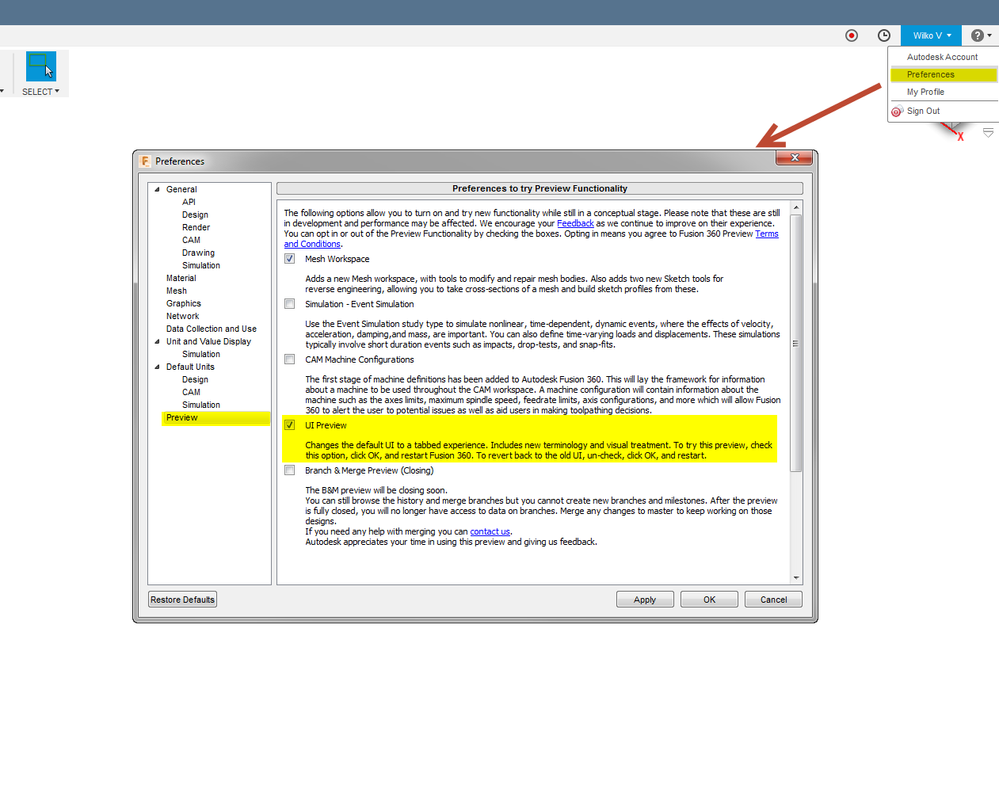
Normally preview features are not enabled through updates. You can disable this by unchecking <your login> -> Preferences -> Preview -> UI Preview.

Disable new UI preview.png

Message 5 of 10

BlondieSL
Contributor
Contributor

I also notice that the constraints are gone from the Sketch Palette.  Only a check box to see or not see constraints in the sketch.

But no way to open up that list of constraints.

Sure, I see them across the top, but one does get accustomed to having things a certain way and it would nice to retain that option.

As for the UI Preview in preferences, I'm not even seeing that  in preferences.


This is all I have.  And even these options trigger a warning about turning on things that are still in development and not officially released.

Sigh.


no UI Preview Option.png

 
Message 6 of 10

g-andresen
Consultant
Consultant

Hi,


@BlondieSL wrote:

But no way to open up that list of constraints.*

Sure, I see them across the top, but one does get accustomed to having things a certain way and it would nice to retain that option.

As for the UI Preview in preferences, I'm not even seeing that  in preferences.**


*

sketch tools  & constraintssketch tools & constraints

**

There is no preview anymore because the new UI has now been implemented.


günther

Message 7 of 10

mouse51180
Enthusiast
Enthusiast

This sucks.  Was much easier for me when it was in the Sketch Palette.  BOO on this feature update! 😡

Message 8 of 10

lichtzeichenanlage
Advisor
Advisor

Simply add the constrains to the shortcut menu. After you did this, simply hit the "s" key and the menu opens where your mouse is. Much less traveling this way. 


06-01-2020 16-41-57.png

Message 9 of 10

NOVALightLabs
Enthusiast
Enthusiast

Is this still possible to enable?


It seems like everything changes so quickly and I am trying to follow your videos but the UI is very different.


Thank you

0 Likes
Message 10 of 10

lichtzeichenanlage
Advisor
Advisor

Sure, still possible. 09-04-2020 10-46-22.png

0 Likes