Import Parts

Import Parts

Royce_adsk
Community Manager Community Manager
7,150 Views
17 Replies
Message 1 of 18

Import Parts

Royce_adsk
Community Manager
Community Manager

Is there a way to start importing design into another design? If I have sub-assembly projects that are used in multiple larger projects how would I place those assemblies or even basic parts into a project?



Royce.Abel
Technical Support Manager

0 Likes
Accepted solutions (1)
7,151 Views
17 Replies
Replies (17)
Message 2 of 18

Oceanconcepts
Advisor
Advisor

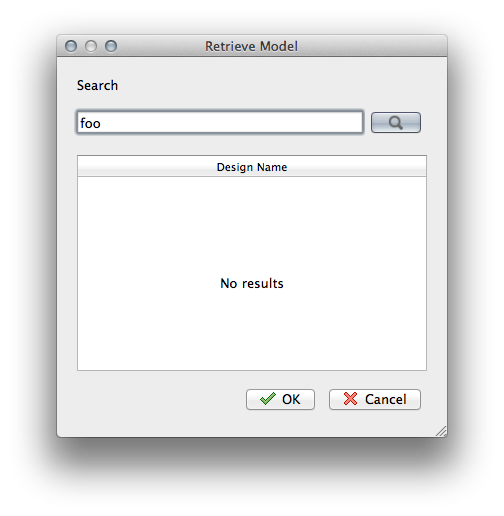
This is one of the less obvious parts of  the interface.  You need to know what you called the other assembly you want to use.  Click on the little magnifying glass at the top right of the window.  A text entry field will appear.  Start typing in the name and the list of matching files will appear, select the one you want and it will import. It works well, unless like me you forget what you called something.  You do need to have the part you want to import saved as a separate file, I don't think you can grab an element from another file, as with copy and paste.


Ron

- Ron

Mostly Mac- currently M1 MacBook Pro

Message 3 of 18

kat.ingalls
Alumni
Alumni

Thanks, Ron! Royce, did that answer your question?

Kat

Fusion 360 Social & Community Manager
twitter: @adskFusion360
facebook: /fusion360
0 Likes
Message 4 of 18

Royce_adsk
Community Manager
Community Manager

Agree that it isn't the most obvious, but once you know it is there it seems to work fairly smooth.


I would think at some point users will want to have some sort of browse option since forgetting the name will probably be common for some users as you said 🙂


One thing I did discover is that I can do a 'Save Copy as' to a sub-assembly or part so that I can import that specific section into another assembly.  Cool stuff.


Royce.Abel
Technical Support Manager

Message 5 of 18

haughec
Alumni
Alumni

I agree that we should provide browse in addition to search when inserting components.  We're looking into this.  FYI - the next release of Fusion 360 will offer a "Place" command in the Assemble menu to place components.


You can also copy/paste components from one design to another, though the Paste workflow isn't very clear at the moment.  To paste into a separate design, you must select a component in the browser, right-click and select "Paste New".  Ideally, you should be able to just right-click in the screen and select Paste.  I'll see if we can address this.


Thanks

Charles Haughey
Fusion 360 User Experience Architect
0 Likes
Message 6 of 18

big_red_frog
Collaborator
Collaborator

I cannot see this "magnifying glass" anywhere, has the workflow changed?


If not, can we have a screen shot please?

0 Likes
Message 7 of 18

schneik-adsk
Community Manager
Community Manager
Accepted solution


The place command is on the assemble pane 

2013-08-03 08.16.23 pm.png


Then you can type a name to search your data to insert.

2013-08-03 08.16.42 pm.png


Browse is coming in a future update. Hopefully September.


Kevin Schneider
0 Likes
Message 8 of 18

kat.ingalls
Alumni
Alumni

Did the screenshot help? What're you working on currently?

Kat

Fusion 360 Social & Community Manager
twitter: @adskFusion360
facebook: /fusion360
Message 9 of 18

Anonymous
Not applicable


It helped ME!!

Dang, Place! Imma use this MOFO till it HURTS, logos?... text?... illustrations? ... it's ON!!


BOOM! 🙂

0 Likes
Message 10 of 18

big_red_frog
Collaborator
Collaborator

Thanks for this, now I know where it is "hidden"


Appreciating the whole design browsing is due a rework...

0 Likes
Message 11 of 18

big_red_frog
Collaborator
Collaborator

First attempt to use place command crashed fusion 😞


CER_83533963


0 Likes
Message 12 of 18

big_red_frog
Collaborator
Collaborator

and a manual copy and paste between designs worked fine.

0 Likes
Message 13 of 18

AndrewSears
Community Manager
Community Manager


I ran into this same issue yesterday where placing an imported part caused Fusion to crash.  Your crash reports are going into the same bucket as mine from yesterday. We have a defect logged to fix this.  


Can you email the Fusion beta file?  Use "Export Archive" and email to  [email protected].


Just wondering, did the original file come from a 2011 or 2012 SolidWorks part file or was it created in Fusion Beta? 


Thanks,

Andy 

0 Likes
Message 14 of 18

Anonymous
Not applicable

Any idea why my menu doesn't have the "Place" option?


Missing Place in Assemble Menu

0 Likes
Message 15 of 18

JonSchaeffer
Collaborator
Collaborator

You are using the version for Mac. It does not support that yet. (I'm right with you.)


www.genesisprecisionaz.com
[email protected]
0 Likes
Message 16 of 18

Anonymous
Not applicable
Thanks so much for prompt response! Will use Windows then.
0 Likes
Message 17 of 18

Anonymous
Not applicable

Surprisingly that with Parallels in Mac, Windows 8 version of Fusion360 also doesn't come with the "Place" option in the Assemble menu. 


Is there anything I need to do in order to import the designs of my own or uploaded STP files to a new design?

Missing Place in Assemble Menu

0 Likes
Message 18 of 18

Anonymous
Not applicable

I just realised that I can do the same using right click and "Insert". Thanks for everything, guys.


 Insert Using Right-click

0 Likes