How to create 3D relief from photo

How to create 3D relief from photo

Anonymous
Not applicable
38,162 Views
12 Replies
Message 1 of 13

How to create 3D relief from photo

Anonymous
Not applicable

This has probably been answered 1000 times BUT as a newbie I get lost on or before step 2 !!!

Every "tutorial" I have found assumes a level of expertise that is WAY above where I am so l am...

The tut says "use *whatever* - OK - Where is it?

Eventually someone tells me that I have to "install" it. - OK - How?

"Download it" - OK - Where From? - Where do I save it to? Should I unzip it? Then what?

So at the end of the day I get nowhere, AND confused, AND disheartened!!!

So here is what I would like to do:

I have an image of my Mom.

I would like to carve it into a board using the 3D Relief (I think) method.

I would also like to 3D print it to see what it looks like.

Where do I start? Step by step, what do I do, all the way to exporting the STL for the slicer to prepare for printing and (at a later date) whatever is needed to generate the tool path for a Cartesian 3 axis mill.

And please assume that I am a TOTAL Newbie (which I am).

Thanks people.

38,163 Views
12 Replies
Replies (12)
Message 2 of 13

I_Forge_KC
Advisor
Advisor

Hi Aubrey! Welcome to the forum.


A pretty good tutorial to start with is this one:

http://www.instructables.com/id/3D-CNC-Relief-Sculpture-Fusion-360/


If you're looking for a super quick and easy 3D printable design, check out the lithophane maker here:

http://3dp.rocks/lithophane/


K. Cornett
Generative Design Consultant / Trainer

Message 3 of 13

Anonymous
Not applicable

Hi - thanks for trying to help - BUT!!!

I follow the instructions provided in the link and all I get is this.

And this is ALWAYS the way it goes no matter what the package is.

What you are told to do does not work and eventually you find out that "oh but you missed a step" (which was not therein the howto !)

OR the version has changes and now you have to enable this or that obscure setting or something equally ridiculous to expect someone who has opened the package for the 3rd time ever to know about.

CAD/CAM packages are hard enough to think about, never mind to get working when it is your first time.

Its looking for a folder - so I navigate to where I extracted the download - its not interested.

OK - so I create a folder - that did not work either.

The whole world seems to be raving about Autodesk and how easy it is.

Well, not from where I am sitting. And I am not the only one...

It wont allow me to get past the "Select Folder" step ....

Try adding an addon in Firefox! One or 2 clicks and it is there - it even checks version compatibility for you.

Here you need level 5 certification to get anywhere it would seem.

Sorry for the "bitching session" but this is what happens every time - software written by geeks - exclusively for geeks it would seem...

0 Likes
Message 4 of 13

I_Forge_KC
Advisor
Advisor

Sorry for the confusion. You've unwittingly stumbled into a known issue that has been fixed. When using Javascripts, there must be a manifest file in the package in order for Fusion to determine which js file is the right one to use. In the case of the Image2Surface version linked in the Instructable, the manifest is missing. It has been fixed in the official repository.


TL;DR

Use the official repository instead of the version linked in that instructable (or the file I link here).

https://github.com/hanskellner/Fusion360Image2Surface


Again, not your fault (and not the instrucable's fault either). 


K. Cornett
Generative Design Consultant / Trainer

0 Likes
Message 5 of 13

Anonymous
Not applicable

Hi

I think that I should hire myself out as a debug tester because if there is a bug I will walk straight into it!

EVERY TIME !!!

So I removed the old code and downloaded/unzipped the file from Github.

Still no joy!

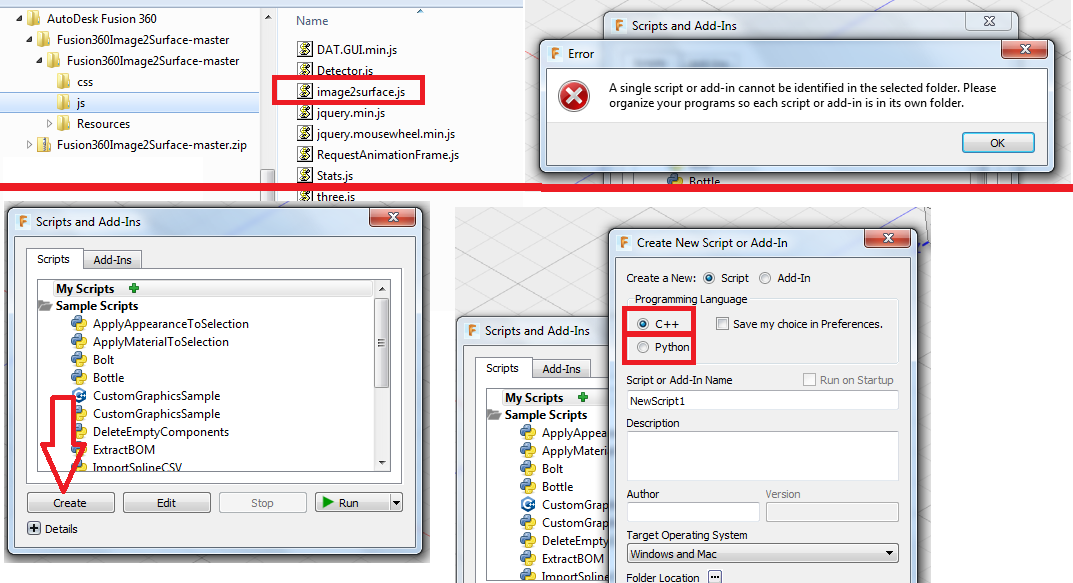
Tried a number of things - the first image is as per instruction. It error-ed!

The 2nd image top part is where I went to look for the js script but when I pointed to that directory, it error-ed as well !

The lower part is where I tried to create it - but that was obviously not the way to go because it is looking for a C++ or Python option - and I am sitting with a JS script.

"ALL" I want to do is create a relief of my recently deceased Mom - and mill one for each child and grandchild as a "memorial" piece.

I am even building a hobby MPCNC to do the task but at the rate it is going, I will probably die of frustration / stroke / heart attack before I get there.

It's not that I am a total newbie, I qualified as a fitter and turner in '77 and I have been coding since '85 and have earned my living as a web developer from 2000 until my recent retirement.

Possibly the "REAL" underlying issue is that Autodesk needs to re-think the "add-on" section and make it work like it does on, for example, all the web browsers.

With all the browsers it is simple (click on the required add-on on a repository site) AND it downloads, installs and it works (if there is no version issues but that has been taken care of by those developers as well).

Or maybe I should install my old VB6 and write an app that reads in an image,  grey-scales it to a bitmap and produces the tool-path g-code to print/mill it - may take time to do it and debugging it will probably be painful but....

After all it is simply math and multiple iterations during the processing.

Thanks for listening (reading) people but I am sure that  am NOT the only one experiencing this sort of problem.

0 Likes
Message 6 of 13

Fueler
Collaborator
Collaborator

Aubrey,

Have you looked at this? http://www.vectric.com/products/photovcarve.html

0 Likes
Message 7 of 13

I_Forge_KC
Advisor
Advisor

Pick this folder:


try 1 montage.png


K. Cornett
Generative Design Consultant / Trainer

Message 8 of 13

Anonymous
Not applicable

Thanks @I_Forge_KC for sticking with me on this - appreciated!

So I tried as per your last post.

Here are the results - one gave an error message, one gave me a box which does nothing (except the "Create" - but I don't think that is the correct option).

And people wonder why I use "MS Paint" for my "technical drawings" ....

Maybe I should uninstall and start from scratch again...

Or maybe use an online preparation service - this is so frustrating.

0 Likes
Message 9 of 13

I_Forge_KC
Advisor
Advisor

Go to the add-on tab instead of the script tab and it should be there.


The newer version of Image2Surface doesn't launch like the old one does. Once you run it from the Add-On tab you then go to the Add-Ins button on the main ribbon to invoke it.


You're getting closer! Sorry this has been a hassle.


K. Cornett
Generative Design Consultant / Trainer

Message 10 of 13

koeppent
Observer
Observer

I've been trying to install this script for hours now and I'm beginning to think it does not work. The pic on this thread shows the same error I get every time. It wants you to create a separate folder for the .js file yet the download has 10 separate .js files in it. I have used scripts in many other programs and have never had so many problems. Most of them come with an installer. This would simplify things. I would like to spend my time carving wood rather than trying to figure out how to install a simple script file. NOT COOL!!!

0 Likes
Message 11 of 13

TrippyLighting
Consultant
Consultant

The author of that script wrote it in his spare time and provided it for free.

If you want to contribute, then the source code for it is available here on Github.


EESignature

0 Likes
Message 12 of 13

JeromeBriot
Mentor
Mentor

@koeppent, you can use the GitHubToFusion360 add-in to install the Image 2 Surface add-in.

Message 13 of 13

willfried_wi
Community Visitor
Community Visitor

try this: Link to video . It worked for me. Good luck.

0 Likes