History - group/ungroup history, rearranging grouped history

History - group/ungroup history, rearranging grouped history

macxike
Enthusiast Enthusiast
19,810 Views
23 Replies
Message 1 of 24

History - group/ungroup history, rearranging grouped history

macxike
Enthusiast
Enthusiast

Hello everyone,


I been playing alot with Fusion 360 lately, and aside for not having snapping features, I am lovin it.


I have 2 questions I can't figure out:


  • In the history timeline, after you group some functions together, a "+/-" symbol appears. I see that you can expand/collaspe the group, but how do you ungroup them?
  • Is it possible to drag history functions in/ out of a history group?


You guys are doing a great job with Fusion. I'm converting my workflow to Fusion 360 soon =D


Thank you in advance for the help!


Accepted solutions (1)
19,811 Views
23 Replies
Replies (23)
Message 2 of 24

SallyYang
Autodesk
Autodesk
Accepted solution

Thanks for your feedback. We are very happy that you are enjoy modeling with Fusion.

About your questions, we currently don't support drag&drop items into a group. However you can delete the group and then reform it with new items.

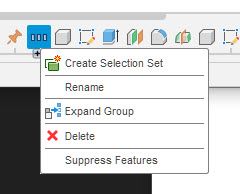
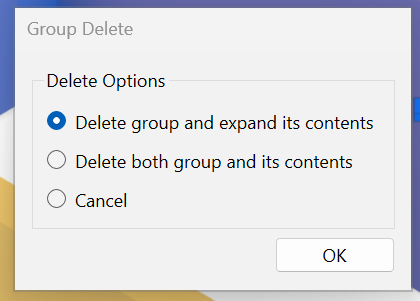
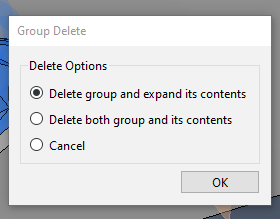
To delete a group, you can collapse the group and right click on it to invoke delete function, then select "Delete group and expand its contents ".

Delete Group.png


Regards,
Sally


Sally Yang
Software QA Engineer
Fusion 360 Quality Assurance Team
Autodesk, Inc.
Message 3 of 24

macxike
Enthusiast
Enthusiast

That will do for now. Thanks a lot Sally.

Now time to cleanup and organize my history...

0 Likes
Message 4 of 24

lkokkone
Enthusiast
Enthusiast

Thank you 🙂

0 Likes
Message 5 of 24

lonarome
Contributor
Contributor

I'd just like to point out that this is not terribly intuitive.

Anytime you have a delete, it's really helpful to be extremely specific about what you are going to delete... 

Message 6 of 24

dewaine50
Advocate
Advocate

How do I add stuff in the line to the group? I tried dragging and dropping but that won't work

0 Likes
Message 7 of 24

cirrus7-de
Contributor
Contributor

I can't see the option "Delete group and expand its contents " by right-clicking the collapsed group in the newest version. Is there a bug or am I doing something wrong?

14-05-_2020_17-37-46.jpg


Message 8 of 24

HughesTooling
Consultant
Consultant

Just select delete from that menu, then you'll get the dialog with the options.


Mark Hughes
Owner, Hughes Tooling
Did you find this post helpful? Feel free to Like this post.
Did your question get successfully answered? Then click on the ACCEPT SOLUTION button.

EESignature


Message 9 of 24

cirrus7-de
Contributor
Contributor

Wow. That was kind of embarrassingly easy 😳 I use delete a lot to clean up my history of unnecessary features from time to time. Never thought of  another dialog than "This feature is referenced by other features ..." would pop up. Thanks! 

0 Likes
Message 10 of 24

aaronseX28WH
Participant
Participant

Clicking on "Delete" will popup a dialog allowing the Customer to select Ungroup.


Come on guys...  Obviously this isn't intuitive, look at the number of people asking this question.  


Consider at least fixing the menu item text to be clearer, e.g. "Delete / Ungroup", try it out...  Don't even bother localizing this edit initially if your Devs typically resist text changes because of localization overhead.

Message 11 of 24

markT6H5R
Explorer
Explorer

There is not even a hint in the context menu that "Delete" might do something other than delete the contents of the group. That's what "Delete" does everywhere else in the app. Some of these UI irregularities are just a constant annoyance. We shouldn't have to search Google for such simple things. A clue in the UI, such as "Delete Grouping ..." with an ellipsis would be helpful to indicate it's something other than the standard "Delete".

Message 12 of 24

aaronseX28WH
Participant
Participant

Does anyone from the product group read these messages?  Ideally we'd get a "we hear you, here's a bug/task tracking number you can monitor to see how long it takes us to make a text change to a menu item..."

0 Likes
Message 13 of 24

eleph67
Explorer
Explorer

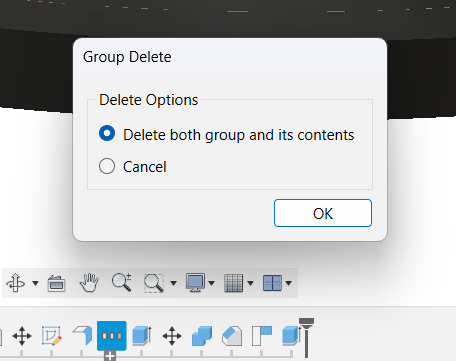
Hi all, how does it come the option to ungroup features is no longer there in current version of F360? I can either "Delete both groups and its contents" or "Cancel".

0 Likes
Message 14 of 24

laughingcreek
Mentor
Mentor

still there for me-

laughingcreek_0-1701275785796.png


0 Likes
Message 15 of 24

eleph67
Explorer
Explorer

2023-11-29 18_39_06-Clipboard.png

Not for me! May be the is an option hidden somewhere? I can't believe someone decided to just remove the first radio button!

0 Likes
Message 16 of 24

laughingcreek
Mentor
Mentor

probably a bug - @Phil.E ?

0 Likes
Message 17 of 24

aaronseX28WH
Participant
Participant

If you're making changes...  Consider at least fixing the menu item text to be clearer, e.g. "Delete / Ungroup", try it out...  Don't even bother localizing this edit initially if your Devs typically resist text changes because of localization overhead.

0 Likes
Message 18 of 24

laughingcreek
Mentor
Mentor

I don't work for AD, so I won't be making any changes

Message 19 of 24

aaronseX28WH
Participant
Participant

Oh well.  I appreciate who ever creates, maintains and supports Fusion 360.  Cheers!


@eleph67 sorry you're having worse than normal experience.  Fusion360 says I have latest version, for what it's worth I see the expected options in the poorly named feature ( that should be called "Ungroup or Delete Group" instead of "Delete Group" ) .

aaronseX28WH_0-1701282862746.png


Fusion 360 2.0.17721 x86_64
Active Plan: Personal
Windows 10 Pro 22H2 (19045.3693)

0 Likes
Message 20 of 24

Phil.E
Autodesk
Autodesk

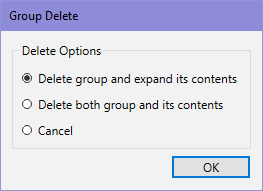
Without a model I have no idea. I don't have a problem with this dialog. It must be model specific.

Windows:

PhilE_0-1701283068419.png

Mac:

Screen Shot 2023-11-29 at 11.18.54 AM.png


Phil Eichmiller
Software Engineer
Quality Assurance
Autodesk, Inc.


0 Likes