Export BOM/Parts List to excel or other format

Export BOM/Parts List to excel or other format

Aaron.Magnin
Alumni Alumni
12,517 Views
10 Replies
Message 1 of 11

Export BOM/Parts List to excel or other format

Aaron.Magnin
Alumni
Alumni

In order to get BOM and Parts Lists into ERP and other systems, it would be helpful to be able to export those directly from a Fusion drawing.


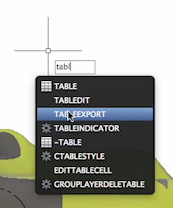
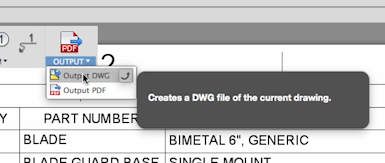
Currently, you can do this by exporting the entire drawing to DWG, then using "TABLEEXPORT" in AutoCAD to get it to a CSV file, but its a bit of extra work. 


For those of you trying to do this now, here are some steps:

1. Export to DWG Screen Shot 2016-03-24 at 9.37.06 AM.png
 

2. TABLEEXPORT from AutoCADScreen Shot 2016-03-24 at 9.37.18 AM.png


3. CSV to Excel (or other spreadsheet software) Screen Shot 2016-03-24 at 9.39.59 AM.png


Aaron Magnin

Technical Marketing Manager Fusion 360

Accepted solutions (1)
12,518 Views
10 Replies
Replies (10)
Message 2 of 11

Anonymous
Not applicable
That is a great solution however I do not own Autocad. I would vote for direct export.
Message 3 of 11

Aaron.Magnin
Alumni
Alumni

@Anonymous So someone on YouTube mentioned they were able to do something similar with a pdf. I had trouble using that method, but it may help you. 


Aaron Magnin

Technical Marketing Manager Fusion 360

0 Likes
Message 4 of 11

schneik-adsk
Community Manager
Community Manager

I have a basic addin to do this here: https://github.com/schneik80/BOM-Export


Kevin Schneider
0 Likes
Message 5 of 11

TimeraAutodesk
Community Manager
Community Manager
 
0 Likes
Message 6 of 11

Anonymous
Not applicable
Are you referring to the export to DWG as the final solution provided? If so, that really is not a viable solution at all for many MANY users
Message 7 of 11

TimeraAutodesk
Community Manager
Community Manager

@Anonymous, what @Aaron.Magnin has noted here is a complicated workaround... we know that you need the ability to export your Parts List directly from the Drawings environment into an excel-friendly format, and we've been working on it. In the early-November update coming soon, you'll be able to export a .csv of your Parts Lists (along with some other pretty exciting new features), so stay tuned! For more info on what we're working on and what our roadmap for Fusion Drawings is, check out our latest blog post here: http://www.autodesk.com/products/fusion-360/blog/2d-drawings-check-roadmap/


-Timera

0 Likes
Message 8 of 11

Anonymous
Not applicable

So is this feature available now? I can't find it... Can i export the Parts List into CSV ro similar format?

Thanks


0 Likes
Message 9 of 11

TimeraAutodesk
Community Manager
Community Manager
Accepted solution

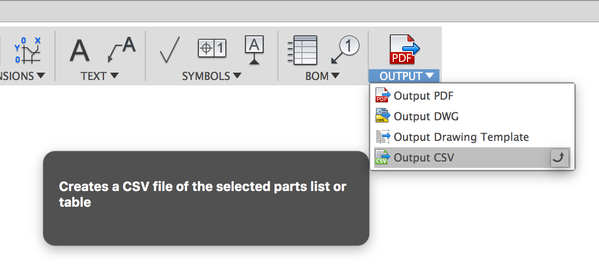
@Anonymous Yes, from the Output menu, select the CSV option, and then choose which table or parts list on a sheet you want exported.


Screen Shot 2017-06-21 at 9.27.31 AM.png

Message 10 of 11

Anonymous
Not applicable

Where is the output button now? I cannot find it anywhere... Or is there an alternate method?

Message 11 of 11

espablo
Enthusiast
Enthusiast

If you are looking for a program that creates a BOM and saves it to an Excel file, you can download such a program from this website and use it for free

https://espablo.pl/download.php?project=bom-excel

0 Likes