3D connexion setting

3D connexion setting

PaulMunford
Autodesk Autodesk
9,859 Views
47 Replies
Message 1 of 48

3D connexion setting

PaulMunford
Autodesk
Autodesk

I'm extremly impressed to see that my 3D Connexion mouse works with Fusion360.


However, It's a little slow. Do you know how I speed it up?


Paul Munford
Technical Onboarding Architect
Linkedin 

Accepted solutions (3)
9,860 Views
47 Replies
Replies (47)
Message 21 of 48

Anonymous
Not applicable

Just wondering if Fusion will have it's own settings profile in the 3Dconnexion control panel? At the moment mine shows up as "Inventor Publisher"


I like to tweak the settings to get the space mouse consistent from program to program

0 Likes
Message 22 of 48

Oceanconcepts
Advisor
Advisor

If you are on a Mac, there is an Add Application option in the drop down in the Control Panel. However, you need to unhide the User Library folder in the Finder in order to be able to navigate to the Fusion application in the 3D Connexion Control Panel-  the Fusion application is kept there rather than in the Applications folder, Apple doesn't allow for on-the-fly updating of things in the Applications folder.  And the Mac OS by default keeps the Library folder hidden.    


You can temporarily unhide the Library folder by opening Terminal (in the Utilities folder) and entering this command at the terminal prompt: chflags nohidden ~/Library  


The Fusion application is located along this path: 

<Your User Directory> - Library- Application Support-   Autodesk-  Webdeploy-  <Folder with a lot of numbers and letters> - the Fusion 360 app


Just find it within the 3D Connexion control panel, add the application, and you can have custom settings. 


Ron

- Ron

Mostly Mac- currently M1 MacBook Pro

0 Likes
Message 23 of 48

lure23
Collaborator
Collaborator

I'm having the laggy effect on OS X (Core i7 Macbook Air). The design is rather large (55MB Rhino import). Will try if smaller materials work more smoothly.


It feels like the commands do get through, but the lag can be seconds = not usable.

Asko Kauppi

IT guy into Cleantech.
0 Likes
Message 24 of 48

lure23
Collaborator
Collaborator
Did you actually get this working smoothly? I'm surprised that the thread is marked as "solved". It is not. (getting lags on two Macs, old and new, with latest software)
Asko Kauppi

IT guy into Cleantech.
0 Likes
Message 25 of 48

philip.s
Alumni
Alumni

Hi Asko!


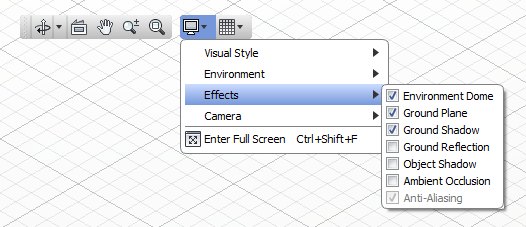
Have you tried turning off some of the Fusion 360 visual effects, specifically ambient occlusion, object shadow and ground reflection, for potential improved performance? These can typically have a large impact on lag time when running large designs.


FUSION 360 EFFECTS.png

0 Likes
Message 26 of 48

Oceanconcepts
Advisor
Advisor

I'm using a 2009 27" iMac, and the Space Navigator is noticeably zippier with the new release version. I may go to the control panel and slow it down a bit.  It seems instantaneous and pretty well perfect in response, but that is with a 25 mb file. I have ground shadow, ground reflection, and ambient occlusion turned off. Lots of difference in graphics processing between different Macs, though. 


Ron

- Ron

Mostly Mac- currently M1 MacBook Pro

0 Likes
Message 27 of 48

lure23
Collaborator
Collaborator

Good idea, Philip.


I hadn't tried that. The settings were "Shaded with hidden edges" and the three topmost effects checked. I now tried without ground shadow, and with wireframe only. Can still get the lag to be visible in a small (from scratch, 5 objects) material.


The way it feels is like when one is typing something, and the things get "lost" in a keyboard buffer. Of course, with a 3D mouse this renders 🙂 everything pretty unmanageable.


Please say if there's anything I can do to help you debug this. I have available: Mac Mini 2009 (2GHz, 4GB) OS X / Windows 7 and Macbook Air Core i7 (4GB) OS X.


Might try on Windows next - earlier 3DConnexion's drivers used to be way more optimized there (unfortunately - their fault, not yours). Maybe you can *pressure* them? >;)


Asko Kauppi

IT guy into Cleantech.
0 Likes
Message 28 of 48

schneik-adsk
Community Manager
Community Manager
Yes, we have a request in to 3DConnexion on some specific improvements for our Mac users. Posting to their forum might help us move the conversation.
Kevin Schneider
0 Likes
Message 29 of 48

Anonymous
Not applicable

No problems at all on Windows with the latest version, I've found it to be very smooth.

0 Likes
Message 30 of 48

Helmi74
Collaborator
Collaborator

I'm on a mac with osx 10.8.3. and a space navigator.


The navigator works in all apps and in fusion360 but no matter what i change in the 3dconnexion settings in syspref doesn't change anything in the app and i also don't have the preferences in fusion360 - the space mouse point just doesn't appear.


any idea what may go wrong? I already added fusion360 in the 3dconnexion settings in sysprefs.

---
Frank / @helmi

Established 1974. Internet addicted since 1994. Collector of Kudos.
0 Likes
Message 31 of 48

jessica.t
Alumni
Alumni

Hi Frank and welcome to the Discussion Forums!


We are still looking to make improvements using the Space Navigator for a Mac as Kevin answered in a previous post but please be sure to let us know if you have any other questions!


Thank you!


Jessica Thrasher
0 Likes
Message 32 of 48

Oceanconcepts
Advisor
Advisor

I also no longer see the SpaceMouse in Fusion preferences. I did see it in the Beta, and I did go onto the SpaceMouse control panel and set to the current Fusion app location after installing the release version. The device works well on my system, but I don't have any access to settings either. 


Ron

- Ron

Mostly Mac- currently M1 MacBook Pro

0 Likes
Message 33 of 48

schneik-adsk
Community Manager
Community Manager

How about people posting their config files? I have attached mine.

Also note that you should get the latest driver for mac as they finaly are out of Beta.


Kevin Schneider
0 Likes
Message 34 of 48

Oceanconcepts
Advisor
Advisor

Here is mine.  I downloaded and installed the latest driver- still don't see the Space Navigator in the Fusion Preferences. 
I've noticed it does get a bit wonky when the manipulator is active in a command, like Move, and can keep moving a while after I stop.


Note that this file was before updating- I will adjust and reset- maybe my not seeing the preference item is due to the driver change.


Added the 2nd config file- still no appearance in the Prefs. 


Ron


- Ron

Mostly Mac- currently M1 MacBook Pro

0 Likes
Message 35 of 48

Helmi74
Collaborator
Collaborator

@jessica Does "still making improvements" mean the Space mouse settings aren't intended to be there currently? This is ok, just didn't know that. 

---
Frank / @helmi

Established 1974. Internet addicted since 1994. Collector of Kudos.
0 Likes
Message 36 of 48

lure23
Collaborator
Collaborator

Somewhat connected to these issues, I've reported to 3Dconnexion that their Trainer app (the first thing one would try!) behaves unresponsively on both of my macs.


Here's a screen capture video I did of it.


http://www.youtube.com/watch?v=XA66bkpAQyc


Anyone else experiencing the same?


Note: Other demos work fine, and Fusion 360 does not suffer of these issues (it has the lag though).

Asko Kauppi

IT guy into Cleantech.
0 Likes
Message 37 of 48

Helmi74
Collaborator
Collaborator

you should give 3dconnexions support a call - did this on a similar problems a while ago and they guided me to way to solve this issues. I guess this forum isn't the right place for that as it is not related to fusion360 at all.

---
Frank / @helmi

Established 1974. Internet addicted since 1994. Collector of Kudos.
0 Likes
Message 38 of 48

lure23
Collaborator
Collaborator
Sure. I actually solved it for them in the Youtube comments (I think). The connection to Fusion 360 is that I want to use my SpaceExplorer precisely with that (and it has the time lag problem described multiple times on this thread). Won't write more of this.
Asko Kauppi

IT guy into Cleantech.
0 Likes
Message 39 of 48

jessica.t
Alumni
Alumni

Hi Frank,


The Space Navigator is intended for use but we have recently discovered issues when using that device with Fusion 360 on Macs. Our goal is to resolve those problems in order to improve the user experience.


Jessica Thrasher
0 Likes
Message 40 of 48

Anonymous
Not applicable

Hi there


The problem I am having is that even when I have added Fusion 360 as an application in the 3D Connexion preferences the “Spacemouse” tab does not show up in the Fusion 360 preferences on my Mac (running OS 10.8.4). As a result I can’t change the sensitivity of the device. Even when I turn the sensitivity of all axes down to the minimum in the 3D connection preferences, the speed is still maxed out in Fusion 360.


When I run it through a Windows version it works perfectly.


Any help would be greatly appreciated.


Thanks


Chris

0 Likes