Use different load animation based on flowitem

Use different load animation based on flowitem

jacob_edge6FHXZ
Contributor Contributor
842 Views
2 Replies
Message 1 of 3

Use different load animation based on flowitem

jacob_edge6FHXZ
Contributor
Contributor

[ FlexSim 21.0.6 ]

Hello,

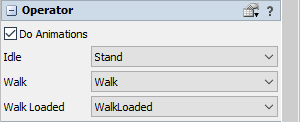
I have an operator that has to push carts, and also load material into a machine. Is there a simple way to change the load animation (and location of the flowitem relative to the operator) depending on the flowitem the operator is carrying?

pushcart.pngcorrect-load-machine-animation.png

Above are the 2 animations I would like. I am able to change to one or the other, but I'm not sure how to incorporate both using one operator. I would prefer to avoid using code if possible. I'm fairly proficient with process flow if that is the only other option. Below is what I currently have. Change Visuals on Load.fsm

current-load-machine-animation.jpg


0 Likes
Accepted solutions (1)
843 Views
2 Replies
Replies (2)
Message 2 of 3

FelixMoehlmann
Collaborator
Collaborator
Accepted solution

You might be able to do it with the "Run Animation" process flow activity, but using code (only a single line) is probably much easier. You can listen to the On Entry trigger of the operator with an Event triggered source in process flow. Depending on some condition (item label/size/etc) the token is send down different paths and does two things:

1. Set the "walkLoadedAnimation" variable of the operator to change which animation is used if the operator has loaded something. The animation Names are the same you woud set in the operator's properties.

object.setVariable("walkLoadedAnimation", "animationName");

1638971836283.png

2. Change the position of the item inside the operator (if necessary)

I'll attach an example model where this is done for two different item sizes; one being carried, the other one pushed.

ChangeWalkAnimation_21_0.fsm

Message 3 of 3

jacob_edge6FHXZ
Contributor
Contributor
Thank you so much @Felix Möhlmann! This is exactly what I was looking for.
0 Likes