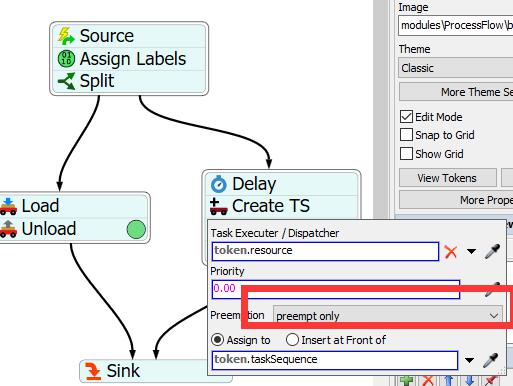
Process Flow: Using TS to create preempt task

Process Flow: Using TS to create preempt task

tongsw
Not applicable
1,732 Views
9 Replies
Message 1 of 10

Process Flow: Using TS to create preempt task

tongsw
Not applicable

[ FlexSim 18.1.0 ]

I have a question about creating a preempt task in process flow. I use Create TS to create a preempt task. But the result is that this task isn't a preempt task. The details are shown below.

12549-图片1.jpg

12550-图片2.jpg

12551-图片3.png

demov201810.fsm

0 Likes
Accepted solutions (1)
1,733 Views
9 Replies
Replies (9)
Message 2 of 10

isaac_l1
Not applicable

@tong

Could you clarify what you are trying to achieve? What do you want the operator to do? Thank you

0 Likes
Message 3 of 10

tongsw
Not applicable

I just want to insert a preempt task( a utilized task) when the operator is implementing a unload task. Thanks for your reply.

0 Likes
Message 4 of 10

sam_stubbsYXX86
Alumni
Alumni

We're still not entirely sure what you mean by you want a "preempt task." Can you clarify further? You want the operator to go into a Utilize state during the unloading, is this what you're trying to do?

0 Likes
Message 5 of 10

tongsw
Not applicable

yes,this is what I want. thanks

0 Likes
Message 6 of 10

isaac_l1
Not applicable

Instead of using a preempt task you would want to use a Delay for the operator to go into a Utilize state during the unloading. Here is an example. I have also attached a model below.

12572-delay-utilize-operator.pngdelay-utilize-operator-model.fsm

Message 7 of 10

isaac_l1
Not applicable

@tong

Does this answer your question?

0 Likes
Message 8 of 10

tongsw
Not applicable

Thanks for your reply. Actually, This unload task includ a travel task .I want insert a preempt task(a unlited task) during the operator on the way to unload.

0 Likes
Message 9 of 10

jing_chen
Not applicable
Accepted solution

Hi @tong

Change Executer/Task Sequence to "token.taskSequence"

12593-preempt.png

0 Likes
Message 10 of 10

tongsw
Not applicable

The problem has been solved. Thanks very much.

0 Likes