Message 1 of 16

- Mark as New
- Bookmark
- Subscribe
- Mute
- Subscribe to RSS Feed
- Permalink
- Report
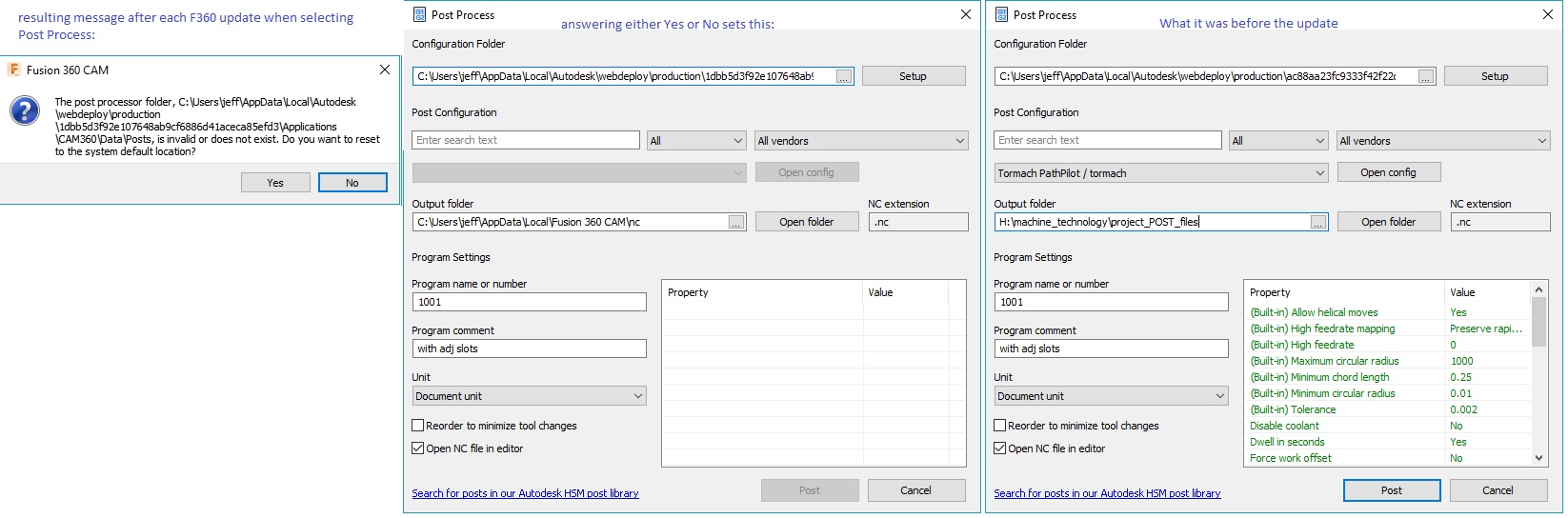
I get this every time I post process, apparently it doesn't remember that I said YES the previous time.
Solved! Go to Solution.

 Collaborator
I get this every time I post process, apparently it doesn't remember that I said YES the previous time.
Solved! Go to Solution.
This happens after an update. The hexadecimal folder name changes so the old path is no longer correct.
Is there any way to stop this happening?
It is so annoying having to reset and reconfigure my posting options every time I use the program.
Copy your preferred post into your Cloud posts and use it from there instead.
If you're not sure how to do this, here's an instructional: https://knowledge.autodesk.com/support/fusion-360/troubleshooting/caas/sfdcarticles/sfdcarticles/How...
And you can download the post (and many that are not included in the standard install folder) from here if you can't manage to locate it in the default directory: http://cam.autodesk.com/posts/
FYI, we'll have a fix for this in an upcoming Fusion update. After that update, you'll probably see that message one more time. After that, we'll store the folder path differently, so that it automatically follows the new location of the "generic" post folder.
Jeff
delete
FYI, looks like this was broken again earlier this year to fix another problem.
Will need to reapply the change (while of course avoiding the other problem).
Thanks for pointing this out. CAM-12273.
Jeff
So I had to reload Fusion 360 because a few files were no longer running correctly. After doing so Autodesk seems to be running fine but once I try to Post Process an item I created it is giving me that message with the choice of Yes and No. I choose No, so how do I find the correct file I was running before so I can use Mack 3 to cut this out?
Select "Yes" so Fusion will locate the correct post processor.
This is an excellent example as to why you should always download and secure your own post processor far away from the generic directory that gets overwritten every time an update rolls out.

I am suffering the same issue of the post processor directory "not found" after every update. Finally got fed up searching for the folder manually every time and have come looking for a solution. I don't get a "yes or no" dialog box, the post processor list is just empty.
You mention using a cloud location for the post processor, are you saying that local post processor folders aren't recommended?
Regards Simon
I wouldn't say that I don't recommend local folders, however, I would say that I prefer cloud folders, as I find myself moving between several computers over the course of the week.
Are you not finding the generic built-in posts?
I can always find the post processor folder by browsing.
Do the standard local folders for the post processors work flawlessly?
Is there a problem with the location of the standard folder being lost during an update?
I am trying to work out if this is a Fusion issue or an issue specific to my setup.
By the way I run Fusion on two PCs, one at work and one at home, they both show this problem.
Regards Simon
Just updated to 2.0.7824 and the post processor list is now pointing at the wrong hex folder!