cancel
Showing results for 
Show  only  | Search instead for 
Did you mean: 

Editable C3D Tables

Editable C3D Tables

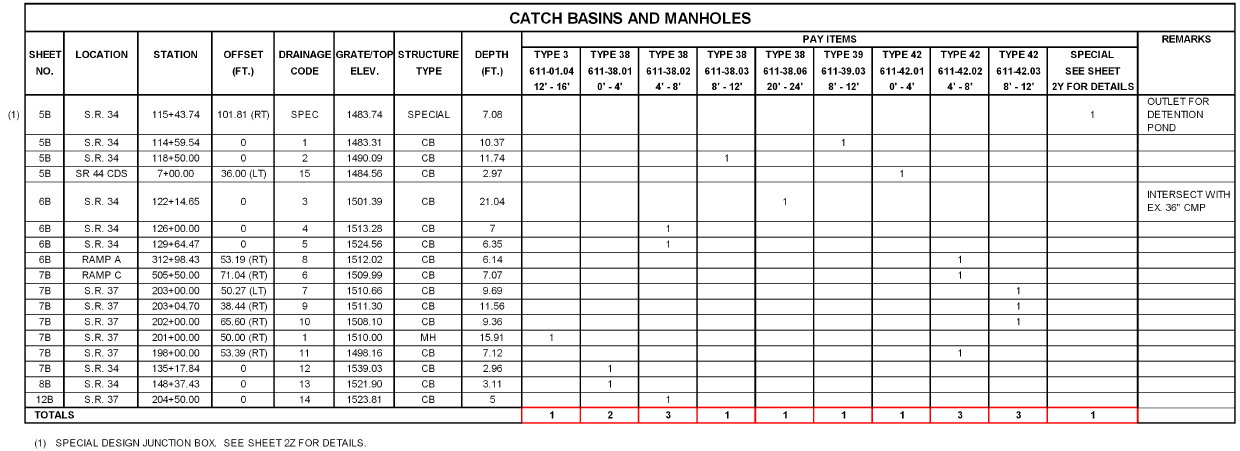
We need the ability to edit a C3D table like an AutoCAD table. For instance, a pipe table cannot be edited to add a user defined column, or create rows for headers that can contain merged cells. Below is what the Tennessee DOT requires for storm pipe and storm structure tables.
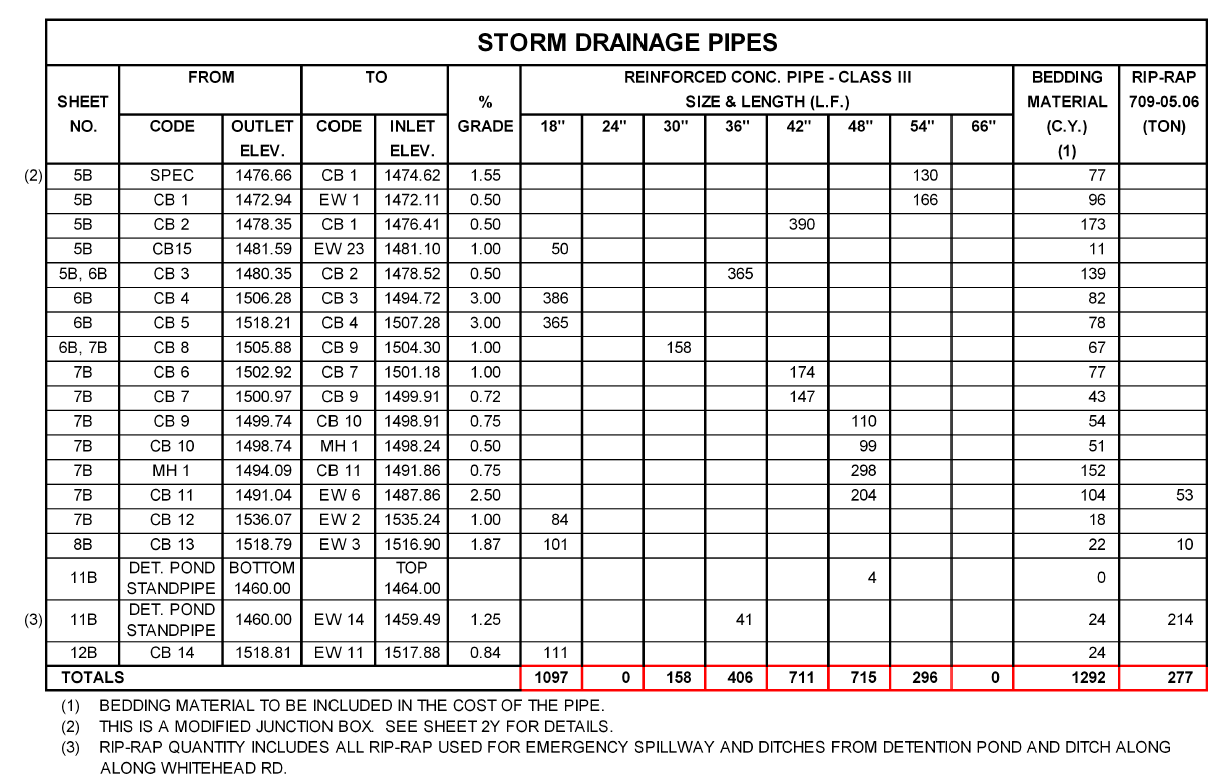
 

Example TDOT Storm Pipe Table


storm_structure_table_example.png


It is impossible to make tables like this currently in C3D that are dynamic and actually read the pipe network data. 


It's also impossible to make a dynamic control point table in C3D that looks like the example below because point objects cannot reference alignments.

control_point_table_example.png


The C3D tables need to be AutoCAD tables that can read the model data. 

111 Comments
C_William_Lee
Advocate
It sure seems like Civil 3D is the lowest priority of all the Autodesk products.
alexey.kurenkov
Advisor

I think it is necessary to publish the idea of increasing the priority of Civil3D:smileyhappy:

alexey.kurenkov
Advisor

Ideas posted in Civil3D live a separate life from the development of the program

ceethreedee.com
Collaborator
Autodesk is too busy trying to make their software cloud friendly.
alexey.kurenkov
Advisor

What scoundrel has posted such an idea?Smiley Very Happy

RandyBenson
Advocate

Hard to believe this hasn't been acted on -- 3 years later... SAD.

durasovartyom
Advisor
TimYarris
Autodesk

Hi everyone,


If you’ve seen the recent news regarding Project Explorer, hopefully you’re encouraged that we’re on our way to addressing many of the requirements that have been identified in this long thread. Project Explorer’s table functionality does not solve everything you've identified, but it does solve many of the key requirements, including:

  • Civil 3D object data into AutoCAD tables
  • Tables that are dynamic to changes in the object data
  • Export to Excel
  • Dynamic control point tables (points referencing an alignment)

Here’s a link to a video that describes some of the table-related functionality in Project Explorer.


Many of the other requirements are on our roadmap of planned improvements for tables in Project Explorer:

  • Merging table header rows
  • Adding user-defined columns and rows


I love the Excel plug in idea, which seems like it would resolve those requirements and many others.


While I don’t think it’s fair to close this one as “Implemented” just yet, once we’ve made some additional enhancements we may close this idea out and ask the remaining bits be spun off into separate, achievable ideas.

Cadguru42
Advisor

@TimYarris While the Project Explorer table function looks to be a working start, it's just that. The point of having an AutoCAD table read C3D data was because user created rows, columns, and data can be created while also referencing C3D data. In the example I gave for a TDOT structure table you can see that the last column is called REMARKS and is a custom text field that will be user created when needed. Another aspect that I haven't seen even mentioned is having pay item data as one of the fields available in these tables. Perhaps it's there, but the video you linked nor the webinar touched on it. 


TDOT itself uses an Excel file that somehow Microstation references for many of the design tables. I have no idea how the design data gets into that table and back into Microstation, but there's a huge missed opportunity that Autodesk has been squandering by not having a similar ability, let alone improving it. 


Basically, what I'm worried about is that Autodesk will implement a few of the features and call it finished when the end product still doesn't address the original idea. With what's been provided so far, it still seems that Autodesk has no solution to be able to create the drainage tables as TDOT nor other DOTs require using the data in the model/drawing as shown in the original examples.


TimYarris
Autodesk

@Cadguru42 , I agree Project Explorer is simply a start toward the solution to the idea -- which is why I didn't mark it as Implemented. As I mentioned, we have a lot of plans to build it out further, especially around tables and reports.

TimYarris
Autodesk

Update: we're researching a number of enhancements to Project Explorer tables that will address the remaining gaps (merging cells, user-defined columns/rows, etc.) in the original idea. More to come soon.

hencoop
Advisor

@TimYarris There are some abilities of css styles in conjunction with html that produce some nice presentations.  Perhaps you could replicate some of the presentation configuration abilities of CSS as you enhance user-defined columns/rows etc.  Here are a couple of minimal examples of CSS use (These html files were written using an application created using AutoCAD .NET):

http://www.digaero.com/CurveTable.html 
http://www.digaero.com/LineTable.html 

Cadguru42
Advisor

I still don't understand why it's so hard for Autodesk to just allow C3D object data to be referenced in an AutoCAD table cell. The data is already stored in the DWG. There shouldn't be some huge programing issue to get data that's already part of the DWG into another part of the DWG while using a built-in feature to display said data (tables, MTEXT, etc.). An AutoCAD table can grab data from an external file (like an Excel file) and display it, but can't even display data from within the DWG itself.


Autodesk bought Project Explorer from a 3rd party vendor to try and half-way implement this feature even though the data and ability to display the data is already theirs! The fact that it's now been six years and this still hasn't been implemented, even though it's been the most requested feature for over half a decade, speaks volumes about Autodesk's commitment to C3D and the community as a whole.

TimYarris
Autodesk

@Cadguru42 , as I mentioned: we are working on closing the gaps to satisfy the requirement for Civil 3D data in AutoCAD tables. Unfortunately, getting the appropriate object data into an AutoCAD table is more complicated than it seems on the surface. We acquired Project Explorer because it does a great deal of this work; now we're working toward completing it.

I'm going to send you a PM off this thread in hopes you'd be willing to meet with the development team and me. We would really appreciate it if you could clarify what's missing so we can give you a better way to produce the tables you showed at the beginning of this thread.

troma
Mentor

@TimYarris I'll clarify one thing that's missing: access.

"Project Explorer is available exclusively with Civil 3D in the AEC Collection and to customers with an Enterprise Business Agreement. "


This functionality should be available to all C3D users, built into the program. Not as an extra feature for certain collections.

JOKO_
Enthusiast

Here's the bottom line for our company.  The dynamic tables take up too much space because of the large row height.  Since agencies sometimes charge for plan review on a per-sheet basis, we prefer to utilize sheet space efficiently.  Our current workflow requires us to create a dynamic table, explode it twice, then use COT (convert old table) third party app to convert it to an autocad table that we can manipulate to fit on the sheet.  The process of converting into a autocad table is then repeated any time there is a design change.  


Additionally, some columns need to contain custom information like pipe size.  This currently is entered into the autocad table after conversion.


The ability to control row height and add custom information in a dynamic table would reduce errors and lessen work time significantly. 


Adding another third party app like Project Explorer is not a viable solution for us. 


Please see screen shot below.

JOKO__0-1619470220381.png


avaughan_townes
Participant

Would like to be able to create a table containing both Pipes and Structure information (alternate Pipe and Structure information)  Something similar to this:


Strc#  -  Type  -  Top  Elev  - Nose  -  Str Height  -  Comments  -  Steps

Pipe#  -  Length  -  Diameter  -  Material  -  Inv In  -  Inv out -  Slope  -  Comments

Strc#  -  Type  -  Top  Elev  - Nose  -  Str Height  -  Comments  -  Steps

Pipe#  -  Length  -  Diameter  -  Material  -  Inv In  -  Inv out -  Slope  -  Comments

And so on.....


Tags (3)
TimYarris
Autodesk
Status changed to: Implemented

With the updates included in Project Explorer 2023, I am marking this idea as Implemented. Please feel free to create new idea posts for further enhancements you'd like to see for editable tables in Civil 3D. Following is a video showing what's new in editable tables, including:

    • Report total quantities
    • Create rows that display custom text
    • Control formatting of cells, including text size and row height

Thanks for your continued feedback!

https://youtu.be/_-G0sJrr354

hencoop
Advisor

@TimYarris 

Implemented... because of "updates included in Project Explorer 2023"?

I've never even heard of Project Explorer.  Upon researching it, I am instructed that it has been developed with major Architecture firms to help them present their buildings.  Much like BIM, it does not fit our Civil project needs at all... which is probably why I've never seen it.  After getting an overview of it I don't think our firm can make use of it.


Are you saying users must employ Project Explorer in order to take advantage of Autodesk's "Implementation" of "Editable C3D Tables" or was that just an unnecessary connection you made?


I would expect the "editable" to be true for any C3D table regardless of the method of creation.  If that's true, I agree with your conclusion that this idea is "Implemented".  If not, it isn't.

TimYarris
Autodesk

Hi @hencoop .

Project Explorer for Civil 3D is an add-on to Civil 3D that is included in the AEC Collection. It was developed for (and works only with) Civil 3D. While it has a lot of useful functionality for Civil 3D customers; two key areas where it shines are:

  • reviewing and editing Civil 3D object data from a single interface
  • generating custom tables and reports from the Civil 3D objects in a drawing

I'm afraid it is not applicable for architecture/building data.

Can't find what you're looking for? Ask the community or share your knowledge.

Submit Idea