*Warning* Multiply owned object, handle "206CF"

*Warning* Multiply owned object, handle "206CF"

Anonymous
Not applicable
42,942 Views
35 Replies
Message 1 of 36

*Warning* Multiply owned object, handle "206CF"

Anonymous
Not applicable

I am getting this warning as I try to save my drawing.  Not sure what it means.


My drawing file crashed (FATAL ERROR) before I was able to complete the save.  I did a MAPCLEAN followed by AUDIT, but still get the error message when trying to save.


I am using C3D 2011 with Windows 7.


Any ideas would be greatly appreciated.

0 Likes
Accepted solutions (1)
42,943 Views
35 Replies
Replies (35)
Message 2 of 36

Anonymous
Not applicable

This usually fixes it

Enter in the command line: (entdel(handet"206CF"))


Repeat this for any other handles that crop up,


Nathan

Message 3 of 36

SethHall
Autodesk
Autodesk

Hi ignich-


Just as Nathan had suggested, that command will remove the object. For a bit more information about this error, please have a look at this blog post: http://beingcivil.typepad.com/my_weblog/2010/08/warning-multiply-owned-objects.html


Hope this helps!


Seth Hall
Product Owner
Model Builder
Message 4 of 36

Anonymous
Not applicable

Thank you.

0 Likes
Message 5 of 36

Lisa_Pohlmeyer
Collaborator
Collaborator

When I try the suggestion for the command line entry I get this:

Command: (entdel(handet"5154"))

; error: no function definition: HANDET


My errors were 5153 and 5154


Lisa Pohlmeyer
Civil 3D User
Website | Facebook | Twitter

0 Likes
Message 6 of 36

Sinc
Advisor
Advisor
Accepted solution

Try (entdel (handent "5154"))

Sinc
Message 7 of 36

Lisa_Pohlmeyer
Collaborator
Collaborator

ding, ding, ding... we have a winner.  Ah, syntax, love it.  Thanks so much!


Lisa Pohlmeyer
Civil 3D User
Website | Facebook | Twitter

0 Likes
Message 8 of 36

Anonymous
Not applicable

how did you find out the error #'s

I'm having the same issue after doing the initial Command:

(entdel(handet"22f29"))

; error: no function definition: HANDET


sounds like i need the error # to fix the problem.


0 Likes
Message 9 of 36

Jeff_M
Consultant
Consultant

HANDENT not HANDET.....

Jeff_M, also a frequent Swamper
EESignature
Message 10 of 36

Anonymous
Not applicable

thanks....i need to learn how to type betterSmiley Embarassed

0 Likes
Message 11 of 36

Anonymous
Not applicable

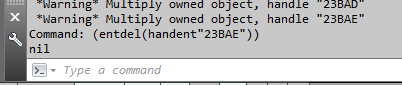
Raising the Dead:

Capture.PNG

OK, the fix listed, now does not seem to work for C3D 2013.  AutoCAD just replies "nil"


Anyone have another solution to this? 


0 Likes
Message 12 of 36

Jeff_M
Consultant
Consultant

Does the MOO not get deleted? 

What does (entget (handent "23BAE")) return?

Jeff_M, also a frequent Swamper
EESignature
0 Likes
Message 13 of 36

EDTROUT
Participant
Participant
 
0 Likes
Message 14 of 36

msarqui
Collaborator
Collaborator

I am having the same problem.

The (entget (handent "blablabla"))  return "nil"


Autodesk!!!! Are you there??

0 Likes
Message 15 of 36

Jeff_M
Consultant
Consultant

@msarqui wrote:


Autodesk!!!! Are you there??


Not necessarily, no. This is a peer to peer help forum for the most part. Yes, we do sometimes get a few of the Autodesk people to come through here. But if you want real help from them you must submit a support request through your subscription center or the product feedback page.


Can you post your drawing to see if someone here can help?

Jeff_M, also a frequent Swamper
EESignature
0 Likes
Message 16 of 36

Anonymous
Not applicable

I'm having the same problem. After I delete the entity though and run audit, the drawing crashes.

0 Likes
Message 17 of 36

Red.Hawk
Participant
Participant

Thank you sir. Smiley Happy

0 Likes
Message 18 of 36

doni49
Mentor
Mentor

Since the previous poster didn't do as requested and post the actual dwg file, I'll do so here.


Command: _QSAVE
 *Warning* Multiply owned object, handle "A4A7"
 *Warning* Multiply owned object, handle "A4A6"
 *Warning* Multiply owned object, handle "A4A5"
Command:
Command:
Command: (entdel (handent "5154"))
; error: bad argument type: lentityp nil
Command: (entdel (handent "5153"))
; error: bad argument type: lentityp nil


EDIT:  I forgot to ask this but instead of JUST DELETING the offending object(s), is there a way to repair them or at least explode them to 3d polylines (assuming they're featurelines) so that I can recreate them?  At a very minimum, I'd need to know which objects they are.


Don Ireland
Engineering Design Technician


If a reply solves your issue, please remember to click on "Accept as Solution". This will help other users looking to solve a similar issue. Thank you.


Please do not send a PM asking for assistance. That's what the forums are for. This allows everyone to benefit from the question asked and the answers given.

Message 19 of 36

Jeff_M
Consultant
Consultant
Don, I am not seeing that error message in your file, using C3D 2016. Also, your (entdel...) lines don't look right. You have to input the actual handle that says it's multiply owned:
(entdel (handent "A4A7")) would be correct based on the outpout you show.
Jeff_M, also a frequent Swamper
EESignature
Message 20 of 36

doni49
Mentor
Mentor

@Jeff_M wrote:
Don, I am not seeing that error message in your file, using C3D 2016. Also, your (entdel...) lines don't look right. You have to input the actual handle that says it's multiply owned:
(entdel (handent "A4A7")) would be correct based on the outpout you show.

That's odd.  I'm also using C3D 2016 here (SP1).  I've seen this error previously in 2012 & 2014 too.


I copy/pasted the lisp code from the "answer" posted above.  I guess it never dawned on me that I needed to change it to the actual handle(s).  Smiley Embarassed


Any thoughts on the second part of the question (the "EDIT")?


Don Ireland
Engineering Design Technician


If a reply solves your issue, please remember to click on "Accept as Solution". This will help other users looking to solve a similar issue. Thank you.


Please do not send a PM asking for assistance. That's what the forums are for. This allows everyone to benefit from the question asked and the answers given.

0 Likes