How to instance with Bifrost and add animation delay(random)

How to instance with Bifrost and add animation delay(random)

takaharu_tobe
Contributor Contributor
3,906 Views
9 Replies
Message 1 of 10

How to instance with Bifrost and add animation delay(random)

takaharu_tobe
Contributor
Contributor

Hi,

I instantiated the animated model by bifrost and placed it.

I wanted to stagger the animations of the instantiated models individually, but I didn't know how to do it.
How do you shift the animation?


///////

MAYA : 2020.4
Bifrost : 2.2.00

0 Likes
Accepted solutions (2)
3,907 Views
9 Replies
Replies (9)
Message 2 of 10

jason-t-brown
Autodesk
Autodesk

I think the best way to achieve this is by bringing your animation in as an alembic file and randomly offsetting the input time in the graph.


Jason Brown
Software Developer, Bifrost
Message 3 of 10

takaharu_tobe
Contributor
Contributor

Thanks!

I tried Alembic, but I don't know where to connect randam or offset.

What should I do now?
I'm sorry for bothering you.

Message 4 of 10

Roland.Reyer
Alumni
Alumni
Accepted solution

Depending on your animated objects you could also create "Animated Snapshots" and then use the create_instances node to play through these objects on a per point bases.

The offset per instance point could be a point property like particle age.


In this example I'm using a field (the wireframe sphere) to set a value for the points (flowers) and that chooses 1 out of 40 anim snapshots.


flower_anim.gif


flower_anim.jpg

Message 5 of 10

jason-t-brown
Autodesk
Autodesk
Accepted solution

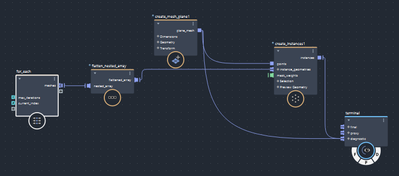
Based on @Roland.Reyer's answer up there, my solution would be this:  Make a for-each loop.  The max iterations should be set to the number of different, random offsets you wish to instance, so if you want 20 different animations, set it to 20.

Inside that for-each loop, add a time node, add a random number to it that changes (current_iteration into seed), then a modulo for looping (modulo returns the remainder of a division, so if you have 40 frames and a modulo set to 40, on frame 41 it will return 1, frame 42 returns 2, etc).  Plug the modulo into the frame input of your alembic read node and connect that to the output f the loop.

This will generate the number of instance geometries you want, with random animations.
jasontbrown_0-1642688473197.png

jasontbrown_1-1642688530795.png


Jason Brown
Software Developer, Bifrost
Message 6 of 10

jason-t-brown
Autodesk
Autodesk

If you don't want it to be random, convert the current_index to a float and add whatever delay you need to it then add that to the frame 🙂


Jason Brown
Software Developer, Bifrost
Message 7 of 10

takaharu_tobe
Contributor
Contributor

@Roland.Reyer
@jason-t-brown

Thank you for your kindness!

Bifrost is complicated and I don't know what to do by myself.
I will try various things based on what I was taught this time.

0 Likes
Message 8 of 10

jason-t-brown
Autodesk
Autodesk

Zero problems, feel free to reach out anytime!


Jason Brown
Software Developer, Bifrost
Message 9 of 10

kongyingjie
Contributor
Contributor

Noticed random_value node is a bit special. The output value increases as "max" increases, not absolutely random.

Look in the following attachment screen shot.


0 Likes
Message 10 of 10

Roland.Reyer
Alumni
Alumni

@kongyingjie 

The random number will always be the same until you change the *seed*.
min and max are only offset and scaling. 


If you plug the frame number into seed then you’ll get a new random number every frame.