catalog editor sizes have disappeared

catalog editor sizes have disappeared

veronica.rosaGJXV3
Enthusiast Enthusiast
1,237 Views
4 Replies
Message 1 of 5

catalog editor sizes have disappeared

veronica.rosaGJXV3
Enthusiast
Enthusiast

Hi,

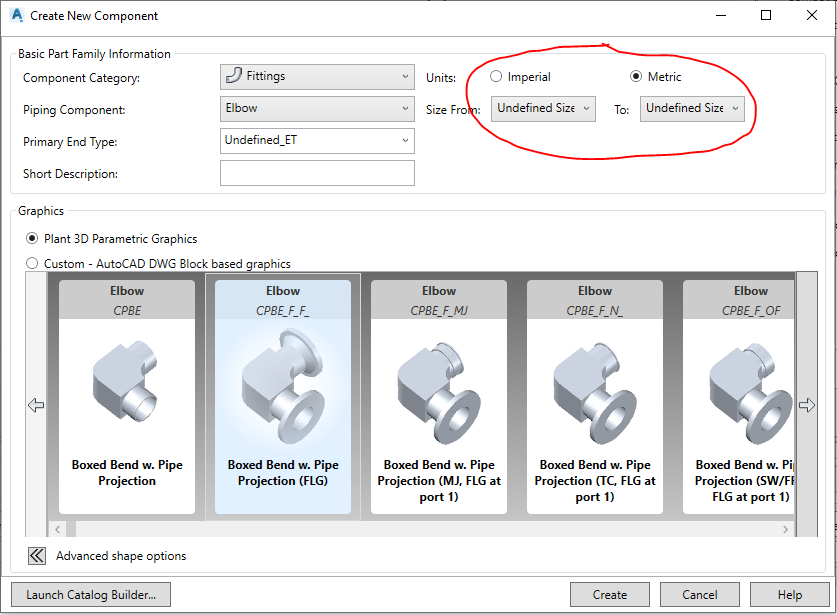
When I try to create a new parametric item from a catalog, I can't because the default size lists appear as "Undefined Size" and I can't create any items. In addition, the various sizes of the elements that already had created in the past, appear "mm". The same happens in Autocad Plant 3D, the sizes of the size list of the "Part insertion" menu appear with "mm".


Thank you.

Greetings.

0 Likes
Accepted solutions (1)
1,238 Views
4 Replies
Replies (4)
Message 2 of 5

Gokhan_Kaya
Mentor
Mentor

Hi

firstly you must select unit and  is it not selectable ? when you click size combobox


Forumlarımızda çözülen sorularınızı "ÇÖZÜM OLARAK KABUL ET" ("Accept as Solution") seçimiyle işaretlemeyi lütfen unutmayın.
Beğendiğiniz mesajları lütfen "Övgü Puanı" ("Kudo") ile ödüllendirin.

Gökhan Kaya
Tehcnical Manager
Autodesk Inventor Certified Professional 2015
LinkedIn


MSI WS 60 i7 Quadro M2000M

0 Likes
Message 3 of 5

veronica.rosaGJXV3
Enthusiast
Enthusiast

I select metric units and the list of diameters does not appear. In Imprerial units either.

0 Likes
Message 4 of 5

Vasu27
Advocate
Advocate

Hi @veronica.rosaGJXV3 ,


I suspect the file 'NominalDiameterMap.csv' in location 'C:\Program Files\Autodesk\AutoCAD 2019' might be corrupted. If you have a backup copy of that file, can you try replacing that and see, if that helps?


Thanks


Vasu

0 Likes
Message 5 of 5

veronica.rosaGJXV3
Enthusiast
Enthusiast
Accepted solution

Hi, thanks for your reply.
I did this but it didn't work either. I finally solved it by reinstalling the program.


Regards.

0 Likes