Dimension Text Won't Center between Dim Lines

Dimension Text Won't Center between Dim Lines

Anonymous
Not applicable
23,697 Views
11 Replies
Message 1 of 12

Dimension Text Won't Center between Dim Lines

Anonymous
Not applicable

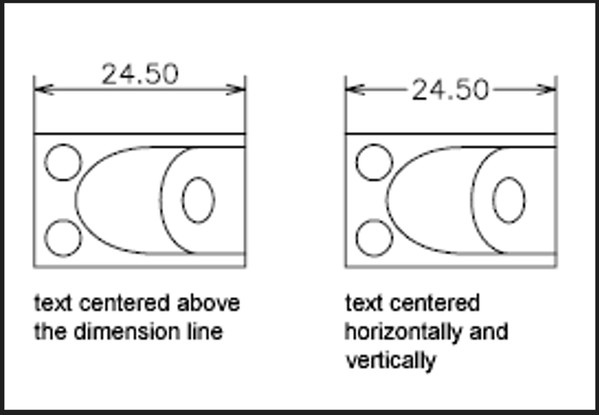
II give up.  I can't get my dimension text to appear as I want.   I want the text center between the dimension lines with a break between the dim lines.  No matter what I change on DIMSTYLE I can't get this to happen.  See attached picture.  I would like to have the style on the right.  But I can only get the style on the left.


Please help!  I'm going bonkers.


Blake

[This post has been edited for clarity by cheryl.buck]


cherylbuck_0-1663704180265.pngcherylbuck_0-1663704180265.png


0 Likes
Accepted solutions (1)
23,698 Views
11 Replies
Replies (11)
Message 2 of 12

Anonymous
Not applicable

DIMSTYLE


TEXT TAB


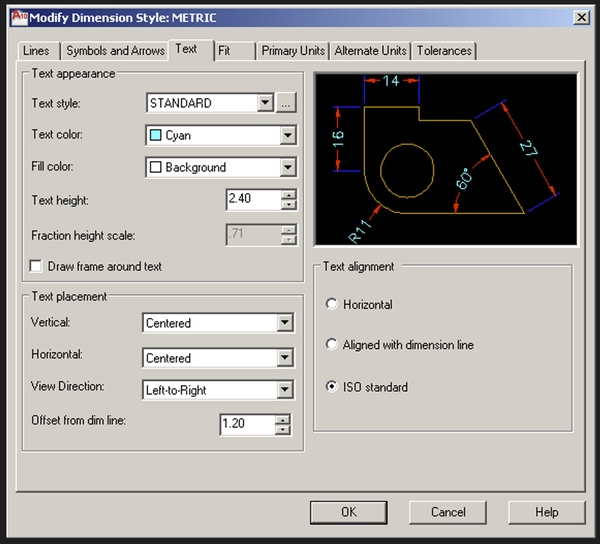
UNDER TEXT PLACEMENT MAKE SURE 'VERTICAL' = 'CENTERED'


[This post has been edited for clarity by cheryl.buck]


cherylbuck_0-1663704274627.pngcherylbuck_0-1663704274627.png


0 Likes
Message 3 of 12

zph
Collaborator
Collaborator

Come on, dude!


If it were that simple, don't you think he would have found that?


And to note, I am having the same issue as the OP.  I've attached a screenshot.


You can see that I have set the text to 'centered' and yet the problem still pursists.


One detail I'd like to note (perhaps it can help shed light on this issue), when I delete the dimensions and purge the drawing, the only objects that show up in the purge menu are two blocks:  D*, D* (* being random numbers).  I purge these but it doesn't seem to do anything to solve the problem.


Any help from someone a bit more knowledgeable on this topic would be greatly appreciated!


Thanks!

0 Likes
Message 4 of 12

crsmith1
Explorer
Explorer

Try typing in DIMTVP and set to 0. Then select dimension update.

0 Likes
Message 5 of 12

Wheelie22
Collaborator
Collaborator

I have it with ACADE 2012


The top 1 centers if you change 1 node !


DIMENSION AUTO CENTER.PNG


Better Never than Late ! Smiley Surprised


How can I get the bottom 1 to change to auto center to ?

0 Likes
Message 6 of 12

steve216586
Advisor
Advisor

DIMTAD & DIMTVP both set to 0.000.

"No one can make you feel inferior without your consent. "-Eleanor Roosevelt
0 Likes
Message 7 of 12

Wheelie22
Collaborator
Collaborator

In our DWT I have DIMTAD = 1, DIMTPV = 0,0000 and I get a dimension that centers.


I have a trick to change the text override to empty.

-  select all dimensions

- do the properties (CTRL-1)

- text part

- change the Text override to nothing


But when I have this dimension line that does not center, the solution is draw to it again. Smiley Sad

How can I change these wrong one's to auto center one's ?

0 Likes
Message 8 of 12

steve216586
Advisor
Advisor

Wheelie22:

"I have a trick to change the text override to empty.

-  select all dimensions

- do the properties (CTRL-1)

- text part

- change the Text override to nothing"


Get rid of the override by deleting in the Dimstyle Manager. It should be right under your current Dimstyle. (See attached) It may be an override setting in your template or even a routine which changes the system variable values at start-up. In that case you may want to delete and then re-save as your "working" .dwt template. 


Wheelie22 this isn't directed towards you but I would like to make a general statement about "problems" like this one in general.


I don't know how non-standard or default settings like this ever get changed when a user only desires the default or standard result? I wish when users have problems like this, they would identify how the System Variable might have been changed from default in the first place. I could understand settings being changed when a user wants a result which requires customization. This problem, and many others just like it, is clearly a result of someone changing a setting or system variable and not knowing what that certain variable setting causes as a result of changing from the default setting. This never ceases to make me marvel at the expertise of a user. (Maybe not the user whom asked the question but someone in their office or another office where the user may have received the drawing.)

"No one can make you feel inferior without your consent. "-Eleanor Roosevelt
0 Likes
Message 9 of 12

Ncampos7157
Explorer
Explorer
Accepted solution

Just figured this one out. Type dimedit and select/type home. This places the dim text at its default position, which centers it.

Message 10 of 12

Andrew.Tymon
Explorer
Explorer

You beauty worked a treat

I,m self taught so this fix greatly appreciated 🙂

0 Likes
Message 11 of 12

MCL63PJ7KD
Community Visitor
Community Visitor
Did anyone figure this out? None of the above remedies works for me.
0 Likes
Message 12 of 12

pendean
Community Legend
Community Legend

@MCL63PJ7KD wrote:
Did anyone figure this out? None of the above remedies works for me.

Show us your issue, share that portion of your DWG file here.

0 Likes