Autocad PDF prints extremely slow

Autocad PDF prints extremely slow

Anonymous
Not applicable
39,650 Views
8 Replies
Message 1 of 9

Autocad PDF prints extremely slow

Anonymous
Not applicable

I'm having trouble printing the PDF's I create from my autocad files.  I've looked into what I think is everything to find the solution.  My PDF files are not large, anywhere from 200kb to 500kb.  I understand that if the PDF viewer needs to Raster the images then this might be where the bottleneck is.


I've already done the following:

1. Scale hatches larger

2. Turn off textfill options

3. Plot to smallest PDF

4. Uncheck "Print Transparency"

5. Uncheck any attachments like bookmarks, layers, etc.

6. Lower the quality of Raster and Vector options

and a number of other tricks I've found on google.


Is there anyway to view the print log to see where the bottleneck may be?  Or anyway to create the autocad PDFs in Vector form only?


My thoughts are the PDF viewers are still processing all of the components as Raster images somehow, drastically slowing up any printing.


I've not had this problem with files in the past, it just began occurring.


0 Likes
Accepted solutions (1)
39,651 Views
8 Replies
Replies (8)
Message 2 of 9

h_s_walker
Mentor
Mentor

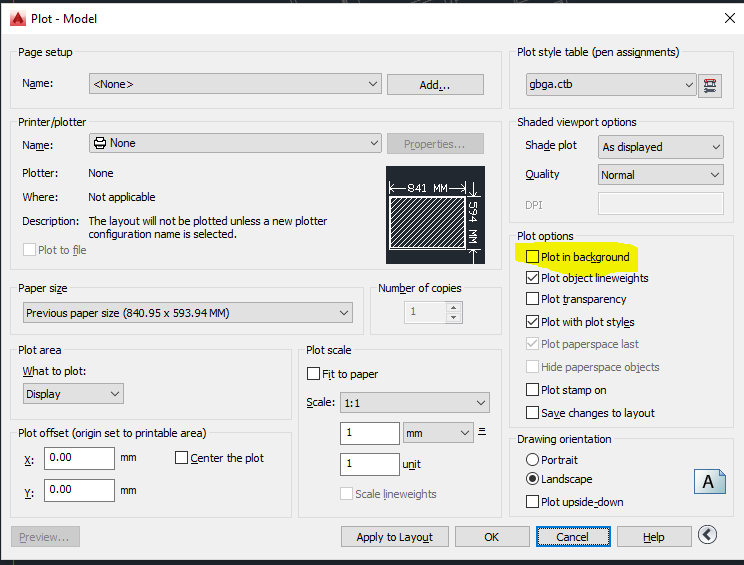
Call up the plot dialog box. Make sure the highlighted item in the image below is not ticked


Capture.PNG


Call up the publish dialog box. Make sure the highlighted item in the image below is not ticked


Capture1.PNG

Howard Walker
Did you find this post helpful? Feel free to Like this post.
Did your question get successfully answered? Then click on the ACCEPT SOLUTION button.

EESignature


Left Handed and Proud

Message 3 of 9

Anonymous
Not applicable

hwalker - the issue is has not been printing Autocad Plans to Pdfs.  That works fast and correctly with file sizes that are from 200kb to 500kb which seems normal from what I've read.


The problem is after I have the PDF, when I'm trying to print this on actual paper, the plotters for all the PDF viewers, printer drives, and anything else I've tried takes an extremely long time, if it prints at all.


The only thing I can think of that makes sense is the pdf is being viewed as a raster image instead of vector lines.  I'm wondering if there's anyway to force autocad to print in completely vector with no raster images.


Also, do polygon viewports somehow effect printing speeds?  Mine are turned to defpoints but still might affect it?  


My goal is to export flat pdf's with nothing attached to it ("untitled" viewports, raster images, text search) and be in vector form.  Apologies if I don't make sense, I'm not too familiar with this.

0 Likes
Message 4 of 9

pendean
Community Legend
Community Legend
Try a 3rd party PDF driver installed in Windows to use from AutoCAD.

Or

Try a different PDF viewer, there are about 30+ out there, or use Google Chrome.
After that, you need to look at your printer and printer drivers are being possible choke points.

Or

Invest in Adobe Acrobat Pro, use its tools to manipulate already created PDF files, and use it to speed print to your devices.

Either way, your issue cannot be addressed from inside AutoCAD/LT'sbuilt-in PDF drivers.

Good luck.
0 Likes
Message 5 of 9

Anonymous
Not applicable
Accepted solution

I figured out the bottleneck.  Polygon Viewports must cause the PDF viewers to view/print the files as raster images instead of vectors.  Using the standard rectangular viewports have fixed the issues and brought my drawings back to printing normal and fast like previous projects.


Thanks

Message 6 of 9

AutoMarcus
Collaborator
Collaborator

I've had that issue with polygonal viewports as well, really slows down the plotting


i have been having a similar problem printing but i dont use polygonal viewports anymore.

I get better results trying out different pdf viewer software.


the worst results are with the expensive wondershare pdf pro 🙄


0 Likes
Message 7 of 9

Anonymous
Not applicable

 I never have this issue in microstation.


Edited by
Discussion_Admin

0 Likes
Message 8 of 9

cadffm
Consultant
Consultant


It is also possible that the next release of MS have these problems, and the next release of AutoCAD not.

Software&Hardware ???and black holes are much easier to understand 🙂

Sebastian

0 Likes
Message 9 of 9

bobby216
Participant
Participant

This drove me nuts for weeks until I found this post!


Thanks!

0 Likes