Using system variable to xref path

Using system variable to xref path

m_simonettoBLR3F
Observer Observer
1,705 Views
4 Replies
Message 1 of 5

Using system variable to xref path

m_simonettoBLR3F
Observer
Observer

Hi all,

I've a problem with xref in AutoCAD. We basically have the main .dwg file on our server and the xref files in a shared OneDrive folder. Every time someone opens it AutoCAD doesn't find the reference because it search in C:\Users\User\etc even if the path is set to relative. It's possible to use a system variable inside the path to give make AutoCAD automatically fill the user part of the path so that the error is not present anymore?

I've tried with %USERPROFILE% etc but AutoCAD complain that the path isn't correct.


Any chance to solve it?

0 Likes
Accepted solutions (1)
1,706 Views
4 Replies
Replies (4)
Message 2 of 5

Valentin_CAD
Mentor
Mentor

@m_simonettoBLR3F ,


@m_simonettoBLR3F wrote:

... xref files in a shared OneDrive folder

... AutoCAD doesn't find the reference

... even if the path is set to relative.


Seems you have tried the suggestion from these links, but read the variables mentioned within:


Another suggestion would be the ones mentioned here:


ValentinWSP_0-1697213056134.png


Related topic:


Select the "Mark as Solution" if my post solves your issue or answers your question.

Seleccione "Marcar como solución" si mi publicación resuelve o responde a su pregunta.


Emilio Valentin

0 Likes
Message 3 of 5

paullimapa
Mentor
Mentor
Accepted solution

You can use projectname system variable to setup different paths per user.

https://help.autodesk.com/view/ACD/2024/ENU/?guid=GUID-9C5FB777-337C-433A-9562-F395BF77186D

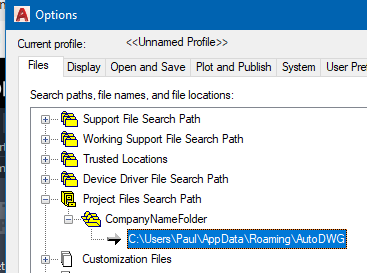
As long as the dwg has the projectname set, then each user under AutoCAD Options > Files > Project Files Search Path can be set with a unique folder structure per that user.

So for example, using your company name as project name in each dwg set projectname to CompanyNameFolder. Then each user under Project Files Search Path would setup their own path for CompanyNameFolder like: C:\Users\Paul\AppData\Roaming\AutoDWG

paullimapa_0-1697220509504.png

Now as each user opens the drawing, their Options setup will search in whatever folder that's been specified based on projectname.

You can also read another example on this implementation here:

https://forums.autodesk.com/t5/autocad-forum/understanding-projectname/m-p/7042960#M876586


Paul Li
IT Specialist
@The Office
Apps & Publications | Video Demos
0 Likes
Message 4 of 5

m_simonettoBLR3F
Observer
Observer

Thanks a lot, works very well!

0 Likes
Message 5 of 5

paullimapa
Mentor
Mentor

Glad to have helped…cheers!!!


Paul Li
IT Specialist
@The Office
Apps & Publications | Video Demos
0 Likes